1. Overview
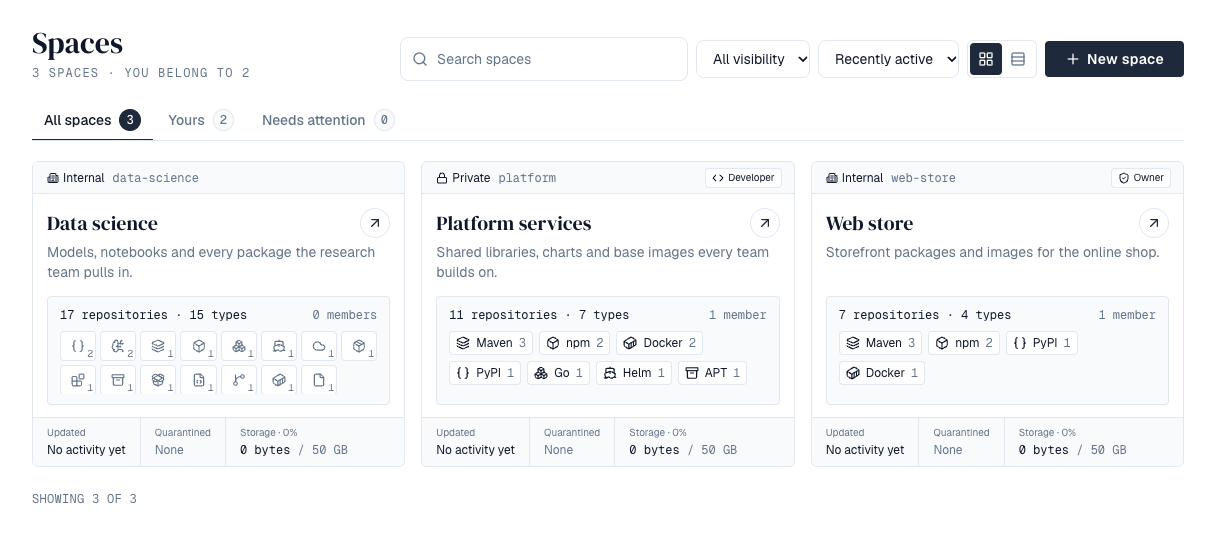
A space holds repositories and decides who can use them. Each space has its own members and roles, a visibility, and a list of package formats its repositories may use. Find your spaces under Spaces in the sidebar. Tabs show All spaces, Yours (where you hold a role) and Needs attention (storage at or past its quota's warning level, or a version in quarantine), each with how many it holds. Search by name or key, narrow to one visibility, and order by Recently active (the default: the space where a version was last stored or changed comes first) or Name. Show them as a table (the default) or as tiles (switch with the buttons beside the search; your browser remembers the choice). Every tile is the same height. It shows who can see the space, its key and your role; its name and description; how many repositories and members it has; its formats with how many repositories use each (hover one for its name and count; without signing in, only the formats), as named chips while they fit on two lines and as a grid of icons when there are more; and, along the bottom, when it last changed, how many versions are in quarantine, and the storage used against the quota (amber from the quota's warning level, 80% unless a super admin changed it, red when full). The table lists the same figures and, on All spaces, puts your spaces first and the others below. Spaces are available on every license tier, with no limit on how many.
2. List spaces from the API
Scripts can list spaces with the same choices as the page. Both calls answer only with spaces the caller can see.
| Request | Returns |
|---|---|
| GET /api/spaces?q=&visibility=&filter=&sort=&limit=&cursor= | A page of spaces. visibility is private, internal or public; filter is mine (spaces you hold a role in), others or attention; sort is name (the default) or activity (last change first). Follow pagination.nextCursor for the next page. For signed-in callers each space has a summary: repositories and repositoriesByFormat (a count per format), members, usedBytes, quotaBytes, quarantined and lastActivityAt. |
| GET /api/space-counts?q=&visibility= | all, mine and attention: how many spaces each tab holds. |
Without signing in (public spaces while anonymous access is on), mine and attention aren't available.
3. Create a space
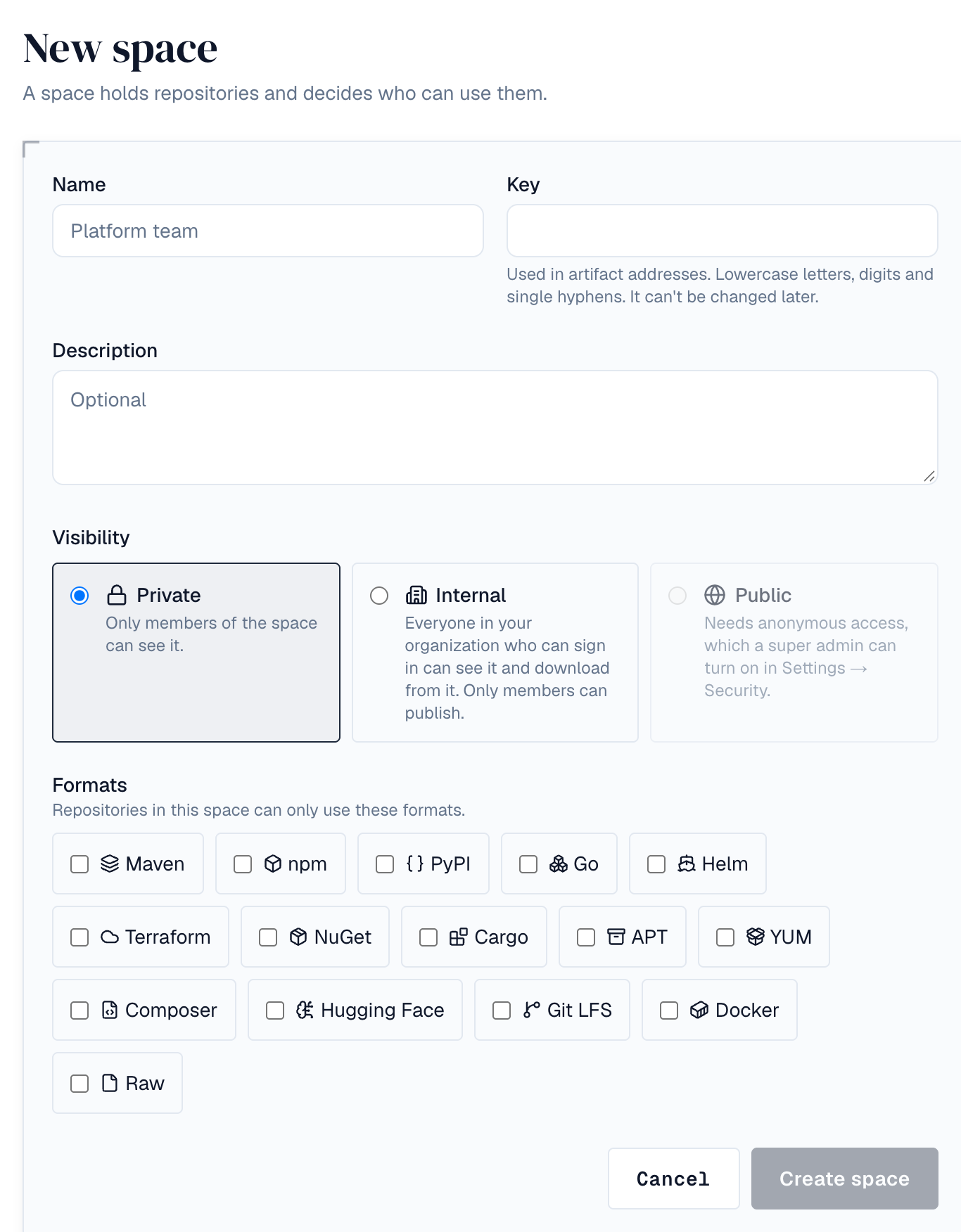
Only super admins create spaces. Choose + Create → Space in the top bar:
- Name — What people see, for example *Platform team*. You can change it later.
- Key — Filled in from the name; edit it if you like. The key appears in artifact addresses, so it can only use lowercase letters, digits and single hyphens (2–40 characters), must be unique, and can't be changed later. new, api, v2, admin, settings, search and static are reserved.
- Description — Optional.
- Visibility — Private (members only) or Internal (see below).
- Formats — The package formats repositories in this space may use, for example Maven and npm.
4. Visibility
| Visibility | Who can see the space and download from it | Who can publish |
|---|---|---|
| Private | Members only | Members with Developer or higher |
| Internal | Everyone who can sign in to your organization, and members | Members with Developer or higher |
| Public | Everyone who can sign in, and anyone at all while anonymous access is on | Members with Developer or higher |
People who can't see a private space get *not found* rather than *no access*, so its name doesn't leak. Requests without a sign-in get *not signed in* for anything they can't read. Super admins see every space.
A space can only be made public while a super admin has turned on Settings → Security → Anonymous access (see Users & directories). If anonymous access is turned off later, public spaces stay public, but only signed-in people can read them until it's back on.
Anonymous access is for package tools and scripts. The web pages still ask people to sign in.
5. Roles
Each role includes everything the one above it can do:
| Role | Can |
|---|---|
| Viewer | Browse the space and download artifacts |
| Developer | Also publish new artifacts (but not delete or overwrite them) and upload application SBOMs |
| Maintainer | Also delete artifacts, and manage the space's repositories and policies |
| Owner | Also manage members and settings, and delete the space |
Roles can be given to people, groups and service accounts. Someone in a group gets the group's role; if they have several roles in a space, the highest one counts. How access fits together shows how space roles combine with system roles, groups from your directory and repository roles. Changes take effect immediately on every server. API tokens can carry space permissions such as spaces:push; a token can still only do what its owner's role in that space allows.
6. Repositories
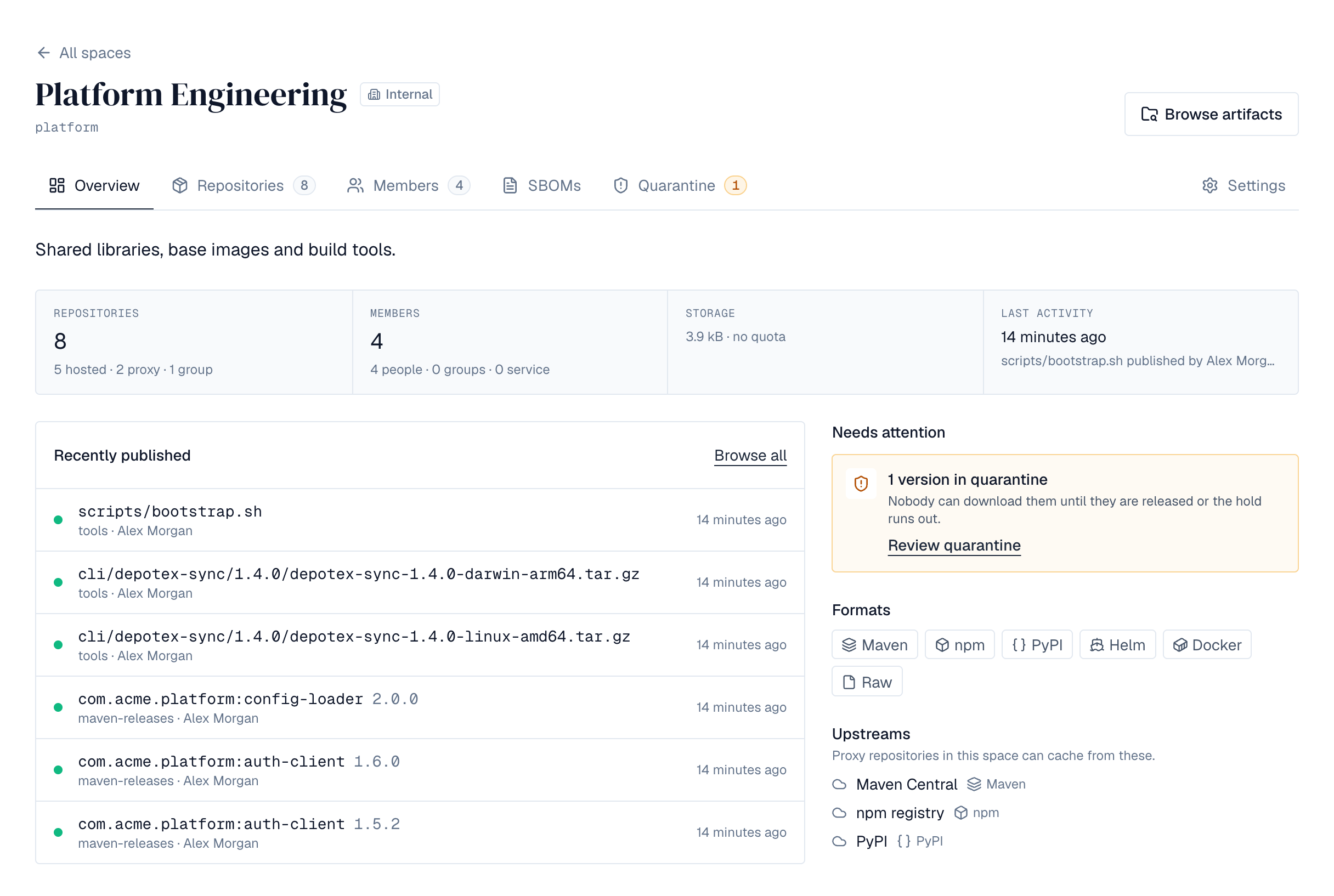
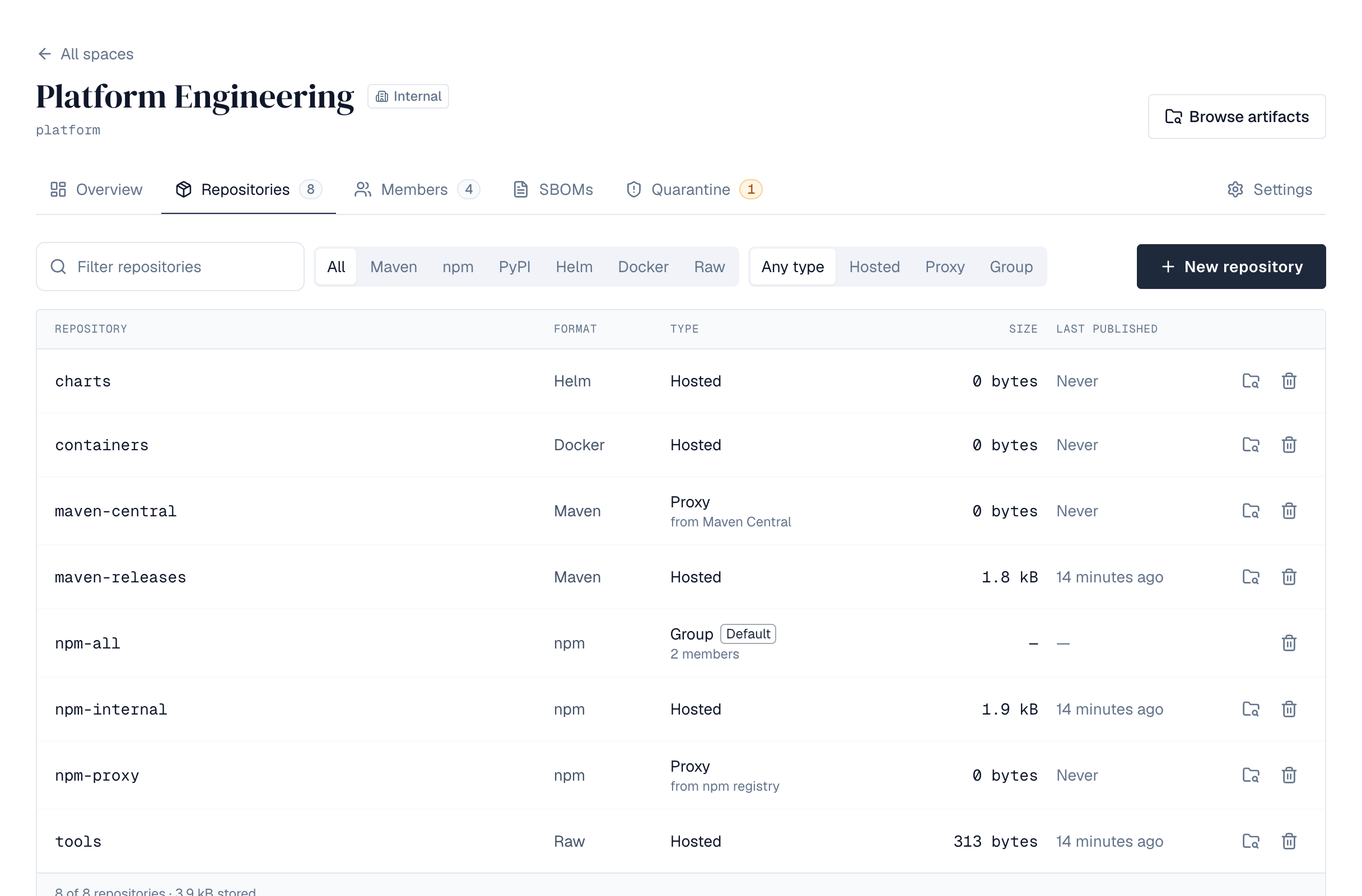
A space opens on its Overview: its description; the same figures with how they split (hosted, proxy and group repositories; people, groups and service accounts; what was published last and by whom); Recently published; Needs attention (versions held in quarantine, storage nearly full, upstreams proxy repositories can't reach), its formats and its upstreams. Browse artifacts at the top opens the browser on this space. Its tabs are Repositories, Members, Quarantine (with the number of versions held now) and Settings. The Repositories tab is a numbered table you can filter by name, format and type (a space with one or two formats shows them as buttons beside All; with more, Format opens a list where you can pick several, with how many repositories each has), with each repository's size and when something was last published; proxy repositories whose upstream can't be reached say so (they keep serving what they have cached). Below it, each format's universal URL and default group. Maintainers and owners (and super admins) choose New repository, give it a name (lowercase letters, digits, dots, dashes and underscores; unique within the space; not a format's name such as maven or npm, which are the universal URLs), pick one of the space's formats and a type:
| Type | What it does |
|---|---|
| Hosted | Stores what is published to it. Every license tier. |
| Proxy | Fetches from an upstream (Maven Central, npm, Docker Hub, an internal mirror) and keeps a copy. Pro license or higher. The upstream must be on the space's list of upstreams and in the same format; it can't be deleted or taken off the list while a proxy repository uses it. |
| Group | Combines repositories of the format behind one address: downloads come from the first member that has the file, uploads go to a hosted member chosen by rules. Every license tier. See Repository groups. |
Select a repository to open it. Browse shows its folders and files. Selecting a file that belongs to a version opens that version in the artifact browser, where its Files tab has each file's details, checksums and delete; other files (indexes and metadata) show their size, downloads and checksums (SHA-256, SHA-1, MD5, SHA-512) in a dialog, with delete. Versions lists its versions.
7. Publish and download
Super admins also have Repositories in the left navigation: every repository of the installation, one section per space (with Browse space and Open space), each showing ten at a time. Filter by format (several at once, with how many repositories each has), type, space and name; Browse opens a repository in the browser, and the bin deletes it. Repositories made before spaces are listed last.
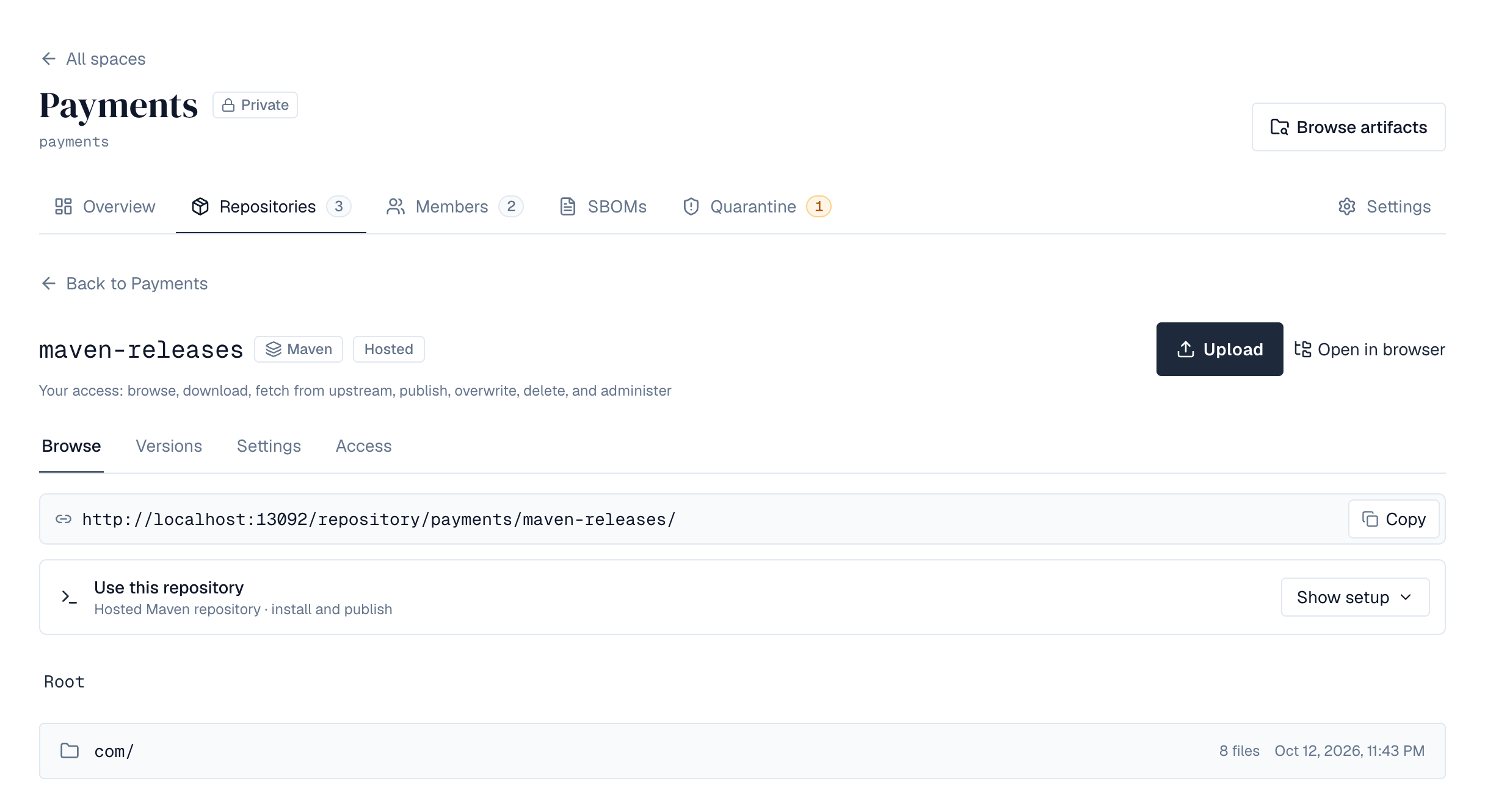
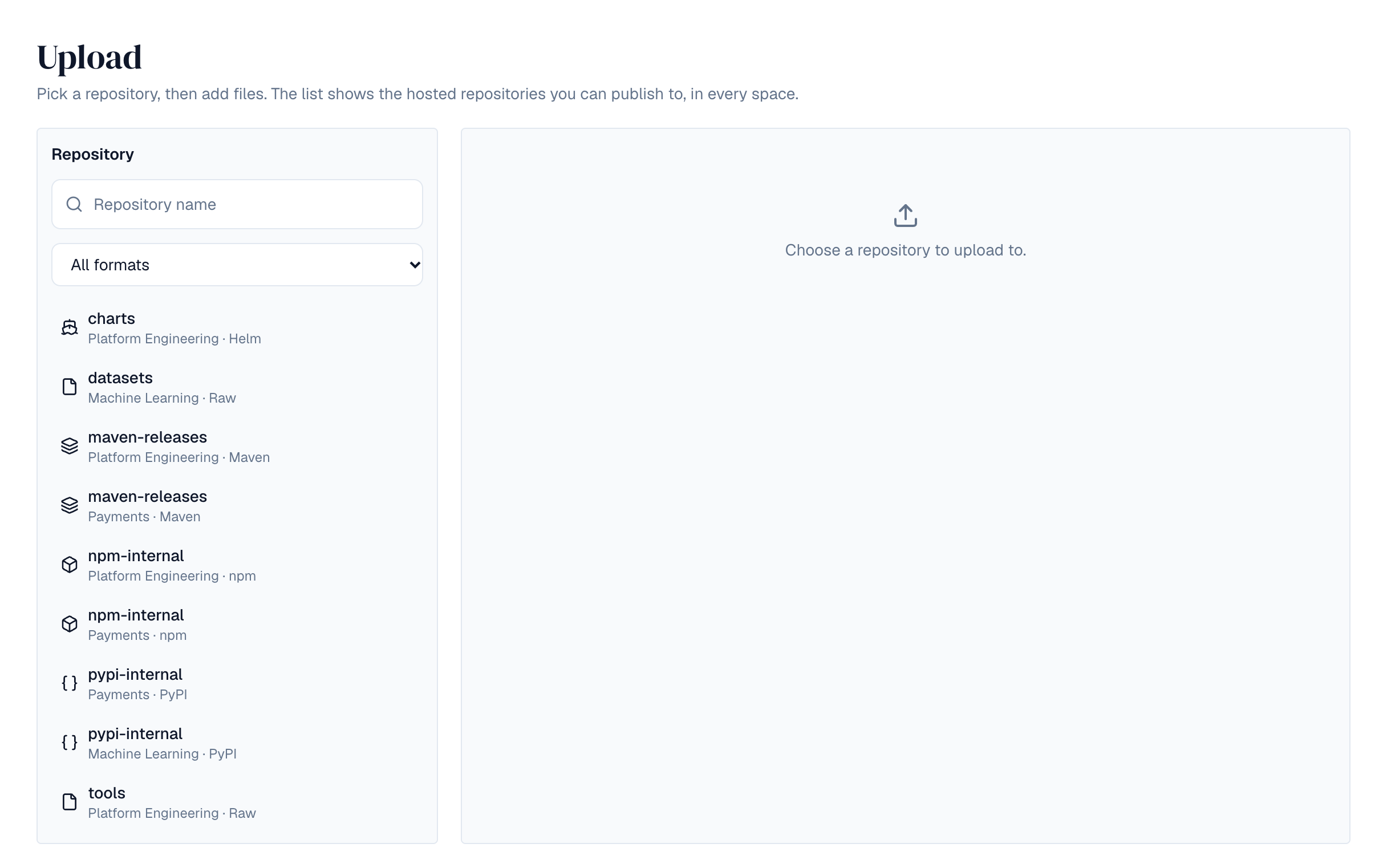
Package managers and scripts reach a repository at https://<depotex>/repository/<space>/<repository>/, and the space's default group for a format at its universal URL https://<depotex>/repository/<space>/<format>/. The repository's page shows the address and examples. Raw repositories hold any file at any path; people with Publish permission can also upload files from the repository's Browse tab, into the folder they're looking at:
curl -u "me:$DEPOTEX_TOKEN" --upload-file app.zip https://depotex.example.com/repository/my-space/files/tools/app.zip
curl -fO -u "me:$DEPOTEX_TOKEN" https://depotex.example.com/repository/my-space/files/tools/app.zip
curl -fs https://depotex.example.com/repository/my-space/files/tools/app.zip.sha256- Credentials: an API token (Profile → API tokens) as the password, with any username, or as a Bearer token; NuGet clients send it as the API key (X-NuGet-ApiKey). Downloads from public spaces need none while anonymous access is on.
- Publishing needs the Publish permission for a new path and Overwrite for an existing one; the repository's publishing setting, size limit and the space's upload rules and quota apply. Send the file's length (all package managers and curl do). To have the upload checked, send X-Checksum-Sha256, X-Checksum-Sha1 or X-Checksum-Md5.
- Downloads support resuming (byte ranges), caching (ETag) and checksum files: add .sha256, .sha1, .md5 or .sha512 to a file's path.
- A path ending in / lists that folder (JSON). DELETE removes a file (Delete permission).
8. Formats
How to set up each tool, the commands that work and each format's limits are on its own page: Maven, npm, PyPI, Docker and Raw. Supported formats compares them.
9. Proxy repositories
A proxy repository answers from its cache, and fetches from its upstream what it doesn't have (Pro). Its Settings decide how:
- Caching: Keep files stores each file the first time it's asked for (it counts toward the space's quota); Pass through stores nothing.
- Files are re-checked with the upstream after their age (Re-check artifacts after, Re-check metadata after); an unchanged file isn't downloaded again.
- Metadata paths (one pattern per line, such as dist/channel-*) are files the upstream changes in place although the format can't tell (raw files): they're re-checked at the metadata age. See Rust toolchains.
- Remember “not found” (minutes; 1440, a day, by default; 0 turns it off; at most 43200) saves asking the upstream again for files it doesn't have. Only a *not found* answer (404 or 410) is remembered, never an error, a timeout or refused credentials. It applies only to files with no copy here: a cached file is still served even if the upstream no longer has it. Every server shares what was remembered. A remembered file stays *not found* until the time is up, even if it appears upstream meanwhile (for example a version published minutes after a build asked for it), so keep the time short for upstreams that publish often, or forget the answer (below).
- A HEAD request never downloads a file.
- Checksums: compare each fetched file with the checksum the upstream publishes: Strict refuses a mismatch, Warn serves it and logs a warning, Off doesn't compare. Use the Security setting follows Settings → Security → Proxy checksums: Strict while it is on, Warn while it is off; the repository's settings (and checksumPolicyEffective when the API returns one repository) show which of the two it is at the moment. New proxy repositories start at Warn, or at Use the Security setting for the formats listed under What is checked; settings sent when creating a repository through the API win, and changing the Security setting never changes a repository set to Strict, Warn or Off.
- While the upstream is unreachable, cached files are served even past their age (Serve cached files…), and an upstream that keeps failing is paused for a while.
- Many requests for the same new file cause one fetch, across all servers.
- Blocked and quarantined versions are never downloaded through a proxy (403). Whether it also leaves them out of the lists it passes on depends on the format: see Hidden versions.
- Going to the upstream needs the fetch from upstream permission (every role has it); without it, people only get what's cached. When the space is over its quota, files are passed through without being kept.

10. Re-check with the upstream
Each proxy repository's Settings tab has a Proxy cache card for repository admins. Re-check now makes the proxy ask its upstream again: every cached file is re-checked on its next request, whatever its age, and every remembered *not found* is forgotten. Files that didn't change aren't downloaded again, and files kept forever (Re-check artifacts after set to -1) stay as they are. Use it after the upstream replaced files or published packages a build is waiting for. For RubyGems proxies it also fetches the upstream's list of gems again, so new versions show at once.
When a package was published upstream just after a build looked for it, the proxy keeps answering *not found* until the remembered answer expires. The Remembered “not found” list in the same card shows each remembered path and when it will be asked for again. Type a path or folder (such as com/acme/) and select Filter to narrow the list. The eraser button beside a path forgets that path; Forget all (or Forget all under the folder you filtered by) forgets the rest. Every server forgets at once.
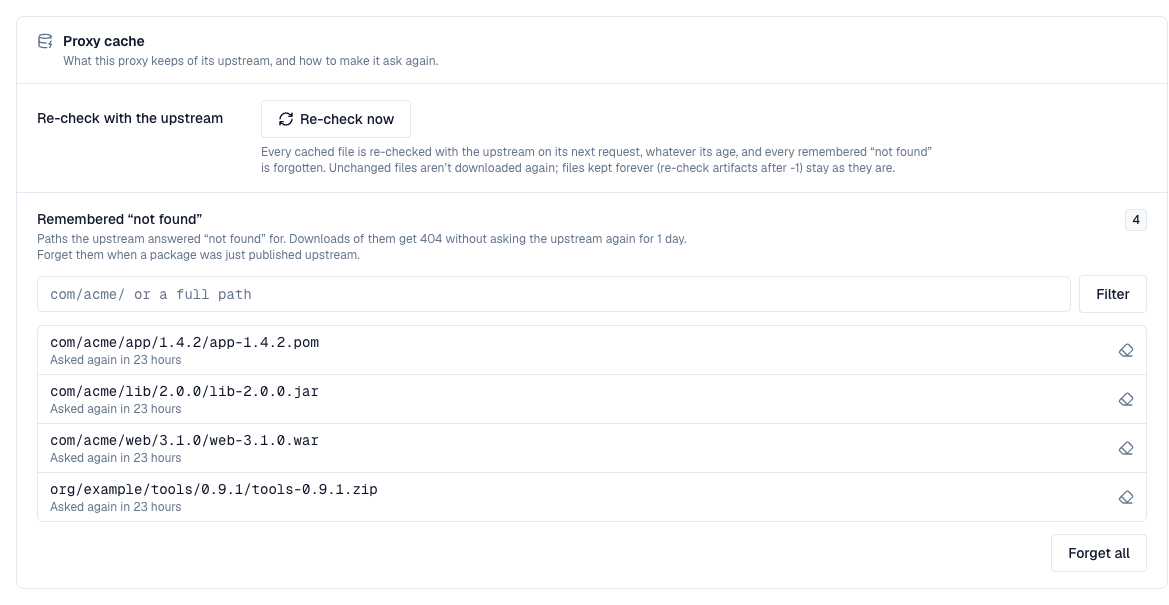
Through the API (repository Admin role): POST /api/spaces/{space}/repositories/{repository}/proxy/invalidate re-checks everything, or only under {"prefix": "com/acme/"}; GET /api/spaces/{space}/repositories/{repository}/proxy/not-found lists remembered paths (prefix, cursor, limit), and DELETE on it forgets one (?path=), those under a folder (?prefix=) or all. Each raises the proxy.cache.invalidate event, so a policy can refuse it or automation can report it.
Behind a load balancer, route /repository/, /v2/ and /v1/search (Docker) straight to the backend servers for the best throughput on large files; the web frontend also forwards them.
11. What is checked
A proxy repository that keeps files compares each one, before keeping it, with a checksum from the upstream: the one in the format's own index or metadata where the format has one, otherwise the upstream's X-Checksum-* response headers or a .sha256, .sha1 or .md5 file next to it. A file the upstream publishes no checksum for is kept without a comparison.
The new proxy repositories of the formats below start at Use the Security setting, and Settings → Security → Proxy checksums lists them. Formats are added here one at a time. A format that isn't listed is still checked as described above, under its repository's own Checksums setting.
| Format | Each package file is checked against |
|---|---|
| RubyGems | The SHA-256 the gem's info file lists for that version and platform. versions against the digest the upstream sends with it (or its length), and only ever added to; it lists each info file's MD5, which tells the proxy when its copy is out of date. names, the specs files, quick/ gemspecs and the JSON API have no upstream checksum and rely on TLS |
| Conda | The sha256 in the upstream's record of the file (its shard, or repodata.json), for package files and shards. The shard index, repodata*, run_exports*, channeldata.json and notices.json have no upstream checksum and rely on TLS, as does a file the upstream lists only as removed |
| Conan | Its revision: each conanmanifest.txt must hash to the revision ID it's fetched for, and conanfile.py and a binary's conaninfo.txt must have the md5 their manifest lists (conanfile.py when the proxy already has the manifest). Any file the upstream sends with an X-Checksum-Sha1 header (Artifactory does) must match it. A revision named after a source control commit, or revision 0, can't be checked against its ID; the lists (revisions, binaries, search) have no upstream checksum and rely on TLS. Once kept, the files inside each archive are checked against the manifest in the background, and a mismatch quarantines the version, as does a manifest kept under Warn or Off that doesn't hash to its revision ID (Archive checks) |
12. Hidden versions
A proxy refuses downloads of blocked versions, and of quarantined ones. Where its format lets it, it also leaves them out of the version lists it passes on, so clients resolve to the newest version that passes instead of failing: blocked versions always, quarantined ones while the repository's Hide quarantined versions is on. A list the proxy passes on as its upstream wrote it keeps them.
- RubyGems: left out of the info/ files Bundler and gem resolve from and of the JSON API, together with versions not fetched yet that a quarantine age rule would hold, judged by their publish date on RubyGems.org. The specs files (gem search, RubyGems 3.1) are passed on as RubyGems.org wrote them, and a Bundler cache that holds a gem's info file from before keeps the version until the gem changes upstream; installing it there fails with 403.
- A RubyGems group leaves out what each member leaves out. A version blocked or quarantined after it reached the group leaves the group's list of gems within about a minute; its download through the group is refused at once.
- Conda: left out of the shard index and shards, repodata.json (plain and .zst), current_repodata.json and run_exports.json, together with builds not fetched yet that a quarantine age rule would hold, judged by when the proxy first saw the file in its upstream's metadata (for files already listed when the proxy first read a platform folder or when an age rule was added, the record's timestamp, set by whoever built the package). conda, micromamba and pixi solve to the newest build that passes; a pinned build (pixi.lock, an explicit URL) gets 403. A group leaves out what its members leave out.
- Conan: a proxy leaves blocked versions out of everything it lists (revisions, binaries, search and so version ranges), and while it hides quarantined versions, the ones it holds in quarantine and the ones not fetched yet that a quarantine age rule would hold, judged by the earliest revision time in the upstream's revision list: their latest revision and revision list answer not found and search leaves them out, so a range such as [>=1.0 <2] installs the newest version that passes. Search looks up the age of at most 50 versions per answer; a version past them stays listed there, and installing it fails with not found. A group leaves out what its members leave out.
13. Repository settings
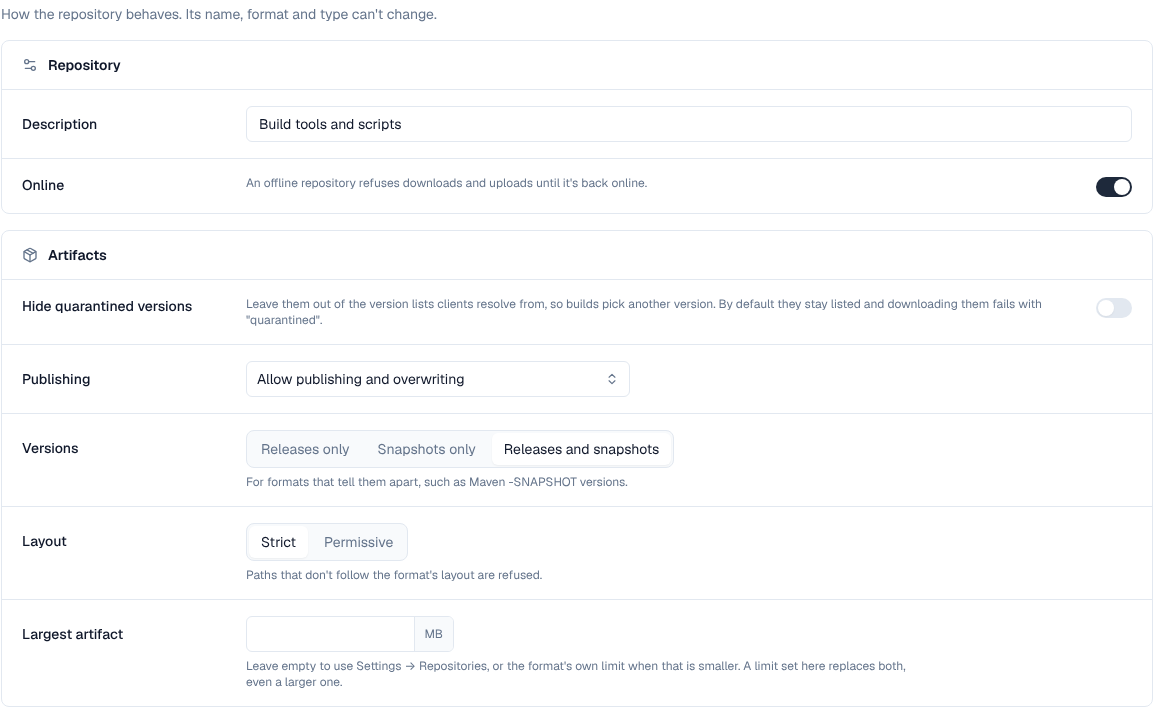
Repository admins (space maintainers and owners, or people given the repository's Admin role) change these under the repository's Settings, grouped in Repository, Artifacts and (for a proxy) Proxy cards. The name, format and type can't change. As soon as something changes, a bar at the bottom of the page says how many changes aren't saved yet: Save applies them, Discard goes back. A format's own card further down (NuGet, Cargo, Composer, RubyGems, Conda, Conan, APT, YUM) saves on its own: its Save and Discard appear at the bottom of that card while it has changes.
| Setting | Choices |
|---|---|
| Online | An offline repository refuses downloads and uploads. |
| Publishing (hosted) | Allow publishing and overwriting; allow publishing but never overwrite a file; or read-only. In a publish-once repository, uploading a file that's already there is refused as a conflict (409), which npm publish and dotnet nuget push --skip-duplicate expect. |
| Delete mode (NuGet, hosted) | Whether dotnet nuget delete unlists the version (the default, as nuget.org does) or deletes it. See NuGet repositories. |
| Versions | Releases only, snapshots only, or both (for formats that tell them apart, such as Maven -SNAPSHOT). |
| Layout | Strict refuses paths that don't follow the format's layout; permissive accepts any path. |
| Largest artifact | Left empty, the repository takes the installation's limit (Settings → Repositories → Defaults and network), or the format's own when that is smaller (Cargo, Composer, RubyGems, Conda and Conan have one). A limit set here replaces both for this repository, even a larger one. |
| Hide quarantined versions | Leave quarantined versions out of the version lists clients resolve from; by default they stay listed and downloading them fails with "quarantined". |
| Distribution release (APT, YUM) | Which release the packages belong to, such as debian-12, ubuntu-22.04, rocky-9 or almalinux-9, so their vulnerabilities are looked up in it (SBOMs, Pro). Leave it empty for a repository that mixes releases: its packages then aren't checked. Changing it checks the packages again. |
| Proxy (proxy repositories) | Keep fetched files or pass them through; how long artifacts and metadata are served before asking the upstream again; how long "not found" is remembered; what to do when a checksum doesn't match (Strict, Warn, Off, or Use the Security setting); pause an upstream that keeps failing; serve cached files while the upstream is down. |
These settings are saved now and apply as each package format arrives.
14. Rebuild metadata
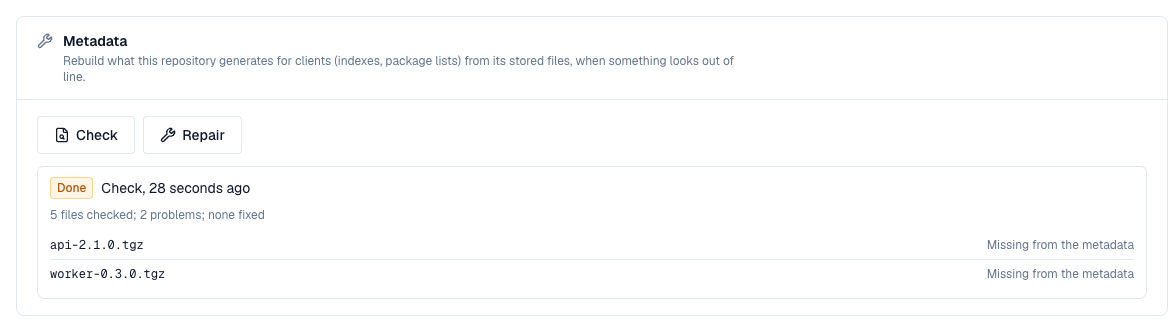
Some formats keep what they serve to clients beside the files (Helm's index.yaml is made from each chart's Chart.yaml, read when it was uploaded). If that gets out of line with the stored files, for example after a restore from an old backup, repository admins can rebuild it from the files in the Metadata card of the repository's Settings (not for groups, which keep nothing of their own).
- Check compares and lists what is out of line (the first 50), without changing anything.
- Repair also fixes it: what is missing is read again from the files, and the repository's versions are inspected and indexed again afterwards.
- Rebuilds run in the background within a minute (the repository-repair job); the card shows the latest one and its report. A second request while one is queued or running gets that one.
- npm, PyPI, NuGet, Composer, RubyGems, Conda, Helm, YUM, Docker and Terraform rebuild what they serve from the files (for Docker, the manifest records that referrers and garbage collection rely on). APT, Cargo and Conan can only list files missing from their indexes: a package's distributions, a crate's index entry and a recipe revision come from the upload, so upload or publish those again. For Maven, Go and raw, which build their metadata on each request, and Hugging Face, whose commits are kept apart from the files, a repair inspects and indexes the versions again.
Through the API (repository Admin role): POST /api/spaces/{space}/repositories/{repository}/repair with {"mode": "check"} or {"mode": "repair"}, and GET on the same address for the latest rebuild. Each raises repository.repair when asked (policies can refuse it) and when run, with its report.
15. Repository access
Space roles apply to every repository in the space: viewers browse and download, developers also publish, maintainers and owners also overwrite, delete and administer. A repository's Access tab gives people more, on that repository only:
- Repository roles: Viewer (browse and download), Deployer (also publish), Maintainer (also overwrite and delete), Admin (also settings and access), for a user, service account or group.
- Path access: a repository role on the paths a content selector matches, for example deploy only under com/acme/team-x/**.
Add someone at the bottom of each card: pick the user, service account or group, the role (and for path access the content selector), then Add. The bin on a row asks in that row before it removes the access.
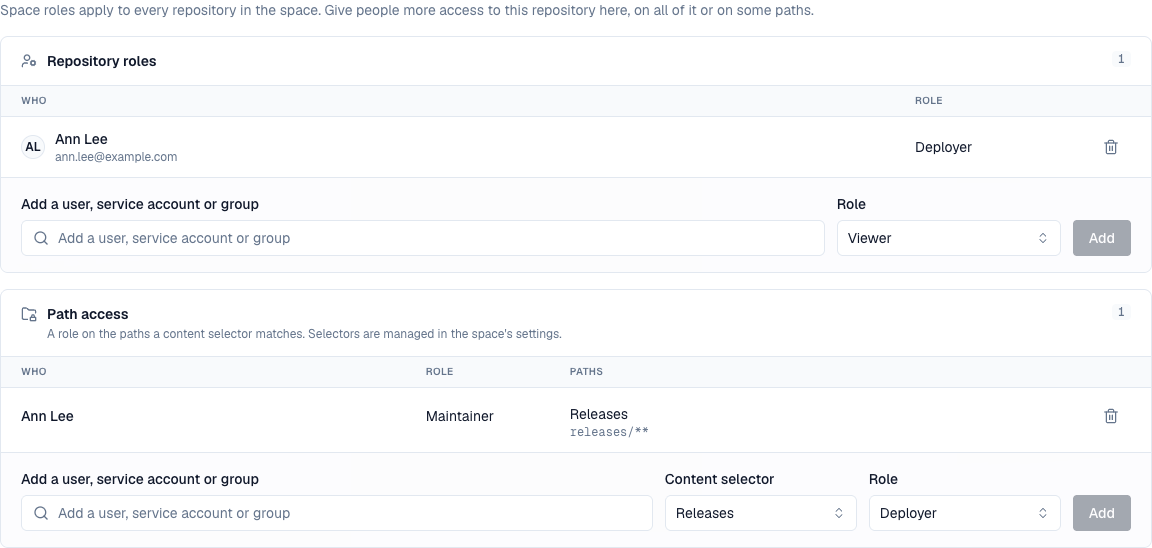
People with only repository access see the space with just those repositories. Access only ever adds to what space roles give. A repository admin with no role in the space sees the Access tab's people only if their own role includes profiles:view.
16. Content selectors
Space owners manage content selectors in the space's Settings: a name and path patterns, one per line. ** matches across folders, * within one folder, ? one character; patterns don't start with a slash. They can also give path access in every repository of the space from there.
- A format can't be removed from a space while one of its repositories uses it.
- A space can't be deleted while it has repositories: delete them first.
- Super admins see every repository in the installation under Repositories in the sidebar, with the space each belongs to.
Creating, changing and deleting repositories raise depot.repository.create, depot.repository.update and depot.repository.delete; content selectors raise content_selector.create, .update, .delete, .grant and .revoke; deleting a file raises artifact.delete. Organization policies can restrict them (for example, allow only certain formats, or refuse proxy repositories), and all are recorded in the audit log.
17. Upload rules
Maintainers and owners decide, in the space's Settings under Upload rules, what may be stored in its repositories:
| Rule | What it does |
|---|---|
| Largest file | Refuses files larger than this. Empty means no limit. |
| Paths | An ordered list of allow and deny rules. Each has a pattern, a regular expression matched against the file's path in its repository, such as \.exe$ or ^com/acme/. The first rule whose pattern matches decides; When no rule matches decides the rest. A note you add is shown to whoever is refused. |
| Released versions can't be overwritten | Refuses uploading a file that already exists, unless its version is a snapshot. Snapshot versions is a regular expression; empty means versions ending in -SNAPSHOT. |
Try a file shows what the saved rules decide for a path, size and version, without storing anything.
Upload rules apply as soon as repositories in the space accept uploads; until then they can be prepared and tried out.
Changing the rules raises space.upload_rules.update and is recorded in the audit log. Every upload raises artifact.upload, which organization policies can also restrict.
18. Cleanup
Maintainers and owners add cleanup policies in the space's Settings under Cleanup. Every night each enabled policy moves matching versions to the trash, where they can be restored for 7 days (super admins can change this on the space-trash-purge job) before they're deleted for good.
| Setting | Meaning |
|---|---|
| Repositories | Which of the space's repositories it applies to; none ticked means all of them, including ones added later. |
| Formats | Only versions in repositories of these formats; none ticked means every format. |
| Repository types | Hosted and/or Proxy (cached copies); none ticked means both. |
| Release type | All versions, Releases only or Pre-releases only. Pre-releases are versions such as 1.0.0-rc.1 (npm, Go, Helm, NuGet), 1.0rc1 (PyPI) or 1.0-SNAPSHOT (Maven); other formats have none. |
| Keep the newest versions of each component | These are never removed, whatever else is set. With a release type chosen, the newest of that type are kept. |
| Newest means | Most recently uploaded (the default) or Highest version number, compared the way the format orders its versions. |
| Older than (days) | Only versions created longer ago. |
| Not downloaded for (days) | Only versions nobody downloaded for this long (counting from creation if never downloaded). |
| Always keep versions matching | A regular expression; matching versions are kept. |
| Only remove versions matching | A regular expression; versions that don't match are kept. |
| Match patterns against the component and version | Patterns match component/version (for example example.com/mod/v1.2.0) instead of the version alone. |
| Keep versions that carry a tag | Versions with any of the space's tags are never removed, so a release candidate or an approved build stays while it's tagged. They still count among the newest versions kept. |
Every condition you set must hold. Preview lists what the policy would remove right now, without removing anything, and Download CSV exports the whole list. The preview warns when the plan includes hosted Go versions: go.mod and go.sum pin exact versions, so builds that still need a removed one fail. Each policy shows when it last ran and what it removed.
Cleanup starts working as soon as repositories in the space store files; until then policies can be prepared.
Changes raise space.cleanup_policy.create, .update and .delete (which organization policies can restrict) and every run raises cleanup.run, so automation can alert you when one fails.
19. Trash
Versions a cleanup policy removed wait in the space's Trash tab, visible to maintainers and owners (whoever may delete the space's artifacts). While there, they're hidden from package managers and don't count toward the space's quota. The tab lists them newest first with the policy that removed them, their size and when; search by name to find one.
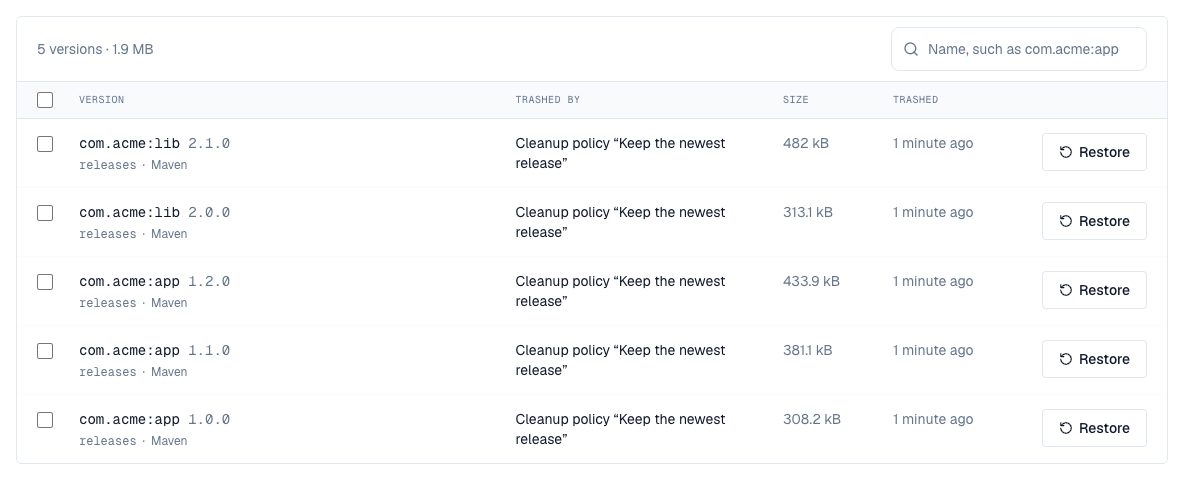
- Restore brings a version back as it was: downloadable again, listed in its format's metadata, and counted toward the quota. A restore that wouldn't fit in the quota is refused.
- Tick several versions to restore them together, or to Purge them: they're deleted for good at once instead of when the trash is emptied, after you confirm.
- To undo a whole run, select the restore button on the policy's row in Settings → Cleanup: everything that run moved to the trash comes back, except versions purged or uploaded again since.
- The trash is emptied after 7 days by default (the space-trash-purge job). A version uploaded again while in the trash replaces the trashed one.

Through the API (the space's delete artifacts permission): GET /api/spaces/{space}/trash lists the trash (q, repository, reason, cursor, limit); POST /api/spaces/{space}/trash/restore and POST /api/spaces/{space}/trash/purge take {"ids": [...]} or {"reason": ...}, where a policy's lastRunReason names its last run. Restoring raises artifact.restore and purging artifact.purge, so policies can refuse them and automation can report them; both are in the audit log. Available on every license tier.
20. Tags
A tag names versions that belong together, such as everything one CI build published, with a description and attributes (the commit, the pipeline, a ticket). Find a space's tags on its Tags tab: each shows how many versions carry it, and Versions lists them, newest tagged first, in the repositories you can see. Tags belong to their space; a version can carry several.
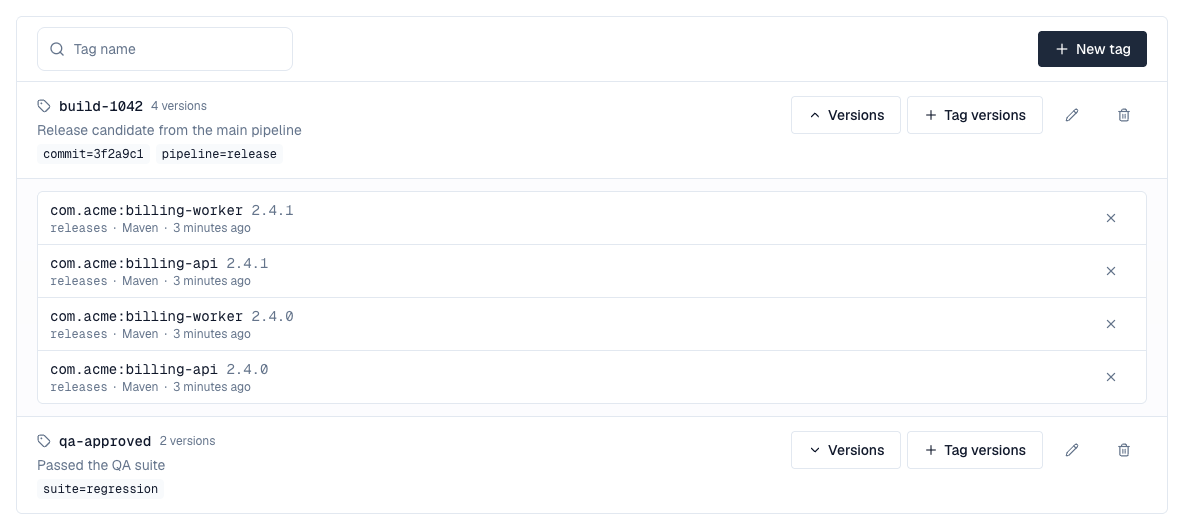
- New tag adds one: a name (letters, digits, dots, dashes and underscores; it can't be changed later), a description and attributes as a JSON object. Developers, maintainers and owners can add and change tags; maintainers and owners can remove them (the versions stay).
- Tag versions puts a tag on the versions you choose by repository, name and version, with * for any run of characters and ? for one (for example version 2.4.*); at most 1000 at a time. The cross next to a version takes the tag off.
- From CI, tag what you publish as you upload it: send the header X-Depotex-Tag: build-1042 (several tags comma-separated, up to 20) with the upload to any /repository/... address. The tag must already exist in the space; an unknown one refuses the upload, so a typo doesn't go unnoticed.
# Create the tag once per build, then publish with it
curl -X POST -H "Authorization: Bearer $DEPOTEX_TOKEN" -H "Content-Type: application/json" \
  https://depotex.example.com/api/spaces/acme/tags \
  -d '{"name": "build-1042", "attributes": {"commit": "3f2a9c1"}}'
curl -T billing-api-2.4.1.jar -H "Authorization: Bearer $DEPOTEX_TOKEN" -H "X-Depotex-Tag: build-1042" \
  https://depotex.example.com/repository/acme/releases/com/acme/billing-api/2.4.1/billing-api-2.4.1.jar
Through the API: GET and POST /api/spaces/{space}/tags; GET, PUT and DELETE /api/spaces/{space}/tags/{tag}; GET /api/spaces/{space}/tags/{tag}/versions; and POST /api/spaces/{space}/tags/{tag}/associate or /disassociate with {"ids": [...]} or {"repositories": [...], "format": ..., "name": ..., "version": ...}. Adding, changing and removing a tag raise tag.create, tag.update and tag.delete, and putting one on versions or taking it off raises artifact.tag, so policies can refuse them (refusing a tag on upload refuses the upload) and automation can report them; all are in the audit log.
Tags also show next to the version in the artifact browser and in search results, each linking to the space's Tags tab, and a cleanup policy can keep every tagged version.
Changing tags needs a Pro license. Without it, existing tags and the versions they carry stay readable, and uploads that send X-Depotex-Tag are refused.
21. Promotion
Promotion copies versions from one repository into another of the same format, such as from a staging repository to the release repository once they've passed their checks, in the same space or another one. The target builds its own metadata from the copied files (its index, package documents, search) exactly as for an upload, and its upload rules, quota and policies apply. The files' content is stored only once.
- Choose the versions by id, or every version of the repository that carries one of the space's tags, up to 100 at a time.
- Move also takes the promoted versions out of the source: they wait in its trash (the reason says where they went), so a move can be undone.
- Within a space, the copies carry the same tags as the originals.
- Versions in quarantine aren't promoted. Neither are versions in a group: promote from the repository that holds them.
- You need to be able to download from the source (and delete from it, to move) and to publish to the target.
In the space's Tags tab, select Promote next to a tag: choose the repository its versions are in and the repository to promote them to (any hosted repository of the format you can publish to, in any space), and whether to move them or run in the background. To promote one version, open it in the artifact browser and choose Promote in its ⋯ menu. Background promotions are listed below the tags with how they went.
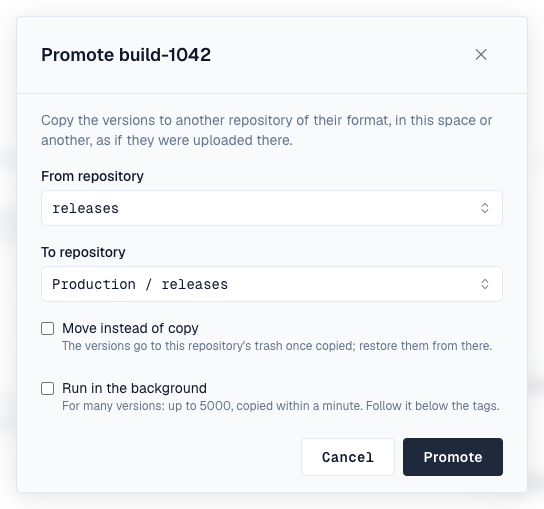
AI agents with the MCP plugin can promote a version for the person using them (the promote_version write tool), with that person's access.
curl -X POST -H "Authorization: Bearer $DEPOTEX_TOKEN" -H "Content-Type: application/json" \
  https://depotex.example.com/api/spaces/acme/repositories/staging/promote \
  -d '{"target": {"space": "acme", "repository": "releases"}, "tag": "build-1042"}'
For more versions, or to not wait, add "background": true: the promotion is queued (up to 5000 versions) and the promotion-run job copies them within a minute, with the access you had when you asked. GET /api/spaces/{space}/promotions lists the space's background promotions for 30 days: queued, running, done or failed, how many versions went, and those refused with why.
The answer lists each version as promoted or refused, with the reason. Every promotion raises artifact.promote with the versions and their tags, so a policy can allow only versions tagged, say, qa-approved into a release repository; each copied file also raises artifact.upload. Promotions are in the audit log.
Promotion needs a Pro license. It works for every format that takes uploads from the browser and for Docker images (by tag, with every platform of a multi-platform image); Conan, Terraform, Hugging Face and Git LFS repositories can't be promoted yet, and a Docker image is promoted from a proxy only when every layer has been pulled through it. An npm promotion makes the promoted version latest in the target, and an APT promotion files the package under the target's default distribution and component.
22. Storage quota
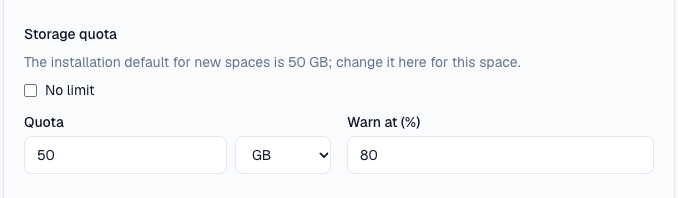
Super admins can limit how much a space's repositories store, in the space's Settings under Storage quota: the quota (GB or TB) and when to warn (80% by default). Uploads that would go over the quota are refused. Everyone who can see the space finds its usage on the Overview, with a warning when it's nearly or completely full.
A new space starts with the installation's default quota, 50 GB unless a super admin changed it under Settings → Repositories, where it can also be set to no limit. Whoever creates the space can give it another quota, or none, in the create form. Changing the default affects only spaces created afterwards; existing spaces keep their quota, or have none.
Every hour Depotex checks usage and raises space.quota.warning once when a space passes its warning threshold and again when it's full; use an automation rule to email or alert the owners. Setting or removing a quota raises space.quota.update and is recorded in the audit log. Available on every license tier.
Usage is counted once repositories in the space store files.
23. Upstreams
A space's Overview also lists the upstream registries it may proxy, such as Maven Central. Super admins choose them in the space's Settings; see Upstreams.
24. Members
Open a space and choose Members to see who has a role there, filtered by people, groups or service accounts. Compare roles shows what each role can do. Owners (and super admins) can:
- Add — Search for a person, service account or group of your organization by name or email, pick a role and choose Add. Searching needs profiles:view, which every signed-in role has by default (see Profile pictures and finding people).
- Change a role — Choose another role next to the member. The change applies at once on every server.
- Remove — Choose the bin next to the member. Roles they have through a group stay.
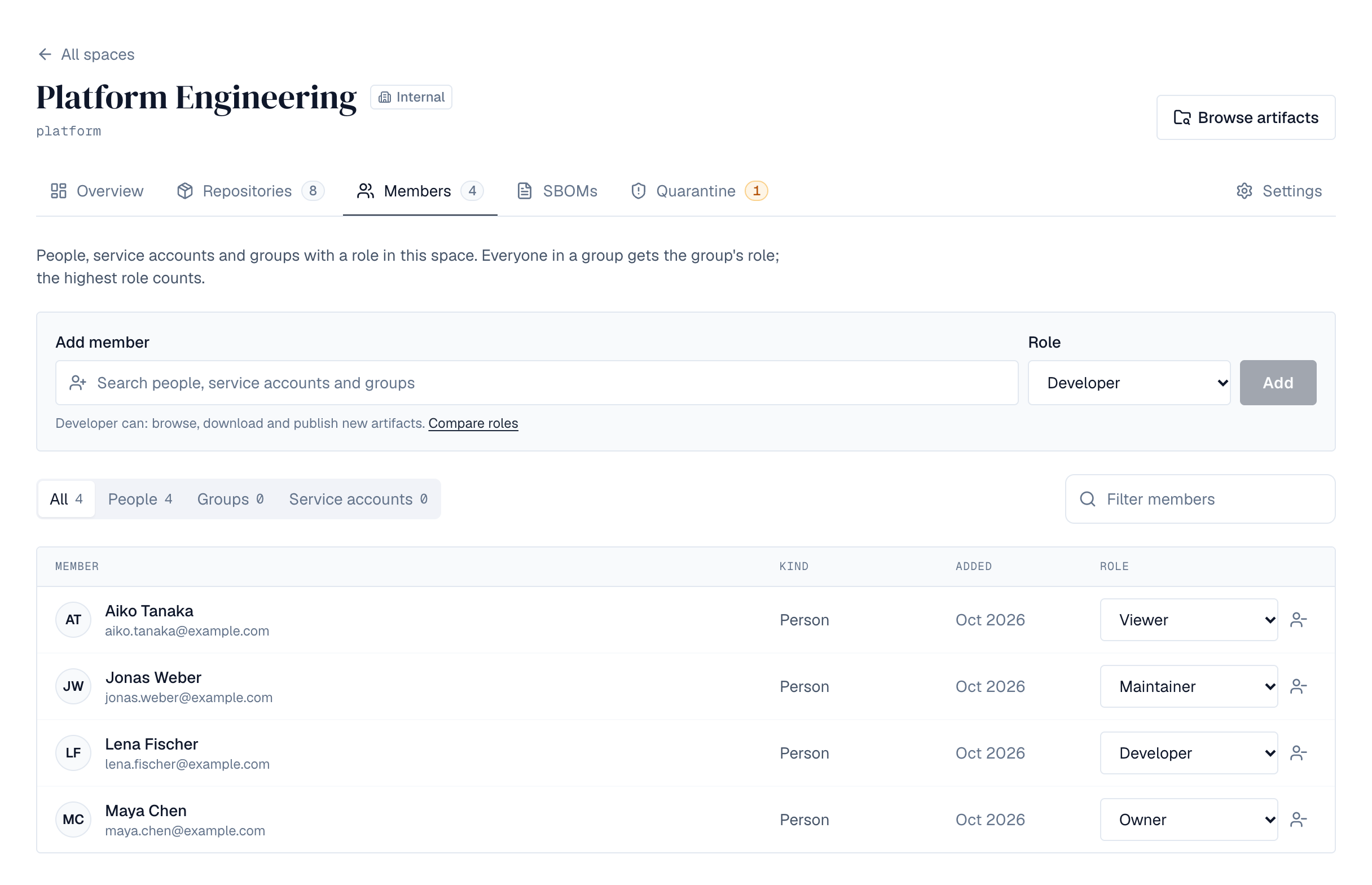
The space's members, whatever their role, see who else is a member, each with their profile picture or initials: every space role includes profiles:view for its space. People who can see an internal or public space without a role in it see how many members it has, but not who they are, unless their own role includes profiles:view (every signed-in role does by default). Each change raises access.grant or access.revoke and is recorded in the audit log.
25. Change or delete a space
A space's Settings shows one section at a time, picked from the menu on the left: General; the rules (Upload rules, Quarantine rules, Block list, Cleanup); Content selectors; for super admins Storage quota and Upstreams; and Delete space. You see the sections your role allows, and each saves on its own.
Owners (and super admins) change the space's name, description, visibility and formats under General. Removing a format doesn't change existing repositories.
Delete space removes the space and everyone's roles in it, once it has no repositories. Type the space's key to confirm. This can't be undone.
26. Permissions
| Permission | Granted by | Allows |
|---|---|---|
| spaces:create | Super admins only | Creating spaces |
| quotas:write | Super admins only | Setting and removing spaces' storage quotas |
| profiles:view | Viewer | Seeing who the space's members are, and who has access to its repositories (on this space only) |
| spaces:read | Viewer | Seeing a space and downloading from it |
| spaces:push | Developer | Publishing new artifacts |
| spaces:sbom:write | Developer | Registering applications and uploading, linking and deleting their SBOMs (Enterprise) |
| spaces:artifacts:delete | Maintainer | Deleting or overwriting artifacts |
| spaces:repos:write | Maintainer | Creating and deleting the space's repositories |
| spaces:policies:write | Maintainer | Changing the space's upload rules (and cleanup policies, later) |
| spaces:quarantine:manage | Maintainer | The space's Quarantine tab: quarantining and releasing versions, and its quarantine rules (Enterprise) |
| spaces:blocklist:manage | Maintainer | The space's block list (Enterprise) |
| spaces:members:write | Owner | Managing members and roles |
| spaces:settings:write | Owner | Changing name, description, visibility and formats |
| spaces:delete | Owner | Deleting the space |
Repository permissions, from space roles or repository roles and path access:
| Permission | Allows |
|---|---|
| repo:browse | Listing folders, files and versions |
| repo:read | Downloading |
| repo:fetch | Making a proxy repository fetch from its upstream |
| repo:add | Publishing to a new path |
| repo:edit | Overwriting a file |
| repo:delete | Deleting files |
| repo:quarantine | The repository's Quarantine tab: quarantining, releasing and blocking its versions, and its own quarantine and block-list rules (repository admins; Enterprise) |
| repo:admin | Changing the repository's settings and who has access |
27. Events
Creating, changing and deleting a space raise space.create, space.update and space.delete, and giving or removing a role raises access.grant and access.revoke. Organization policies can restrict all of them: for example, forbid internal spaces, allow only certain formats, or refuse the Owner role to groups. They can also drive automation, and policy compliance scans check existing spaces against space.create policies. Every change is recorded in the audit log. See Events.