1. Overview
A group is a repository that combines other repositories of the same format in a space. Package managers use one address for everything: reads are answered by the first member that has the file, in the order you set (the hierarchy), and package listings combine every member; uploads go to one hosted member chosen by the group's write rules. Proxy members are never written to. Groups are available on every license tier.
Groups work for every format: Maven, npm, PyPI, Go, Helm, Terraform, NuGet, Cargo, APT, YUM, Composer, RubyGems, Conda, Conan, Hugging Face, Git LFS, Docker and raw.
2. Set up a group
Open the space's Repositories tab. Repositories are shown in a lane per format: the format's universal URL at the top, each group with its members in the order they're asked (a group inside a group is indented), then the repositories in no group. The repository that takes uploads is marked Takes uploads, and a member limited to some paths or packages shows them.
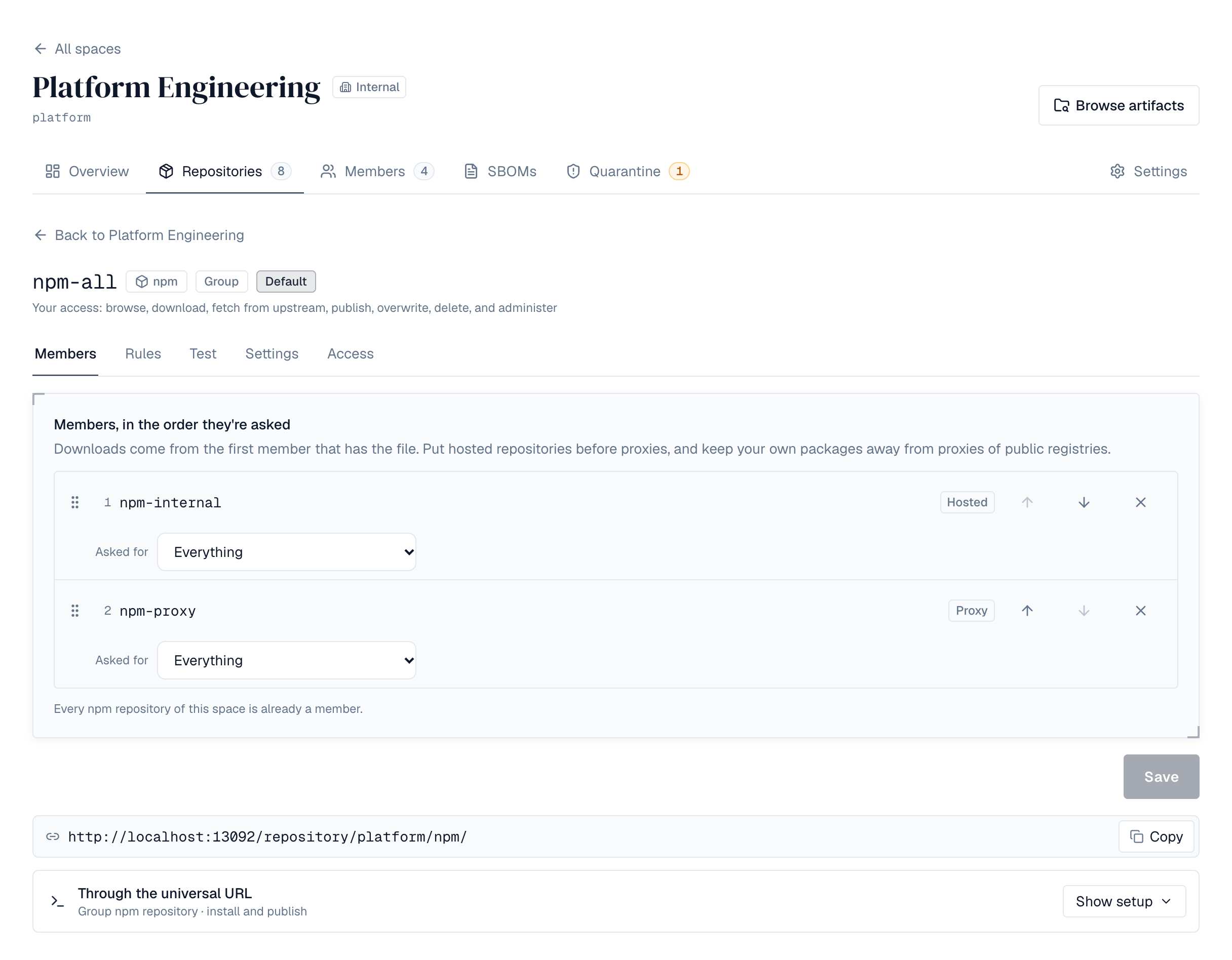
- Create — Choose New repository, type Group, pick the format and the members in the order they should be asked (drag them, or use the arrows), the Default repository for uploads, and whether it becomes the format's universal URL.
- Members — On the group's Members tab, reorder members, and set what each is asked for: everything, only what a pattern matches, or everything except it.
- Rules — On the Rules tab, add write rules (checked in order), the default repository for uploads, paths or packages never served, and the largest download and upload.
- Test — On the Test tab, enter a path or package (and a version and size) to see which members a download asks, or where an upload goes and which rule decided.
Warnings on the group's page point out a proxy asked before a hosted repository, a proxy that doesn't remember “not found”, an offline member, or a group that takes no uploads. Choose the space's default group per format in the lane's universal URL bar (space maintainers). Deleting a repository that is in groups says so first.
3. Using a group
Point the tool at the group's address, https://<depotex>/repository/<space>/<group>/, or at the space's universal URL for the format (below), and use the same address to download and to upload. For example, with raw:
curl -u me:$TOKEN -O https://depotex.example.com/repository/acme/raw/tools/app-1.0.zip
curl -u me:$TOKEN -T app-1.1.zip https://depotex.example.com/repository/acme/raw/tools/app-1.1.zip- Downloads come from the first member, in order, that has the file. A member that refuses the file (quarantined, blocked, no permission) ends the search: the next member isn't asked, so a quarantined version can't be fetched from a proxy instead.
- Folder listings show what every member holds.
- Uploads and deletes go to a hosted member; deletes go to the first hosted member that has the file. Proxy members are never changed.
- If a member that could have the file doesn't answer (for example its upstream is down), the group answers 503 rather than “not found”, so tools retry instead of remembering the file as missing.
- Every answer names the member that answered (X-Depotex-Repository header) and lists the members asked with how long each took (Server-Timing), to find out why a group is slow.
- Reading through a group needs read access to the group and to the member; uploading needs permission to publish to the member the rules choose.
4. Members and the hierarchy
- Members are hosted, proxy or other group repositories of the group's format in the same space, at most 50. A group inside a group is flattened into the hierarchy (at most 5 levels; groups can't contain each other).
- Put hosted members before proxies. A proxy asked first means every internal package costs a request to the upstream, and could be answered by it.
- Each member can be limited to some paths or packages: asked for everything, only what a pattern matches, or everything except what a pattern matches. For example, never ask Maven Central for ^com/acme/: your own packages then can't be replaced by a public package with the same name (dependency confusion).
- Patterns are regular expressions (RE2), on the path inside the repository or on the package: Maven groupId:artifactId, npm name, PyPI project, Go module path, Helm chart, NuGet package ID (lower case), RubyGems gem, conda package, Conan recipe name, Docker image.
- Members that are offline, or that the person can't read, are skipped.
5. Where uploads go
Write rules are checked in order; the first that matches decides. A rule matches a path or package pattern, and optionally only release or only snapshot versions (as the space's upload rules define snapshots; -SNAPSHOT by default). For Go, Helm, Terraform, NuGet, Cargo, RubyGems, Conda, Conan, APT and YUM the choice reads Pre-releases, and matches the versions the format counts as pre-releases, such as 1.0.0-rc.1, v2.0.0-beta.2, RubyGems' 1.2.0.rc1 or Debian's and RPM's 1.0~rc1. It sends the upload to a hosted member of the group (nested groups included), or refuses it. npm and Docker route by package or image only: version conditions don't apply to them. When no rule matches, the upload goes to the group's default write repository; without one the group doesn't take uploads. Rules match whole packages and versions, so every file of a version lands in the same repository. That repository's own write policy, upload rules and quota still apply, and the person needs permission to publish there.
If the repository a rule sends uploads to is deleted, uploads matching that rule are refused rather than sent elsewhere.
6. Limits on the group
- Read deny list: paths or packages the group never serves, from any member.
- Largest download and largest upload through the group.
The largest upload also applies to an upload sent without its size (chunked): it is refused as soon as it passes the limit, and nothing of it is stored.
7. Universal URLs
One group per format can be the space's default. It then also answers at the format's universal URL, https://<depotex>/repository/<space>/<format>/ (for example /repository/acme/maven/), so every project in the space can use the same address. For NuGet, the source address is the universal URL's service index, …/repository/<space>/nuget/index.json. Format names (maven, npm, pypi, go, helm, terraform, nuget, cargo, apt, yum, composer, rubygems, conda, conan, huggingface, gitlfs, docker, raw and vibe) can't be used as repository names. A repository created earlier with such a name keeps its address; rename or delete it before making a group the default for that format.
8. Maven groups
A Maven group combines maven-metadata.xml from every member, so a build sees every version: your releases, your snapshots and Maven Central's, with latest and release worked out across them (its checksum files match the combined file). Jars, POMs and a snapshot's build metadata come from the first member that has them.
Deploy through the group too. A typical setup routes snapshots to the snapshots repository and everything else to releases:
{
  "members": [
    {"repository": "releases"},
    {"repository": "snapshots"},
    {"repository": "maven-central", "routing": {"mode": "except", "patterns": [{"match": "package", "pattern": "^com\\.acme"}]}}
  ],
  "defaultWriteMember": "releases",
  "writeRules": [{"match": "package", "pattern": ".", "versions": "snapshot", "action": "route", "target": "snapshots"}]
}
Every file of a deployed version goes to the same repository. The maven-metadata.xml that mvn deploy uploads is accepted but not kept, because each hosted repository writes its own; plugin prefix metadata is kept. mvn deploy, deploy:deploy-file and dependency:get work against the group's address or the universal URL.
9. npm groups
An npm group merges each package's document from every member: a version comes from the first member that has it, and dist-tags (such as latest) from the first member that sets them, so a package in your hosted repository takes precedence over one with the same name on the public registry. Tarball links point at the address npm used, so one .npmrc entry covers everything:
registry=https://depotex.example.com/repository/acme/npm/
//depotex.example.com/repository/acme/npm/:_authToken=<API token>- npm install, ci, view, outdated, search and audit see every member. Audit reports the public registry's advisories and the versions Depotex has blocked or quarantined in any member.
- npm publish goes to the repository the write rules choose by package name, for example ^@acme/ to your hosted repository. npm dist-tag, deprecate and unpublish change the package in that same repository.
- npm login --registry <group address>, whoami and ping work against the group.
- Route your own scopes away from proxies of the public registry (for example, the proxy member asked for everything except ^@acme/), so a public package can't take the place of a private one.
- npm audit sends the project's package list to every member, proxies included.
10. PyPI groups
A PyPI group is one index for pip, uv, Poetry and PDM: the project list and each project's page list the files of every member (a file in several members is the first member's), and the JSON API combines their releases. Uploads from twine and uv publish go to the repository the write rules choose by project name and version:
pip install --index-url https://__token__:$TOKEN@depotex.example.com/repository/acme/pypi/simple/ my-package
twine upload --repository-url https://depotex.example.com/repository/acme/pypi/legacy/ dist/*- Route your own projects away from the proxy of pypi.org (for example, the proxy asked for everything except ^acme-), so a public project can't stand in for a private one.
- An upload must name its project before its file, as twine and uv publish do; otherwise the group answers that it can't route it (send it to the repository itself instead).
- pip search through a group searches the first proxy member only.
11. Go groups
A Go group is one GOPROXY for your modules and public ones: version lists and @latest combine every member, module files come from the first member that has them, and checksum-database requests go to the first proxy member. Uploads go to the repository the write rules choose by module path and version. See Go repositories.
go env -w GOPROXY=https://depotex.example.com/repository/acme/go/
go env -w GONOSUMDB=example.com/acme/*
12. Helm groups
A Helm group is one chart repository: its index.yaml lists the charts of every member (a chart version in several members is the first member's), and charts download from the first member that has them. PUT uploads are routed by the chart name and version in the file name, and helm cm-push (POST api/charts) by the chart inside the archive. See Helm repositories.
helm repo add acme https://depotex.example.com/repository/acme/helm/ --username me --password "$TOKEN"13. NuGet groups
A NuGet group is one package source: version lists, package details and search combine every member, packages come from the first member that has them, and dotnet nuget push goes to the repository the write rules choose by the ID and version inside the package. dotnet nuget delete and relisting go to the hosted member that has the version. See NuGet repositories.
dotnet nuget add source https://depotex.example.com/repository/acme/nuget/index.json --name acme --username me --password "$TOKEN" --store-password-in-clear-textLists that combine many packages (Helm's index.yaml, NuGet search) only include what each member would serve to that request: a member asked only for some packages, or a package the group never serves, doesn't show up in them.
14. Docker groups
A Docker group is one registry address for the space's images: docker pull depotex.example.com/acme/docker/team/app:1.0 gets the image from the first member that has it (for example your hosted repository, then a Docker Hub proxy), and docker push to the same name stores it in the repository the write rules choose by image name. Tag lists combine every member, and signatures and SBOMs (referrers) of every member are listed.
- Pushes are routed by image name only, never by tag, so an image's layers and manifest always land in the same repository.
- docker login depotex.example.com once covers the group and its members.
- docker search and the registry catalog list the members' images, not the group.
15. RubyGems groups
A RubyGems group is one source for Bundler and gem: each gem's info file and the list of every gem combine the members, gems come from the first member that has them, and gem push goes to the repository the write rules choose by the gem's name and version (yanks and owner changes to the first hosted member that has the gem). A gem name a hosted member has, or has reserved, gets no versions from proxy members, in any casing and for everyone: a public gem of the same name can't stand in for yours. The group's Settings tab turns this off. See RubyGems repositories.
bundle config set --global https://depotex.example.com/repository/acme/rubygems/ "me:$TOKEN"
# Gemfile
source "https://depotex.example.com/repository/acme/rubygems/"
16. Conda groups
A conda group is one channel for conda, micromamba and pixi: its sharded repodata, repodata.json and run_exports.json merge every member's (a package file two members have comes from the first), and rattler-build upload goes to the repository the write rules choose by package name and version. A package name any hosted member has gets nothing from proxy members, downloads included, unless the group's Hosted packages hide upstream packages of the same name is turned off. See Conda channels.
conda install --override-channels -c https://depotex.example.com/repository/acme/conda/ my-tool17. Conan groups
A Conan group is one remote for Conan 2: conan list, conan search, a reference's revisions and a recipe revision's binaries combine every member's, the latest revision and each file come from the first member that has them, and conan upload sends each revision to the repository the write rules choose by recipe name and version. A recipe name any hosted member has gets nothing from proxy members, downloads included, unless the group's Hosted recipes hide upstream recipes of the same name is turned off; the binaries of a recipe revision a hosted member has still come from every member (from a proxy only when its copy of the recipe's manifest hashes to that revision). See Conan repositories.
conan remote add acme-conan https://depotex.example.com/repository/acme/conan --index 018. Check what a group does
The dry run answers, without downloading or storing anything, which members a read would ask and why others are skipped, or where an upload would go and which rule decided.
19. Server settings
Merging members' answers (npm documents, Maven metadata, listings) is bounded on each server. Merged answers are kept in memory and reused while no member changed; they never go stale, so nothing needs clearing in a cluster.
| Environment variable | Default | What |
|---|---|---|
| GROUP_MERGE_CONCURRENCY | 16 | Merges running at once on a server; more wait |
| GROUP_MERGE_MAX_BYTES | 268435456 | Largest answer read from one member, in bytes (npm documents of packages with thousands of versions can be tens of MB) |
| GROUP_MERGE_CACHE_BYTES | 67108864 | Memory for merged answers on a server, in bytes; 0 turns reuse off |
A response served from that memory carries X-Depotex-Group-Cache: hit.
20. API
| Request | Who | What |
|---|---|---|
| POST /api/spaces/{space}/repositories with "type": "group" and "group" | Space maintainers | Create a group with its members and policies |
| GET /api/spaces/{space}/repositories/{group}/group | Anyone who can browse the group | Members, policies and warnings (members you can't see are left unnamed) |
| PUT /api/spaces/{space}/repositories/{group}/group | Repository admins of the group | Replace the members and policies |
| POST /api/spaces/{space}/repositories/{group}/group/resolve | Anyone who can browse the group | Dry run: operation (read or write), path, package, version, size |
| GET /api/spaces/{space}/defaults | Anyone who can see the space | Default groups and their universal URLs |
| PUT, DELETE /api/spaces/{space}/defaults/{format} | Space maintainers | Make a group the default for its format, or remove the default |
{
  "members": [
    {"repository": "releases"},
    {"repository": "snapshots"},
    {"repository": "central", "routing": {"mode": "except", "patterns": [{"match": "path", "pattern": "^com/acme/"}]}}
  ],
  "defaultWriteMember": "releases",
  "writeRules": [
    {"match": "package", "pattern": ".", "versions": "snapshot", "action": "route", "target": "snapshots"},
    {"match": "package", "pattern": "^com\\.acme\\.secret:", "action": "deny"}
  ],
  "readDeny": [{"match": "path", "pattern": "\\.exe$"}],
  "maxUploadBytes": 1073741824,
  "maxDownloadBytes": null
}
21. Events and audit
An upload through a group raises artifact.upload with the group's name in group, next to the repository it's stored in. Creating a group raises depot.repository.create with its members and policies; changing them raises depot.repository.update; making a group the default for a format, or removing it, raises depot.space.default_group. Organization policies can restrict all three (for example, require a read deny list, or forbid proxies in the default group), and every change is recorded in the audit log.