Conda repositories are conda channels: conda, mamba and micromamba, pixi and anything built on rattler install from them. Hosted repositories take .conda and .tar.bz2 packages from rattler-build, curl or the web, and build the channel's index from them; proxy repositories (Pro) cache conda-forge, Bioconda or another channel; and a group serves several of them as one channel.
On a cluster, create conda repositories, and conda groups, once every server runs a version that has them: older servers answer 404 for them.
1. Set up conda, micromamba and pixi
The channel's address is https://depotex.example.com/repository/<space>/<repository>. Use this repository, at the top of the repository's Browse tab, shows every snippet on this page with your address filled in.
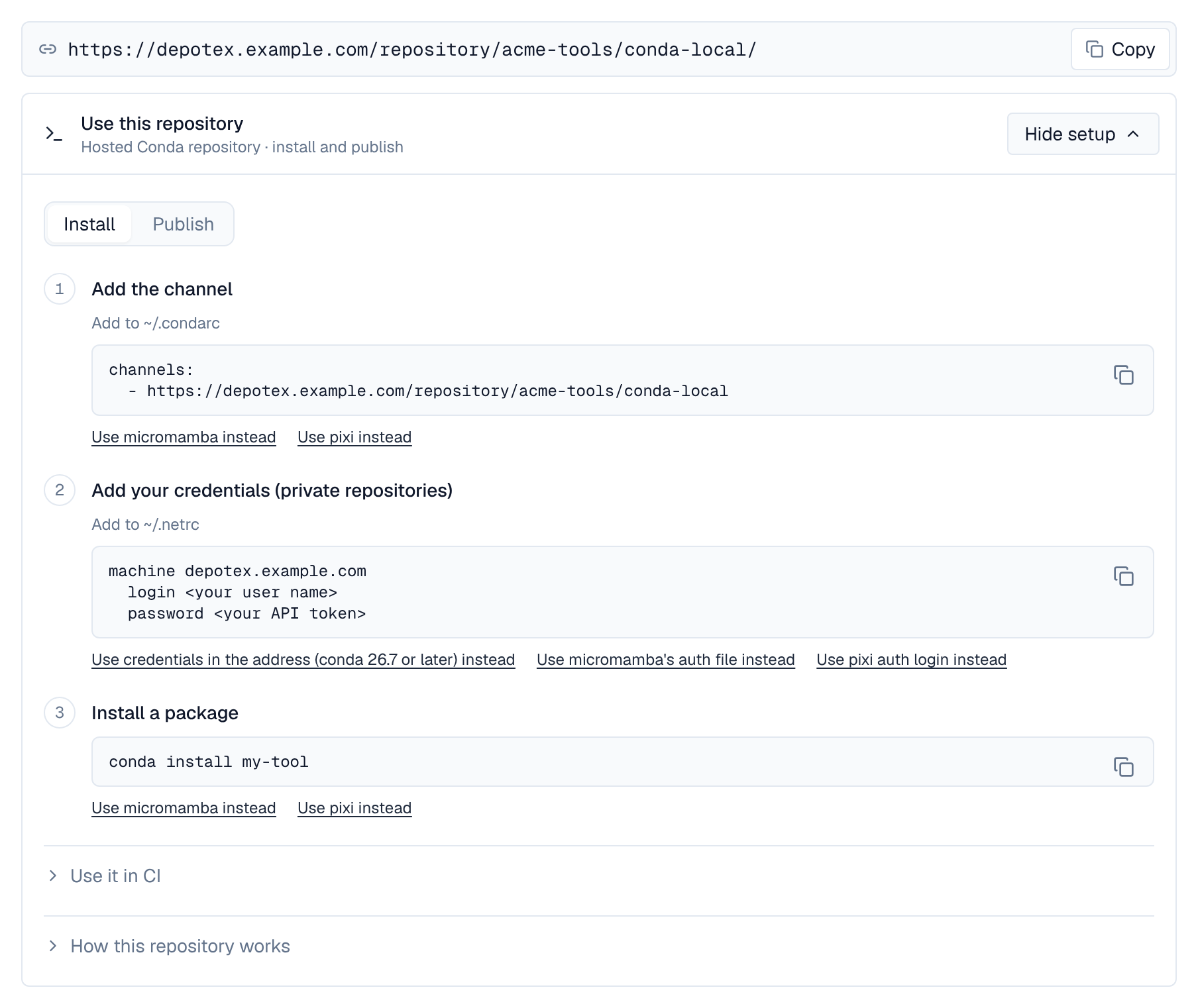
# ~/.condarc (conda) or ~/.mambarc (micromamba)
channels:
  - https://depotex.example.com/repository/my-space/conda-local

# pixi.toml
[workspace]
channels = ["https://depotex.example.com/repository/my-space/conda-local"]
platforms = ["linux-64", "osx-arm64", "win-64"]
conda install my-tool
micromamba install my-tool
pixi add my-toolDownloads from public spaces need no credentials while anonymous access is on. For a private space, give each client an API token (Profile → API tokens) its own way:
| Client | Where the token goes |
|---|---|
| conda | ~/.netrc (recommended): machine depotex.example.com, login any name, password the token. Or in the channel address, https://token:${DEPOTEX_TOKEN}@depotex.example.com/repository/… (any user name: the token signs in), from conda 26.7 (see below) |
| micromamba | ~/.mamba/auth/authentication.json: {"depotex.example.com": {"type": "BearerToken", "token": "<your API token>"}}, keyed by host, with :port when the address has one. ~/.netrc works too |
| pixi | pixi auth login depotex.example.com --token "$DEPOTEX_TOKEN": the host name alone, without a port, because pixi looks credentials up by host name |
| rattler-build | --token (sent as a Bearer token), or --username and --password |
conda 26.5 and 26.6 send credentials in a channel address with repodata.json, but not with the request for sharded repodata: that one gets 401, conda reads the whole repodata.json.zst instead and doesn't try shards for that channel again for 7 days. Installs work; use ~/.netrc or conda 26.7 to get shards. Clients send credentials with their first request and don't try again after a 401.
2. In place of conda-forge
Point the public channel's address at a proxy, so pixi.toml, environment.yml and lockfiles keep naming conda-forge while every download goes through Depotex:
# ~/.pixi/config.toml (pixi)
[mirrors]
"https://conda.anaconda.org/conda-forge" = ["https://depotex.example.com/repository/my-space/conda-forge"]

# ~/.mambarc (micromamba 2)
mirrored_channels:
  conda-forge:
    - https://depotex.example.com/repository/my-space/conda-forge
repodata_shards_ttl: 300

# ~/.condarc (conda): channels named conda-forge come from the space
custom_channels:
conda-forge: https://depotex.example.com/repository/my-space- conda's custom_channels and channel_alias: https://depotex.example.com/repository/my-space find a channel by its name, so they stand in for conda-forge when the proxy repository is named conda-forge.
- In an environment.yml, list the Depotex channel and nodefaults, so conda doesn't also ask Anaconda's channels.
- The raw repository presets Miniforge installers, micromamba releases and pixi releases proxy the installers' GitHub release downloads, so new machines can install the clients through Depotex too (see Raw).
3. In CI
- uses: prefix-dev/setup-pixi@v0.9.3
  with:
    auth-host: depotex.example.com
    auth-token: ${{ secrets.DEPOTEX_TOKEN }}
setup-micromamba and setup-miniconda read the ~/.mambarc, auth file or ~/.netrc shown above; write them from a secret before the step that installs.
4. Upload packages
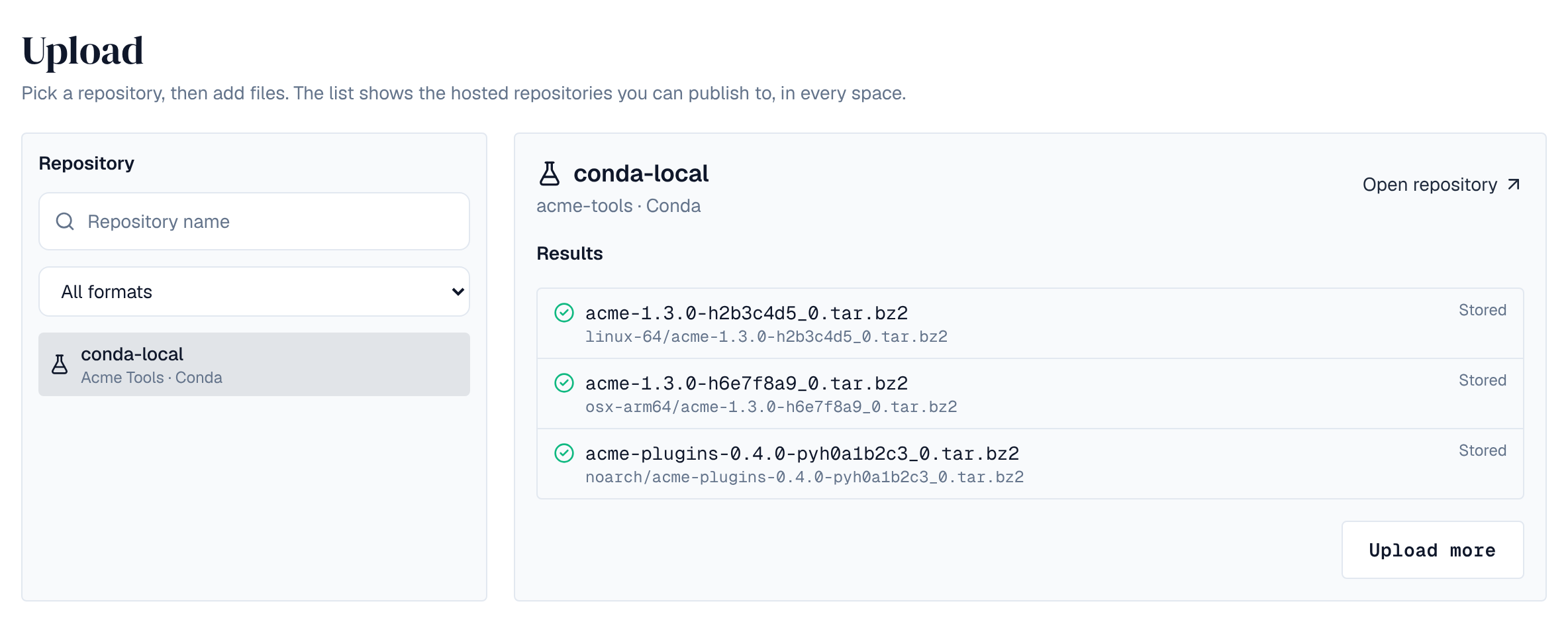
Each package file goes into its platform's folder (noarch/, linux-64/, osx-arm64/, …), with the Publish permission. rattler-build uploads with its Artifactory command; any HTTP client can PUT the file:
rattler-build upload artifactory \
  --url https://depotex.example.com/repository/my-space \
  --channel conda-local \
  --token "$DEPOTEX_TOKEN" \
  output/linux-64/my-tool-1.2.0-h1234567_0.conda

curl -fT my-tool-1.2.0-h1234567_0.conda -H "Authorization: Bearer $DEPOTEX_TOKEN" \
https://depotex.example.com/repository/my-space/conda-local/linux-64/- The file name must agree with the package's info/index.json (name, version, build and platform folder); a noarch package goes in noarch/. Names follow conda's rules (CEP-26): lower-case letters, digits, ., - and _, at most 64 characters, and not starting with __.
- A file can never be replaced, whatever the repository's publishing setting. Uploading the same bytes again answers 200, so a rerun CI job passes; other bytes are refused (409): build again with a new build number. A build can exist as .conda or as .tar.bz2, not both.
- A deleted file (Delete permission) can only be uploaded again with the bytes it had: clients and lockfiles pin each file's sha256.
- A package's timestamp may be at most 5 minutes in the future (check the build machine's clock).
- Numbers in info/index.json and info/run_exports.json must fit a 64-bit float (1e400 doesn't; sharded repodata can't hold it): such a package is refused (422). The two files together may take at most 256 KiB in the channel's index, which writes numbers out in full (1e300 takes 301 digits there); a larger package is refused (422) too.
- rattler-build sends packages without a length; they're read to the end and checked against the size limit as they arrive. X-Checksum-Sha256 or X-Checksum-Md5, when sent, is checked.
- In the web app, Upload takes .conda and .tar.bz2 files, several at once, and puts each in the folder its info/index.json names (see Uploading files with one form).
5. Yank a version
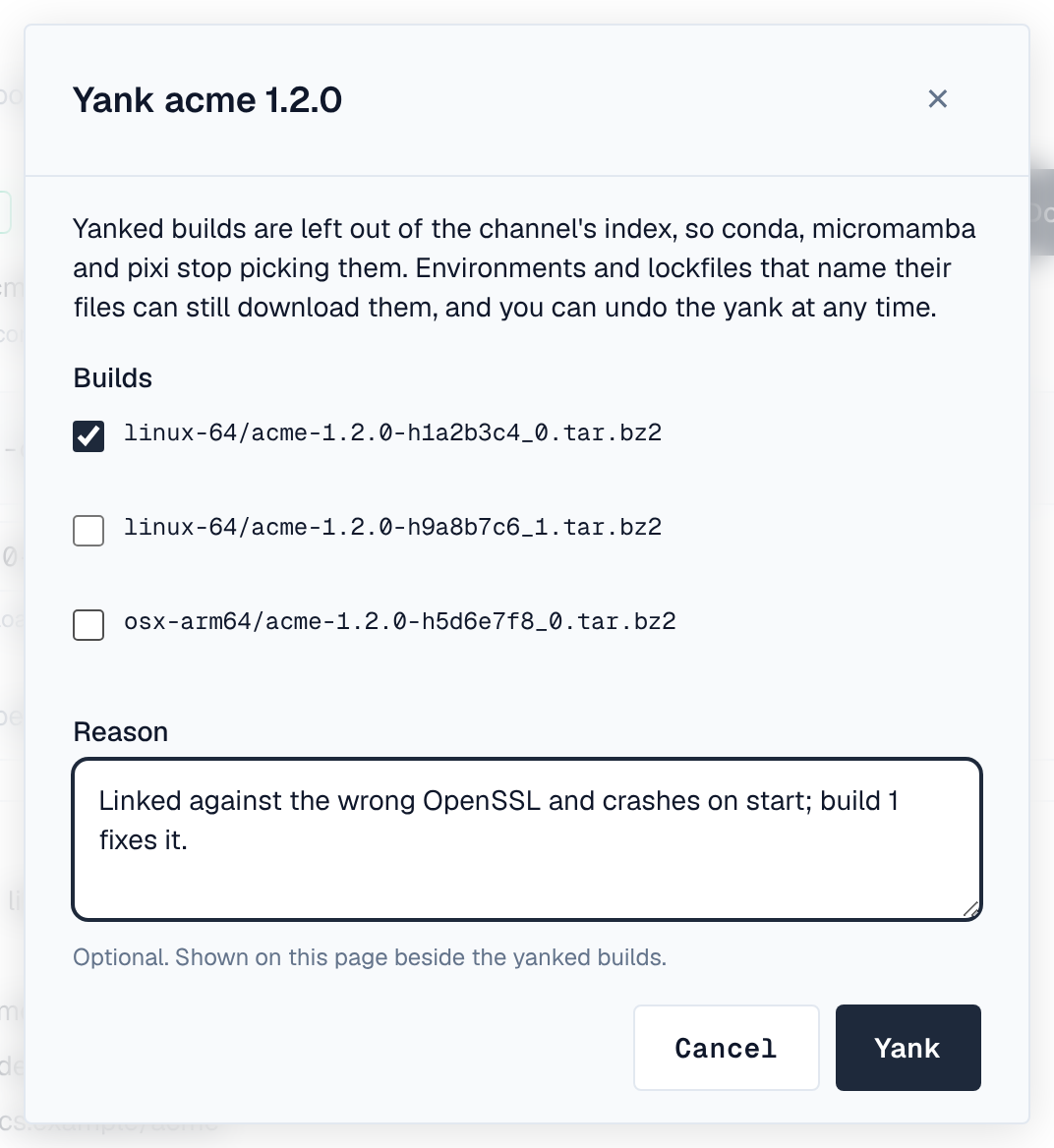
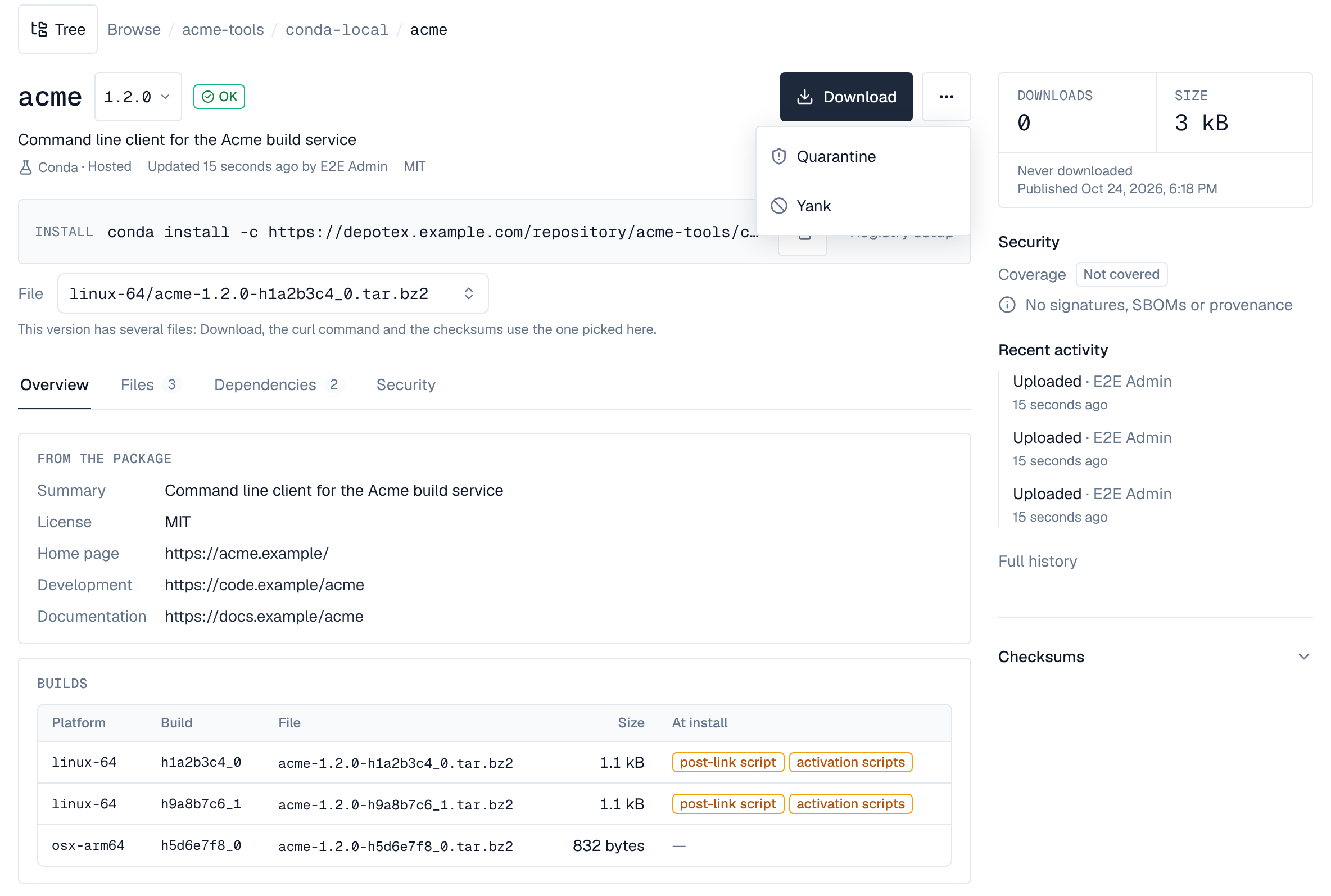
A version's builds can be yanked: they leave the channel's index (listed as removed), so conda, micromamba and pixi stop picking them, while environments and lockfiles that name their files can still download them. On the version's page in the browser, people who may edit every build (or the repository's admins) choose Yank in the ⋯ menu, tick the builds (all are ticked at first: untick the others to yank one broken build alone) and give an optional reason, shown beside the yanked builds. Undo the yank puts them back. Each raises the conda.version.update event, which policies can refuse, and is recorded in the audit log. Hosted repositories only.
curl -f -X PUT -H "Authorization: Bearer $DEPOTEX_TOKEN" -H "Content-Type: application/json" \
  -d '{"yanked": true, "reason": "segfaults on import", "files": ["linux-64/my-tool-1.2.0-h1234567_0.conda"]}' \
  https://depotex.example.com/api/spaces/my-space/repositories/conda-local/conda/packages/my-tool/versions/1.2.0/yank
Leave files out to yank every build; send "yanked": false to undo. To remove a file for good, delete it instead.
6. Sharded repodata
Depotex builds a hosted channel's index from what was uploaded: repodata.json and repodata.json.zst, run_exports.json, and sharded repodata (CEP-16), one small shard per package name. Clients that read shards (conda 26.5 or later, micromamba 2, pixi) fetch a small index and then only the shards of the packages they solve for, instead of the whole repodata; older clients read repodata.json.zst or repodata.json.
Whether a repository serves sharded repodata is in its Settings tab, Conda card (repository admins), and a change raises the conda.settings.update event:
| Serve sharded repodata | What it means |
|---|---|
| Default | Off for hosted channels, which are usually small enough to read whole, so an upload reaches every client on its next run. On for proxies, whose upstreams are large, and for groups |
| On | The shard index is served |
| Off | Clients read the whole repodata.json.zst |
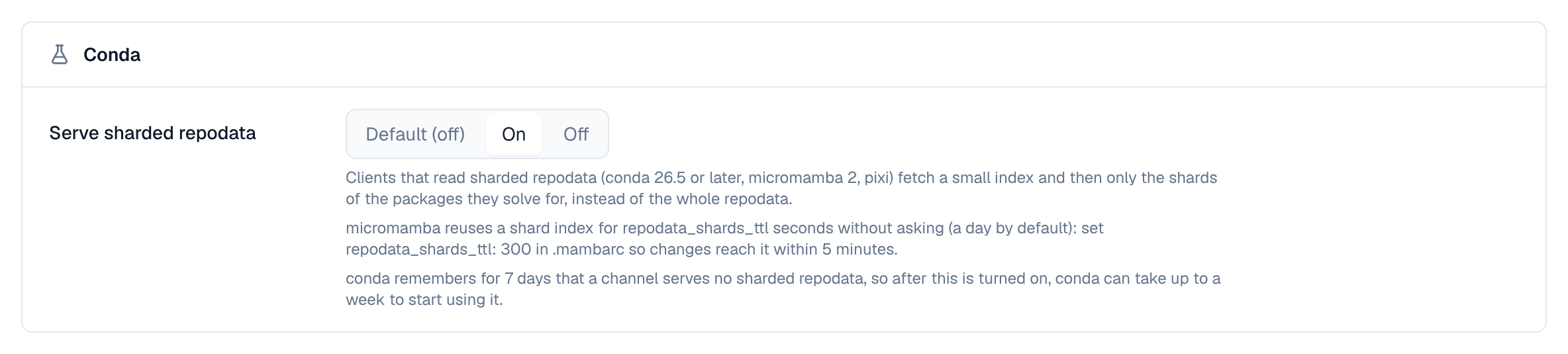
- micromamba reuses a shard index for repodata_shards_ttl seconds without asking (a day by default): set repodata_shards_ttl: 300 in ~/.mambarc so a proxy's or busy channel's changes reach it within 5 minutes.
- conda remembers for 7 days that a channel serves no sharded repodata, so after shards are turned on, conda can take up to a week to start using them.
- A shard stays downloadable for 7 days after the index stops naming it, for clients still holding an older index.
- Hosted channels don't serve current_repodata.json, repodata.json.bz2, channeldata.json or notices.json yet; clients fall back to repodata.json and do without the others.
7. Proxy repositories
Add an upstream with the conda-forge or Bioconda preset (their metadata is re-checked every 20 minutes, as conda.anaconda.org asks) or another channel's address, allow it for the space, then create a proxy repository with it (Pro). The proxy passes the upstream's sharded repodata and repodata.json(.zst) through (leaving out hidden builds), pointing every address back at itself. Each package file is fetched the first time it's asked for, only if the upstream's index lists it (anything else is 404 without asking the upstream), checked and kept.
- What is checked: each package file and shard against the sha256 the upstream's record gives. The shard index, repodata*, run_exports*, channeldata.json and notices.json have no upstream checksum and rely on TLS, as does a file the upstream lists only as removed. See What is checked.
- New conda proxies start with Checksums at Use the Security setting: Strict while Settings → Security → Proxy checksums is on (a file that doesn't match is never kept; the client gets 503 or the last cached copy), Warn while it is off. That switch decides what happens when a file is fetched; Settings → Integrity's checks are another thing, re-reading files already stored.
- An upstream without sharded repodata works with Caching set to Keep files: the proxy fetches its repodata.json.zst (or repodata.json) to find the package files asked for, and asks for it again after Re-check metadata after. With Pass through, such an upstream's package files are 404.
- An upstream whose repodata.json points its packages at another address (base_url) is served without that address, so clients fetch every package from the proxy, which fetches it from there. The address must be the upstream's own host or another host name over HTTPS: any other (an IP address, plain HTTP to another host) answers 502, and so does repodata.json.bz2 whenever its packages are elsewhere (clients read repodata.json.zst or repodata.json instead).
- There is no preset for Anaconda's own channels (defaults, main, r, msys2): Anaconda's terms of service don't allow proxying them without Anaconda's authorization, and organisations of more than 200 employees need a paid plan. Check your agreement with Anaconda before adding one.
- Upstream tokens are sent as Bearer or Basic credentials; tokens in the address path (/t/<token>/) aren't supported.
8. Groups
A conda group is one channel over its members, in the group's order: usually your hosted channel first, then a proxy of conda-forge. conda, micromamba and pixi read one address, whose repodata (sharded and whole, and run_exports.json) Depotex merges from the members' own; a package file two members have under the same name comes from the first. Groups work on every tier; a proxy member needs Pro.
- Create — In the space, New repository, type Group, format Conda: the hosted channel first, the conda-forge proxy after it, and the hosted channel as the Default repository for uploads.
- Universal address — Make the group the space's default for conda to also serve it at https://depotex.example.com/repository/<space>/conda/.
- Clients — Use the group's address as the channel, as for a single channel above. The group's Members tab shows every snippet with your address filled in.
# ~/.condarc (conda)
channels:
  - https://depotex.example.com/repository/my-space/conda/

# ~/.mambarc (micromamba)
channels:
  - https://depotex.example.com/repository/my-space/conda/
repodata_shards_ttl: 300

# pixi.toml
[workspace]
channels = ["https://depotex.example.com/repository/my-space/conda/"]
Upload through the group too: each package file goes to the hosted member the group's write rules choose by package name and version, and that member's rules apply (a file is never replaced; the same bytes again answer 200). A path that isn't a package file is refused (400). Deleting a file through the group deletes it from the first hosted member that has it.
rattler-build upload artifactory \
  --url https://depotex.example.com/repository/my-space \
  --channel conda-all \
  --token "$DEPOTEX_TOKEN" \
  output/noarch/my-lib-0.1.0-0.conda
Hosted packages hide upstream packages of the same name, in the group's Settings tab, Conda card (repository admins), is on by default: a package name any hosted member has, in any platform folder, gets nothing from the proxy members, neither records in the group's repodata nor downloads, even when a proxy comes first. A Python wheel from a proxy goes by its project's name in conda's form (Foo_Bar is foo-bar). So nobody can publish a newer build under one of your internal package names on conda-forge and have it installed through the group. Changing it raises the conda.settings.update event.
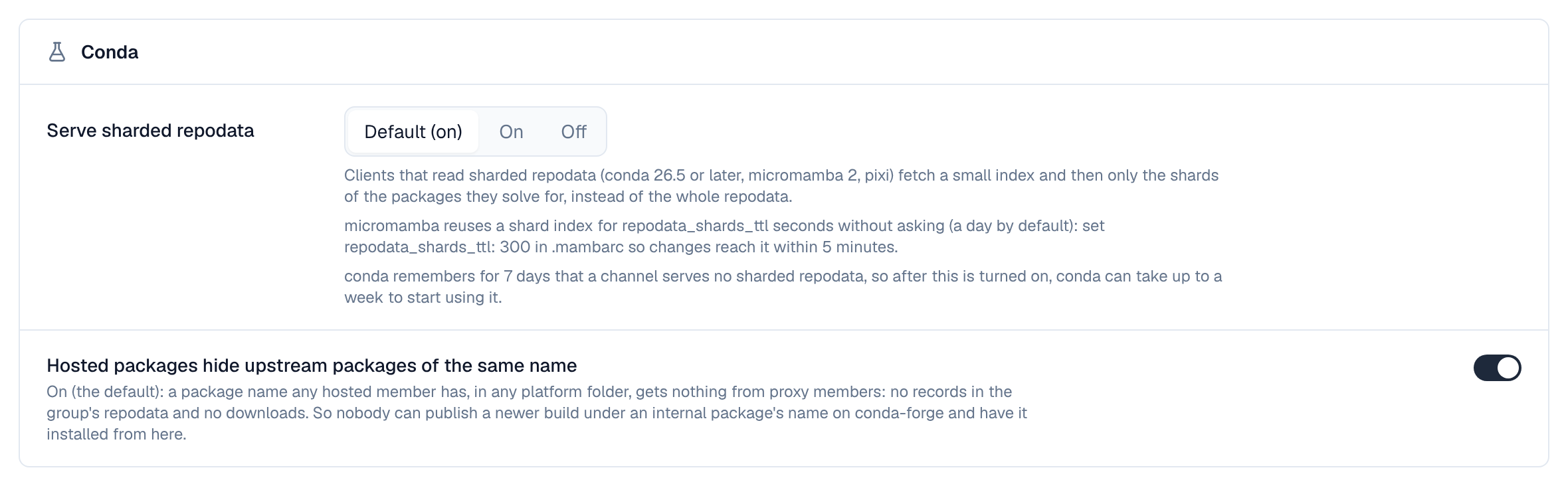
- Sharded repodata is on by default for groups. A member without it (a proxy of a channel that has none) makes the group serve only its whole repodata, and conda then remembers for 7 days that the group has no sharded repodata.
- After a change in a member, the group's whole repodata of a platform folder is merged again the next time it's read; with conda-forge as a member that takes some seconds (about 10 for linux-64). One server merges while the others serve the previous merge. A new group has no previous merge: requests that come while it's being merged wait for it up to 30 seconds, then get 503 with Retry-After: 10. conda and pixi retry a 503 a few times; micromamba doesn't, and reports a decompression error. Run conda search --override-channels -c <group address> my-tool once against a new group before CI uses it. Clients reading sharded repodata don't wait for this merge.
- A member that can't be used (its upstream is down, its repodata can't be read, or it puts its packages at an address Depotex doesn't fetch from, see base_url above): the group serves its repodata as last merged; before the first merge it answers the member's error (503, or 502 for such an address).
- Hosted members' uploads, deletes and yanks show on the group's next read, as on a hosted channel. A build yanked in a member stays yanked through the group, even when a later member has a file of the same name: downloads of that file come from the member that yanked it; a proxy member's upstream changes when the proxy next checks its upstream (Re-check metadata after).
9. Hidden versions
What conda, micromamba and pixi may install is decided before they solve: builds they may not download are left out of the metadata they solve from, so they pick the newest build that passes instead of failing on a 403.
- A hosted channel's index always leaves out blocked builds. Quarantined builds are left out too when the repository's Hide quarantined versions is on; otherwise they stay listed and downloading them fails with 403.
- A proxy leaves blocked builds out of everything clients solve from: the shard index and its shards, repodata.json (plain and .zst), current_repodata.json and run_exports.json. With Hide quarantined versions on, it also leaves out the builds it holds in quarantine and the ones it hasn't fetched yet that a quarantine age rule (Published less than) would hold. That includes a newer build of a version the proxy already stores: downloading it would quarantine the whole version, the stored build too, so it stays hidden until it passes the rule, while the stored build stays listed. Once a version is released from quarantine, all its builds are listed. With the switch off, quarantined builds stay listed and downloading them fails with 403.
- A group leaves out what each member leaves out, in its merged shard index, shards and repodata.
- For example, with a block rule on tzdata for >=2025a, micromamba create tzdata through the proxy or a group of it installs tzdata 2024b, and asking for tzdata>=2025a finds nothing. With a 14-day age rule, clients get the newest builds that are at least 14 days old.
- How old a proxied build is, for age rules: from when the proxy first saw the file in its upstream's metadata. A file already listed when the proxy first read a platform folder (and every file of a folder it read before an age rule applied to it, or before this release) is judged by the timestamp in the upstream's record instead, which the package's builder set and which is trusted only as far as the upstream is. Without a timestamp, the age is the upstream's Last-Modified once the file is fetched. A pass-through proxy keeps nothing, so age rules hold and hide nothing there.
- A downloaded or pinned build stays refused: a pixi.lock, conda-lock.yml, @EXPLICIT file or URL that names a hidden build gets 403 until the build passes (it reaches the rule's age, or the rule changes, or it is released).
- Versions compare as conda compares them (VersionOrder), for cleanup policies, quotas, quarantine and the block list.
Known limits:
- A file listed at the proxy's first read without a timestamp has no age before it's fetched, so it stays listed; once fetched, its Last-Modified age can still refuse its download (403).
- On a new proxy's first read of a platform folder, and after an age rule is added or lengthened, the proxy records the young builds the upstream lists, judged by the timestamp in their record (which the package's builder sets). Until that is done, a few seconds, the shard index treats every build of the names an age rule covers as new; when a broad rule covers more than 20,000 names it answers 503 conda_index_building with Retry-After instead, and clients retry.
- While a rule applies to a proxy, repodata.json.bz2 answers 404 (clients read .zst or plain repodata.json first), and the shard index answers 503 conda_filter_too_large when more than 20,000 package names have a build to hide: narrow the rules, or have clients read repodata.json.
- channeldata.json and notices.json are passed on as the upstream wrote them; they name packages rather than builds, and clients don't solve from them.
- Clients cache metadata: micromamba keeps a shard index for repodata_shards_ttl seconds (a day by default), so a build hidden or shown again reaches it after that.
10. Access to part of a channel
A channel's index lists every package, so people whose access is limited to some paths (content selectors) get no sharded repodata. On a hosted channel they get a repodata.json built for them from the files they may read; a proxy refuses them its repodata.json (403), since it can't build the upstream's per person. notices.json, which conda asks for on every run, lists no packages: anyone who may read part of a proxy gets the copy it has cached, and the upstream's when they may fetch from upstream. A group does the same: it builds such people a repodata.json from the files of its hosted members they may read, and refuses them (403) when they may read a proxy member. Give people who install from a proxy, or a group with one, read access to the whole repository.
11. In the artifact browser
A version's page lists its builds, one per platform and file: platform, build, file, size, date, what it does at install (post-link and pre-unlink scripts, activation scripts, rewriting paths in text or binary files) and whether it's yanked. It also shows what the newest build's about.json says (summary, licence, home page, development and documentation links) and its dependencies (depends, and constrains as constraints). The Install bar shows conda install.
12. SBOMs and vulnerabilities
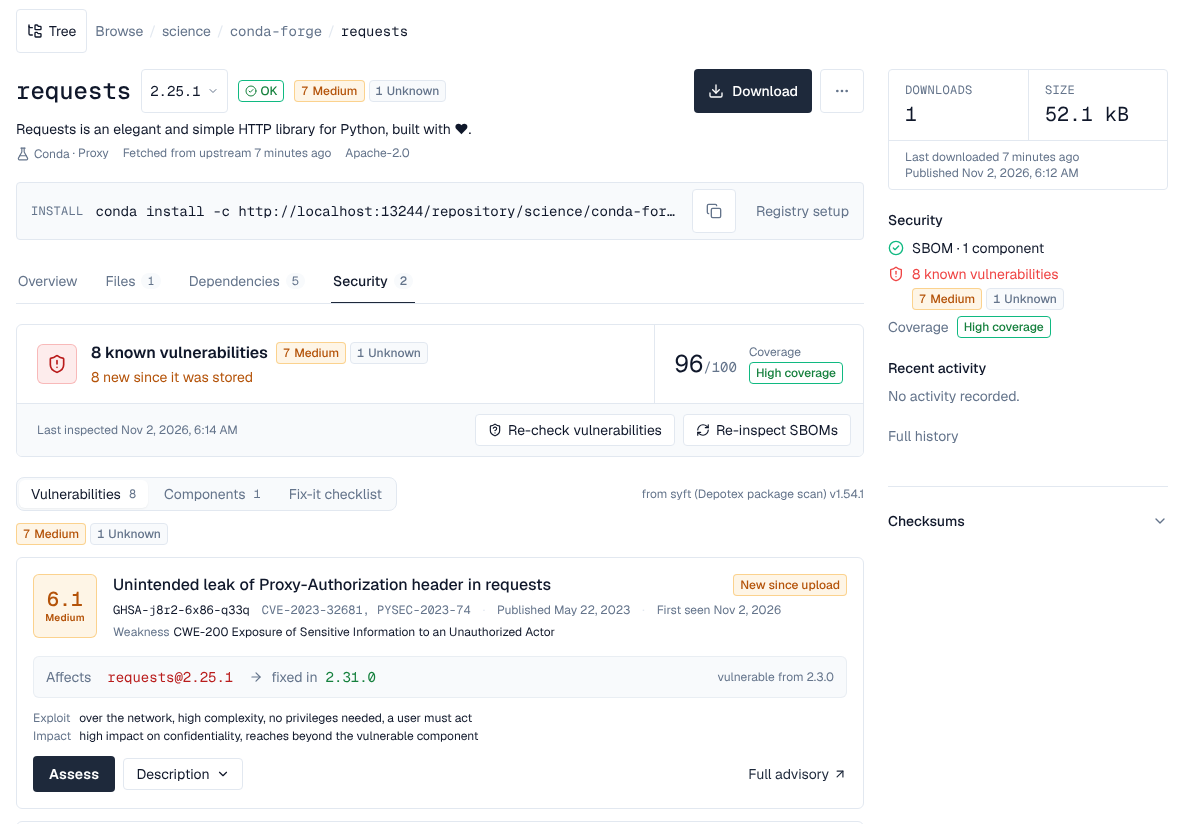
From Pro, conda versions get SBOMs on their Security tab, made by Depotex in the background:
- Every version gets an SBOM from its newest build's depends: the package itself (in a proxy) and each dependency pinned to one version (1.2.3, ==1.2.3, with or without a build). Ranges such as >=1.2 or 1.2.* aren't resolved; constrains and virtual packages (__glibc, __cuda) are left out. The package URLs name the channel: pkg:conda/conda-forge/numpy@1.26.4 for a channel on conda.anaconda.org, otherwise the channel's address (?repository_url=…). A hosted channel's address is your installation's, so its versions get this SBOM only once Settings → General → Public URL is set. Setting or changing it doesn't update versions already stored: afterwards, use Re-inspect all versions in the repository's Settings (or Re-inspect every version under Settings → Vulnerability data).
- Packages from public channels (conda-forge, Bioconda and Anaconda's main, r, msys2, pytorch and nvidia, fetched through a proxy) are also unpacked and read with Syft, one SBOM per package file: the Python packages they install, R packages, and Ruby, Java, JavaScript, Go and Rust packages they carry, each at the version found. Python packages are checked against PyPI's advisories and R packages from CRAN (their DESCRIPTION says Repository: CRAN) against CRAN's. Only package files the proxy fetched from such a channel are read: if a proxy's upstream is changed to a public channel, files it cached before from another channel aren't. The scan runs within the image scan limits and appears a minute or two after the package is first fetched.
- Not covered, never shown as clean: conda packages themselves (no vulnerability database has conda advisories), R packages from Bioconductor or anywhere but CRAN, and the few C and C++ libraries Syft recognises by their binaries (such as OpenSSL). Most C and C++ libraries inside conda packages have no package record and aren't listed at all, so a vulnerability in them isn't found. A version made only of such components reads Not covered on its Security tab.
- Hosted channels, proxies of other channels (a private channel's requests may not be PyPI's) and labels get the dependency SBOM only, not the Syft read.
- The Fix-it checklist suggests conda install "numpy=1.26.4" for a conda package. A Python package found inside a conda package gets the pip command; in a conda environment the fix is usually a newer build of the conda package that carries it.
13. Moving a channel from Artifactory or anaconda.org
A channel at https://artifactory.example.com/artifactory/api/conda/<repo>/<subdir>/… or https://conda.anaconda.org/<channel>/<subdir>/… becomes https://depotex.example.com/repository/<space>/<repository>/<subdir>/…: replace the channel's address in .condarc, .mambarc, pixi.toml and environment.yml. To copy the packages, read each platform's repodata.json and upload every file it lists:
SRC=https://artifactory.example.com/artifactory/api/conda/conda-local
DST=https://depotex.example.com/repository/my-space/conda-local
for sub in noarch linux-64 osx-arm64 win-64; do
  curl -fsS -u "$SRC_USER:$SRC_TOKEN" "$SRC/$sub/repodata.json" |
  python3 -c 'import json,sys; d=json.load(sys.stdin); [print(f) for k in ("packages.conda", "packages") for f in d.get(k) or {}]' |
  while read -r f; do
    curl -fsS -u "$SRC_USER:$SRC_TOKEN" -o "$f" "$SRC/$sub/$f" &&
      curl -fsS -T "$f" -H "Authorization: Bearer $DEPOTEX_TOKEN" "$DST/$sub/"
    rm -f "$f"
  done
done- Running it again is safe: files already copied answer 200.
- A build published in both formats is copied once: the .conda goes first, and its .tar.bz2 twin is refused (409), as Depotex keeps one file per build.
- Yanks, labels and repodata patches aren't copied.
14. Licence tiers
- Hosted repositories, groups, uploads, yanks and the settings: every tier.
- Proxy repositories (in a group too): Pro. Quarantine and the block list: Enterprise.
- SBOMs and vulnerability data: Pro.
15. Limits
- Packages are at most 4 GiB by default, and never more than the installation's limit (Settings → Repositories). A repository's own Largest artifact, in its settings, replaces both, larger or smaller: that's how to raise or lower it for one repository. The only server settings (environment variables) for conda are the image scan limits, which also bound reading public channels' packages with Syft.
- A group merges at most 5,000 package names per platform folder that more than one member has into its sharded repodata (two proxies of overlapping channels can have more): such a folder serves only its whole repodata.
- A group's merged repodata keeps its members' package records and removed files, not their other fields (such as signatures). Groups serve no labels (label/main/ included) and, like hosted channels, no current_repodata.json, repodata.json.bz2 or channeldata.json.
- Hosted channels have no labels: label/main/ is the channel itself, other labels are 404 and uploads to a label are refused.
- An index lists at most 500,000 files per platform folder.