1. Overview
A quarantined version stays listed in its repository but can't be downloaded until someone releases it. Builds that need it fail with a clear quarantined error and the reason, instead of quietly using something else. Versions are quarantined by rules, as they are published or fetched by a proxy repository, or by hand. Needs an Enterprise license.
- Downloads, HEAD requests and checksum files of a quarantined version answer 403 with the reason quarantined and the rule's reason.
- Another Depotex linked to the repository (Depotex link) is refused too, and removes copies it cached.
- Quarantined versions stay in the version lists clients resolve from (such as maven-metadata.xml and npm package documents), unless the repository hides them (see Hidden versions). npm audit reports quarantined versions as high advisories.
- A released version is never quarantined again by a rule; it can still be quarantined by hand.
- Depotex also quarantines versions carrying unsafe content (oversized or hostile SBOMs, attestations or metadata, or a Conan archive that doesn't match its manifest) by itself, on every license tier: see Browse. They show as Refused content (automatic).
- A policy on SBOMs that denies what a version's SBOM lists (severe vulnerabilities, forbidden licenses) quarantines it too; those show as Refused by policy with the policy's message.
2. Hidden versions
Turn on Hide quarantined versions in a repository's Settings to leave quarantined versions out of the version lists clients resolve from, so builds pick another version instead of failing. A released version is listed again at once.
- Lists Depotex writes itself leave them out, such as a hosted RubyGems repository's compact index, a hosted conda channel's index or what a hosted Conan repository lists.
- A RubyGems proxy leaves them out of the info/ files Bundler and gem resolve from, and also leaves out versions it hasn't fetched yet that an age rule would hold, judged by their publish date on RubyGems.org: with a 7-day rule, Bundler resolves to the newest release that is at least 7 days old. The specs files it passes on (gem search, RubyGems 3.1) still list them, and so does a Bundler cache holding the gem's info file from before the version was hidden, until the gem changes on RubyGems.org; installing such a version fails with quarantined.
- A RubyGems group leaves out what its members leave out; a version quarantined after it was pushed leaves the group's list of gems within about a minute, and its download is refused at once.
- A conda proxy leaves them out of its shard index, shards and repodata, and also leaves out builds it hasn't fetched yet that an age rule would hold, judged by when the proxy first saw the file in its upstream's metadata (for files that were already young when it first read a platform folder, or when an age rule was added, by the timestamp in the upstream's record, which the package's builder sets). A newer build of a version the proxy already stores is judged the same way, since downloading it would quarantine the whole version. conda, micromamba and pixi then solve to the newest build that passes; a pinned build (pixi.lock, an explicit URL) gets 403. A conda group leaves out what its members leave out.
- A Conan proxy leaves them out of a version's latest revision and revision list and of search, and also leaves out versions it hasn't fetched yet that an age rule would hold, judged by the earliest revision time in the upstream's revision list, so a version range such as [>=1.0 <2] installs the newest version that passes. Its search looks up the age of at most 50 versions per answer; a version past them stays in that answer, and installing it fails with not found. A lockfile pinned to a hidden version fails with not found too. A Conan group leaves out what its members leave out.
- A list a proxy repository passes on as its upstream wrote it keeps them, and their downloads are refused. Each format's page says which applies.
- Other proxies quarantine a version when its first file is fetched, so a version a rule would hold back that the proxy hasn't fetched yet is still listed, and downloading it is refused.
- With the switch off, quarantined versions stay listed and downloading them fails with quarantined.
3. Quarantine rules
Rules apply to new versions when their first file is published or fetched. There are rules at two levels:
- Space rules, in the space's Settings under Quarantine rules (maintainers and owners), with its other policies. A space rule can be narrowed to one repository.
- Installation rules, under Settings → Repositories → Quarantine (super admins), for every repository of every space.
| Setting | Meaning |
|---|---|
| Applies to | Uploads and proxied files, uploads only (hosted repositories), or proxied files only. |
| Formats | Which formats; none ticked means all. |
| Namespace, Name, Version | Patterns the version must match; * matches anything, ? one character, case doesn't matter; empty matches everything. A Maven name is groupId:artifactId (so com.acme:*), an npm name may have its @scope, and a PyPI name matches however it is written (Acme_Internal* matches acme-internal-tools). For example, version *-rc* holds back release candidates. |
| Published less than (days) | Only versions published less than this many days ago: proxied files by the upstream's date (a gem's release on RubyGems.org; for a conda build, when the proxy first saw it in its upstream's metadata, else the timestamp in the upstream's record; for a Conan version, its earliest revision in the upstream's revision list), uploads from when they're uploaded (a gem from its push, which is also the date Bundler sees). Their quarantine ends by itself when they are old enough. This holds back freshly published packages, the way malicious ones usually arrive. |
| Reason | Shown to anyone whose download is refused, and in the quarantine list. |
Every setting you fill in must match. When several rules match, one without an age limit wins; otherwise the one ending last.
When a proxied file's upstream doesn't say when it was published, an age rule treats it as just published when the file is fetched. A proxy that leaves out of its listings the versions it hasn't fetched yet that an age rule would hold (with Hide quarantined versions on; its format's page says whether it does) keeps a version whose publish date it doesn't know listed, and judges it when it is fetched. A proxy set to Pass through stores nothing, so rules don't hold the files it streams and hide nothing from its listings.
4. Vulnerable versions
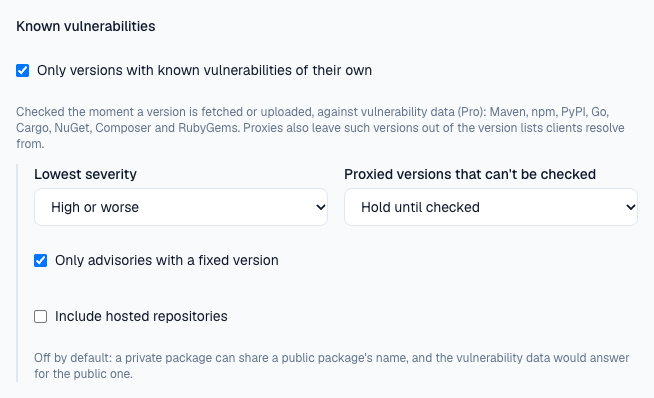
A rule can also hold versions that have known vulnerabilities themselves, judged the moment a version is fetched through a proxy or uploaded, before anyone downloads it (it doesn't wait for the version's SBOM). It applies to Maven, npm, PyPI, Go, Cargo, NuGet, Composer and RubyGems, and needs vulnerability data turned on (Pro) besides Enterprise.
| Setting | Default | Meaning |
|---|---|---|
| Lowest severity | High | Advisories of this severity or worse count (critical counts for high). |
| Only when a fix exists | On | Only advisories that name a fixed version count, so the rule doesn't hold a version nobody can upgrade from. |
| Proxied versions that can't be checked | Hold | When the vulnerability data doesn't answer within 3 seconds, a proxied version is held until it is checked; choose Let through to allow it and check it later. |
| Uploads that can't be checked | Let through | The same for uploads to hosted repositories, when the rule includes them. |
| Include hosted repositories | Off | Uploads are left out by default: a private package can share a public package's name, and the vulnerability data would answer for the public one. |
In the rule dialog, turn on Only versions with known vulnerabilities of their own under Known vulnerabilities: it starts with the recommended settings above, which you can change. Its other settings (formats, patterns, age) still have to match too. Through the API, add "vulnerability": {} to a rule for the defaults, or set minSeverity (critical, high, medium, low), fixableOnly, uncheckedProxy and uncheckedHosted (hold or allow) and includeHosted.
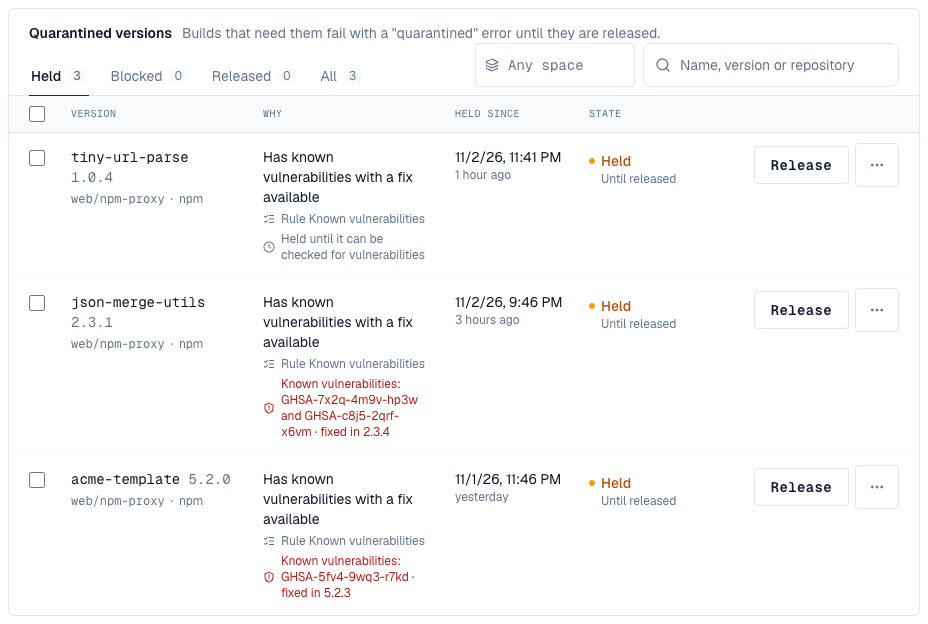
The quarantine list shows, under a held version, the advisories it matched and the version that fixes them all, or Held until it can be checked for vulnerabilities; a version released once its check came back clean reads Released: checked.
Proxy repositories also leave the versions such a rule would hold out of what clients resolve versions from (package documents, indexes and version lists), whether or not the repository hides quarantined versions, so a version range or latest resolves to one you can download, usually the version with the fix. Versions the proxy already stored keep their own state: a released one stays listed. A rule that also has an age limit doesn't hide versions this way; they're judged when fetched. This covers npm package documents, Maven maven-metadata.xml, Go version lists and @latest, PyPI simple and JSON indexes, Cargo index files, Composer metadata, NuGet version lists and registrations, and RubyGems info files and version APIs, and groups that include such proxies; search results aren't filtered.
A download of a held version is refused with the advisories it matched and the version that fixes them, for example Known vulnerabilities (GHSA-1234, GHSA-5678; fixed in 4.17.21), or with a note that it hasn't been checked yet, so the package manager's error says what to upgrade to.
5. After a version is stored
While a rule with a vulnerability condition is on, Depotex keeps checking the versions repositories already store against the vulnerability data, on its usual re-check schedule:
- A version held because it couldn't be checked yet is settled within about a minute of being checked: released if nothing qualifies (the release shows as checked), or kept with the advisories and the fixed version if something does. If its rule is deleted meanwhile, it stays quarantined until someone releases it.
- When new advisories name a version that is stored and was never quarantined or released, the rules judge it again, and what happens follows the re-check setting under Settings → Vulnerability data: Alert only (the default) leaves it available, Quarantine after a grace period quarantines it at once (no grace days) or when the grace period ends if it still qualifies then. A version someone released keeps its state.
- Each such finding raises the quarantine.vulnerability.found event, so automation can notify people or open a ticket.
A rule doesn't sweep the versions already stored when you create it: they are judged when new advisories name them.
6. Quarantined versions
The space's Quarantine tab lists its quarantined versions, newest first, and Settings → Repositories → Quarantine lists every space's. Show the versions held, released or all, and search by name, version or repository (on the installation-wide list, also by space). Select several to release them together. A version's name opens it in the artifact browser, where its Security tab says what was found; its repository opens the repository.
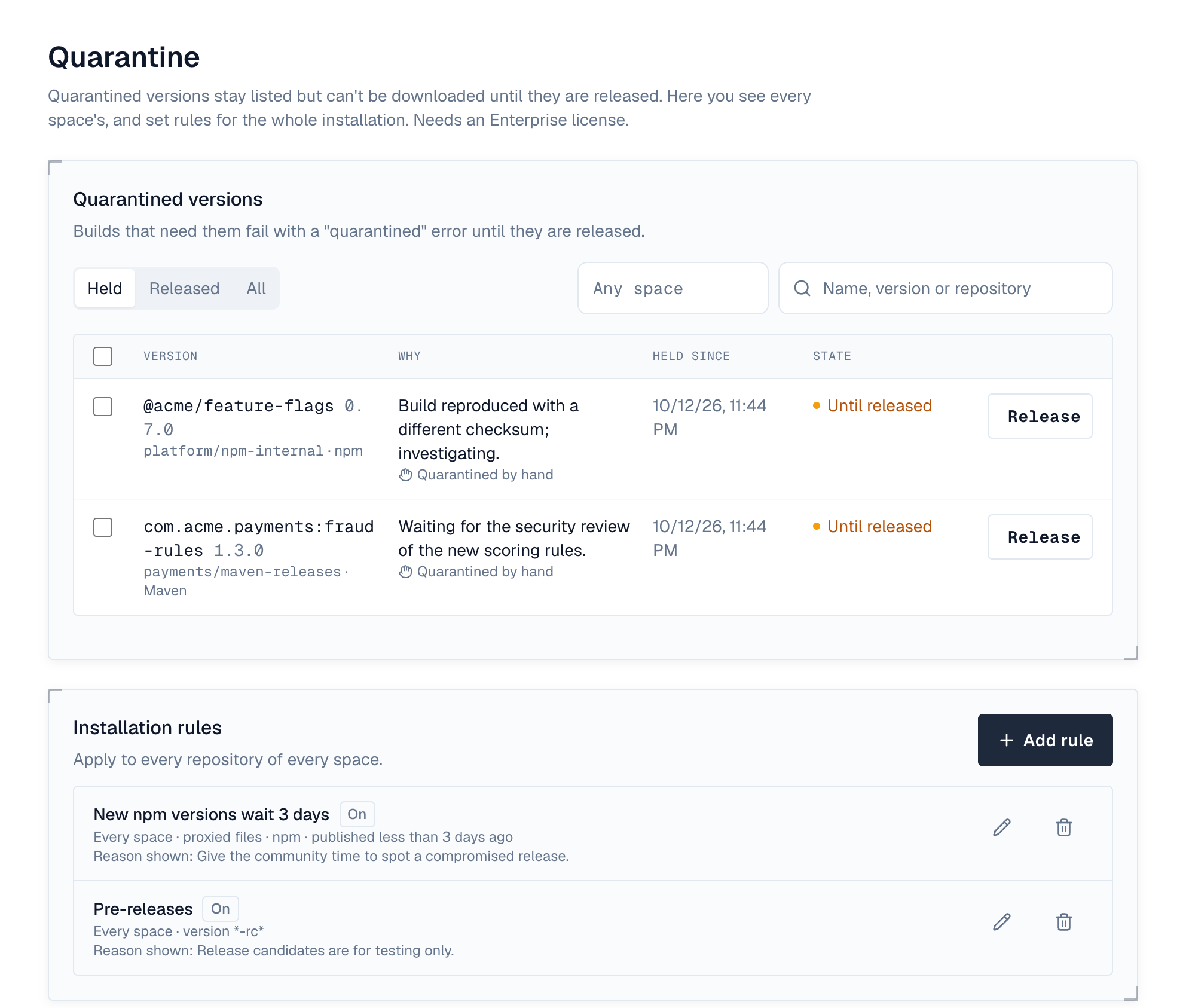
- Release — Tick the versions, or choose Release on one, add a note if you like (it goes in the audit log), and confirm. They can be downloaded again at once.
- Quarantine by hand — In a repository's Versions tab, choose Quarantine next to a version and give a reason. Release there does the opposite.
A version blocked from quarantine (see below) leaves the held list for Blocked, marked with the rule that blocks it.
AI agents can quarantine and release versions too, through write tools, once an administrator allows it. They act as the person using them, need the same rights in the space, and are recorded in the audit log with via: mcp:<plugin>/<application>.
Versions held by an age rule show until when; once that time passes they're downloadable again and are listed as ended.
7. Block, or Delete and block
When a quarantined version must never be used, don't release it: choose Block… or Delete and block… from the ⋯ menu next to it (or select several). Both add a rule to the block list that refuses downloads, uploads and proxy fetches of the version from then on, including a rebuilt copy published again under the same version, and the same files under another name (by their SHA-256).
| Action | What happens |
|---|---|
| Block | The version stays stored and quarantined, listed under Blocked. Releasing it is refused. Unblock (from the same menu) deletes its block-list rule and puts it back in quarantine, held until someone releases it. |
| Delete and block | The version and its files are deleted at once (there is no trash; storage is freed later), and the rule keeps refusing it. The rule records where the version was, why it was quarantined, and that it was deleted. Needs the right to delete versions. You type the version to confirm. |
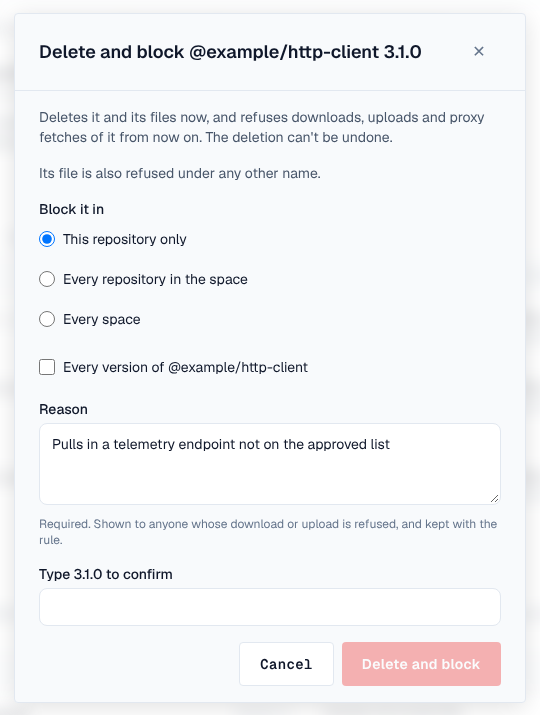
In the dialog you choose:
- Where: this repository only, every repository in the space (the default), or every space. You see only the places you may block in: the space and its repositories with the space's block-list permission, every space with the installation's.
- Every version of the name, not only this one. Other stored versions are then refused too, but they aren't deleted; the dialog says how many there are.
- Reason (required): shown to anyone whose download or upload is refused, and kept with the rule.
Blocking needs an Enterprise license. Files under 128 bytes, checksum files and a Docker image's layers aren't compared by content.
8. Repository Quarantine tab
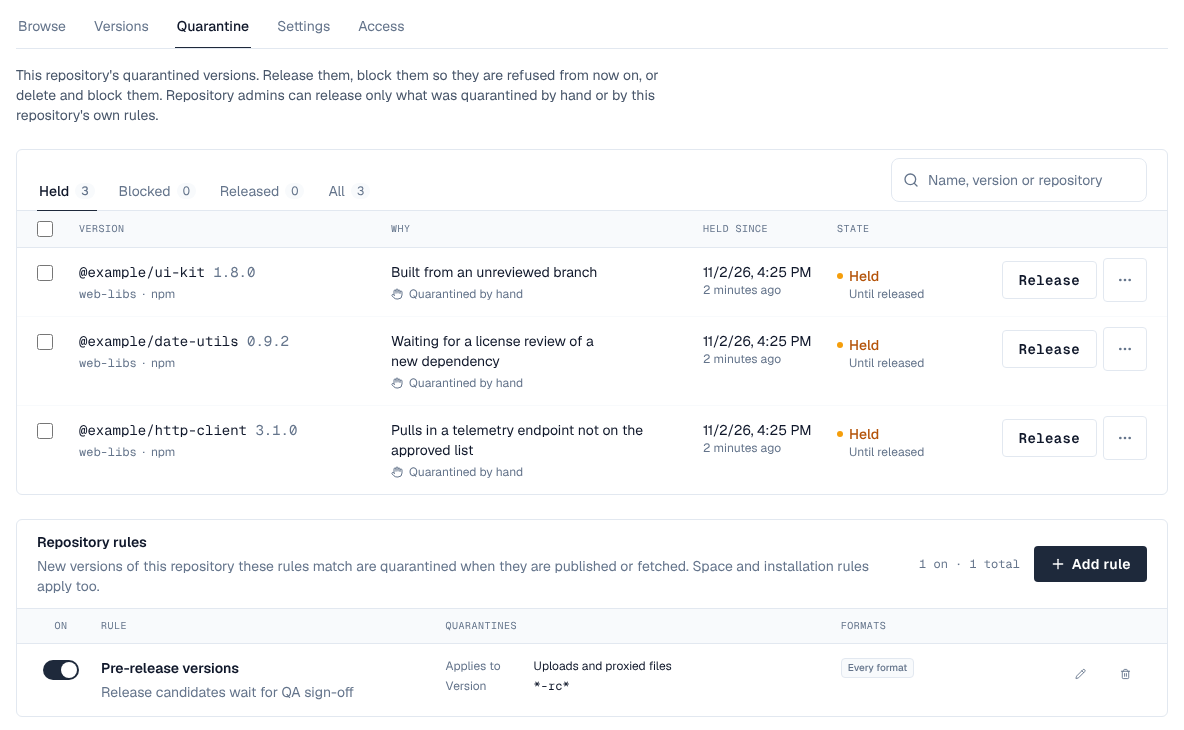
Each repository has a Quarantine tab for its admins (repo:quarantine, part of the repository Admin role) and for the space's quarantine managers. It lists the repository's quarantined versions with the same actions, and the repository's own quarantine rules.
- Repository admins can quarantine, block, and delete and block the repository's versions, with blocks in that repository only.
- They can release only what was quarantined by hand or by the repository's own rules. A version held by a space or installation rule, by a policy, or automatically needs a space quarantine manager.
- Their rules apply to that repository only.
9. Without Enterprise
Rules don't apply and nothing new can be quarantined or blocked, but versions already quarantined or blocked stay so, and you can still list and release them, unblock them and delete rules.
10. Events
artifact.quarantine is raised when a version is quarantined (by hand: before and after, so policies can refuse it; by a rule: after). artifact.release is raised when one is released (by hand: before, refused if a policy or plugin fails, and after; when an age rule ends: after). quarantine.rule.create, .update and .delete wrap rule changes. artifact.block and artifact.reject (Delete and block) are raised before and after blocking a quarantined version, so policies can refuse them, followed by blocklist.rule.create and, when deleting, artifact.delete for each file. Use automation to notify someone when versions are quarantined. Everything is recorded in the audit log. See Events.
11. Permissions
| Permission | Who | Allows |
|---|---|---|
| spaces:quarantine:manage | Space maintainers and owners | The space's quarantine list, quarantining and releasing its versions, and its rules |
| artifacts:quarantine:manage | Super admins only | Settings → Repositories → Quarantine: every space's quarantined versions and the installation rules |
| repo:quarantine | Repository admins | The repository's Quarantine tab, as above |
| spaces:blocklist:manage, artifacts:blocklist:manage | Space maintainers and owners; super admins | Blocking in the space and its repositories; in every space |
| spaces:artifacts:delete, repo:delete | Space maintainers and owners; repository maintainers and admins | Delete and block |