Conan repositories serve C and C++ packages to Conan 2 (2.0 or later). A hosted repository takes what conan upload sends: each recipe revision of a package version with its binaries (one per package ID, each with its own package revisions) and their metadata files, and answers conan install, list, search, download and remove. A proxy repository (Pro) caches ConanCenter or another Conan 2 server, and a group serves several of them as one remote.
On a cluster, create Conan repositories (hosted repositories, groups and proxies) once every server runs a version that has them: older servers answer 404 for them.
1. Set up Conan
The repository's Browse tab shows its address and, under Use this repository, these commands with the remote name you type (by default <space>-<repository>). A group shows them below its members, with a step that turns ConanCenter off; the group a space uses for Conan shows its universal address, /repository/<space>/conan:
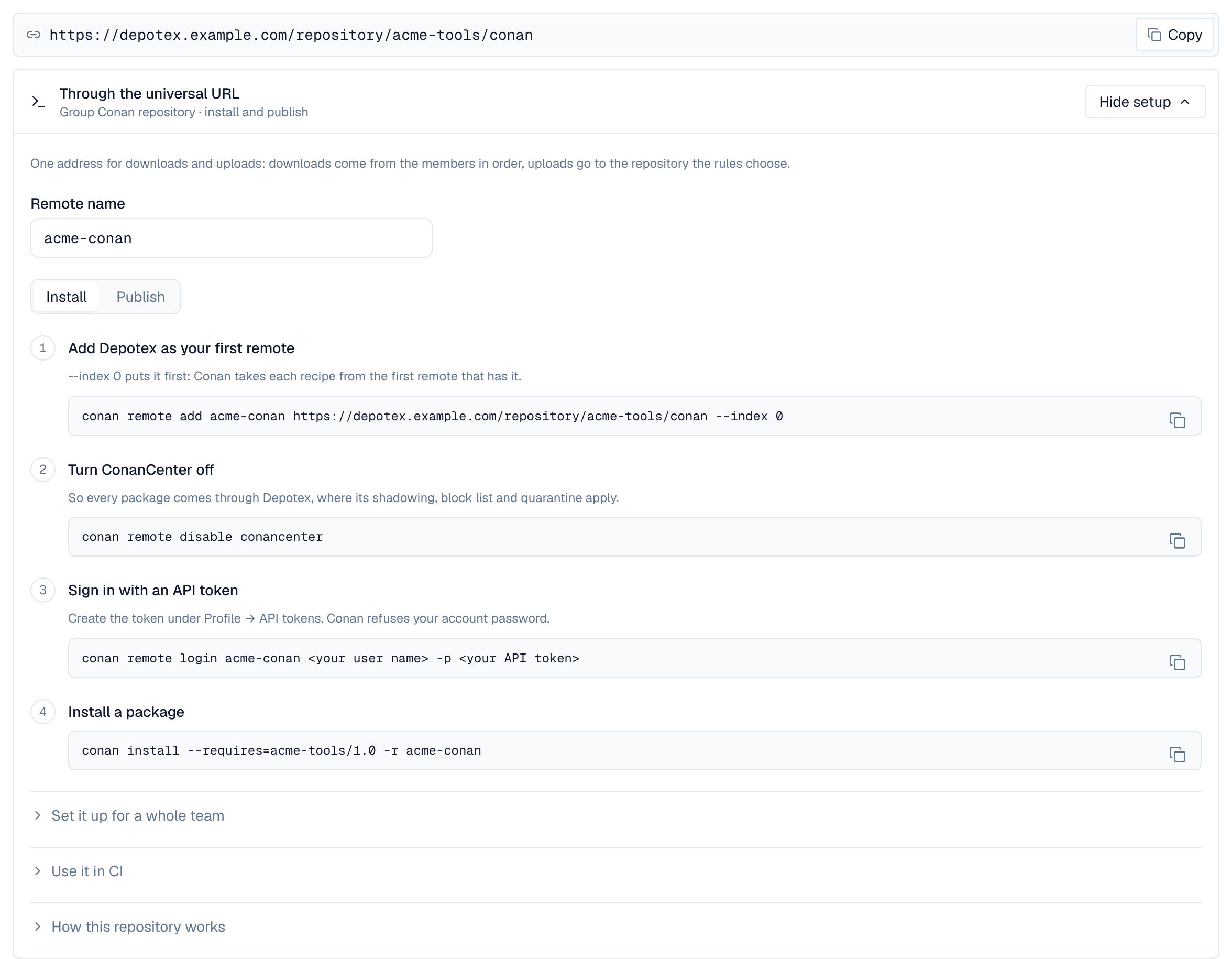
conan remote add acme-conan https://depotex.example.com/repository/acme-tools/conan-local --index 0
conan remote login acme-conan me -p "$DEPOTEX_TOKEN"
conan install --requires=acme-tools/1.0 -r acme-conan- The address has no trailing slash: Conan adds its own paths to it.
- Sign in with an API token (Profile → API tokens) as the password; the user name can be anything. Conan keeps the token and sends it with every request, so revoking the token signs the client out.
- Conan refuses your account password. The terminal shows the server's reason, then a line of Conan's own; the address is fine:
$ conan remote login acme-conan me -p 'my account password'
ERROR: b'Use an API token as the password: Profile, API tokens'

Invalid server response, check remote URL and try again. [Remote: acme-conan]
2. Make Depotex the only Conan remote
Conan takes each recipe from the first remote that has it. Quarantine and the block list apply only to what Conan asks Depotex for, so add the remote with --index 0, and turn ConanCenter off (conan remote disable conancenter) once everything you build with comes from Depotex. A proxy of ConanCenter brings ConanCenter's packages through Depotex, and a group makes one remote of your hosted repositories and the proxy.
For a whole team, share the remotes in a remotes.json that conan config install copies into every machine's and CI job's Conan home. It replaces their remotes, ConanCenter included, with the ones it lists (the repository's Set it up for a whole team shows it filled in):
{
  "remotes": [
    {"name": "acme-conan", "url": "https://depotex.example.com/repository/acme-tools/conan-local", "verify_ssl": true}
  ]
}
conan config install https://git.example.com/acme/conan-config.git # or a folder holding remotes.json3. Use it in CI
Conan signs in by itself from environment variables named after the remote: its name in capitals, with - as _. CONAN_LOGIN_USERNAME and CONAN_PASSWORD apply to every remote that has no variables of its own.
export CONAN_LOGIN_USERNAME_ACME_CONAN=ci
export CONAN_PASSWORD_ACME_CONAN="$DEPOTEX_TOKEN"
conan install . -r acme-conan --build=missing- Give remotes names of letters, digits and - only: a shell can't set a variable whose name has a . or other characters (conan remote rename changes the name).
- Instead of a stored token, a CI job can sign in with its own identity token through workload identity (Enterprise): the access token it gets goes in CONAN_PASSWORD_<REMOTE>.
4. Install, upload, list, search and remove
conan create .
conan upload "acme-tools/1.0" -r acme-conan -c

conan install --requires="acme-tools/[>=1.0 <2]" -r acme-conan
conan list "acme-tools/1.0#*" -r acme-conan          # its recipe revisions
conan list "acme-tools/1.0:*" -r acme-conan          # the newest revision's binaries, with settings and options
conan search "acme-*" -r acme-conan

conan remove "acme-tools/1.0#e570e109a3c4e0ba07c4c0bd4f9cd106" -r acme-conan -c- Uploading needs the Publish permission, removing the Delete permission; installing, listing and searching need Read. Uploads take lower-case references only.
- conan upload sends a revision's files one at a time and its manifest last. The revision appears when the manifest arrives, complete with every file, for every server of a cluster at once; until then nothing of it is listed. Files of an upload that never finishes are forgotten after CONAN_UPLOAD_TTL (see Server settings); running the upload again completes it.
- When a file is refused (too large, an upload rule, a policy), the client prints the reason and stops; nothing of that revision is installable, and fixing the cause and uploading again completes it.
- An offline repository (its Online setting off) refuses every request, and the client prints The repository is offline instead of retrying.
- Version ranges such as [>=1.0 <2] work: Conan finds the versions through Depotex's search and picks the newest that fits.
5. Revisions
- A revision never changes: its ID is the hash of its manifest, which lists every file. A changed recipe makes a new recipe revision, a rebuilt binary a new package revision, and both become the latest that conan install picks, while lockfiles keep installing the revision they pin.
- conan upload --force sends a revision that is already here again: Depotex keeps the stored files and their time and answers that all is well, so a rerun CI job passes. (Artifactory makes such a re-upload the latest revision after 60 seconds; Depotex doesn't.)
- A revision whose version a cleanup policy moved to the trash isn't listed or installable: uploading it again stores it anew, as a first upload would (and the copy in the trash can no longer be restored). Upload the recipe revision before its binaries: a binary of a recipe revision in the trash is refused until the recipe is back.
- To make an older revision the latest again, delete the newer one: conan remove "acme-tools/1.0#<newer revision>" -r acme-conan -c.
- Revisions named after a source control commit (revision_mode = "scm") and revision 0, which Artifactory gives packages migrated from Conan 1, are taken too. Their IDs say nothing about their content, so the browser shows them as Source control and Revision 0, and a revision with such an ID can't be uploaded again with other files while it's here.
6. Metadata files
Files under a revision's metadata folder (build logs, test results, SBOMs you make) travel with it:
meta=$(conan cache path acme-tools/1.0 --folder=metadata)
mkdir -p "$meta/logs" && cp build.log "$meta/logs/"
conan upload "acme-tools/1.0" -r acme-conan -c --metadata="*"
conan download "acme-tools/1.0" -r acme-conan --metadata="*"- Files can be added to a revision later by uploading it again with --metadata; files already there with the same content pass.
- Depotex serves a metadata file a browser would run as a page or script (HTML, SVG, XML, JavaScript) as plain text, in hosted and proxy repositories alike, so a build report opens as its source.
- Replacing a metadata file with other content follows the repository's Publishing setting: refused in a publish-once repository (the default for Conan), allowed with the Overwrite permission when the repository allows overwriting. A revision's own files never change either way.
7. Cleaning up old revisions
Cleanup policies count versions, not revisions: keeping the last versions keeps every revision and binary of each. A recipe with revision_mode = "scm" gains a revision with its binaries on every commit, so remove the older revisions from CI on a schedule:
conan remove 'acme-tools/*#!latest' -r acme-conan -c      # every recipe revision but the latest, with its binaries
conan remove 'acme-tools/*:*#!latest' -r acme-conan -c    # every package revision but the latest of each binary
8. Proxy repositories
A Conan proxy repository (Pro) is a remote that answers from its upstream, a Conan 2 server such as ConanCenter, and keeps what it fetches: each recipe revision and binary is fetched the first time someone installs it, checked and kept, and installs of it are served by Depotex from then on, also while the upstream is down. What the proxy lists (a reference's revisions, a recipe revision's binaries, search) is the upstream's answer combined with what the proxy has kept.
- Upstream — Under Upstreams, Add upstream with the ConanCenter preset (https://center2.conan.io, without signing in) or another Conan 2 server's address (see below), and allow it for the space. Test connection checks that the address answers as a Conan 2 server with revisions: center.conan.io, ConanCenter's frozen Conan 1 remote, and other Conan 1 servers don't. With credentials, it also checks them as the Conan client does: a user name and password by signing in, a token with the server's credentials check.
- Proxy — In the space, New repository, type Proxy, format Conan, with that upstream.
- Clients — Add the proxy as the first remote and turn ConanCenter off. The proxy's Use this repository shows the commands with your address filled in.
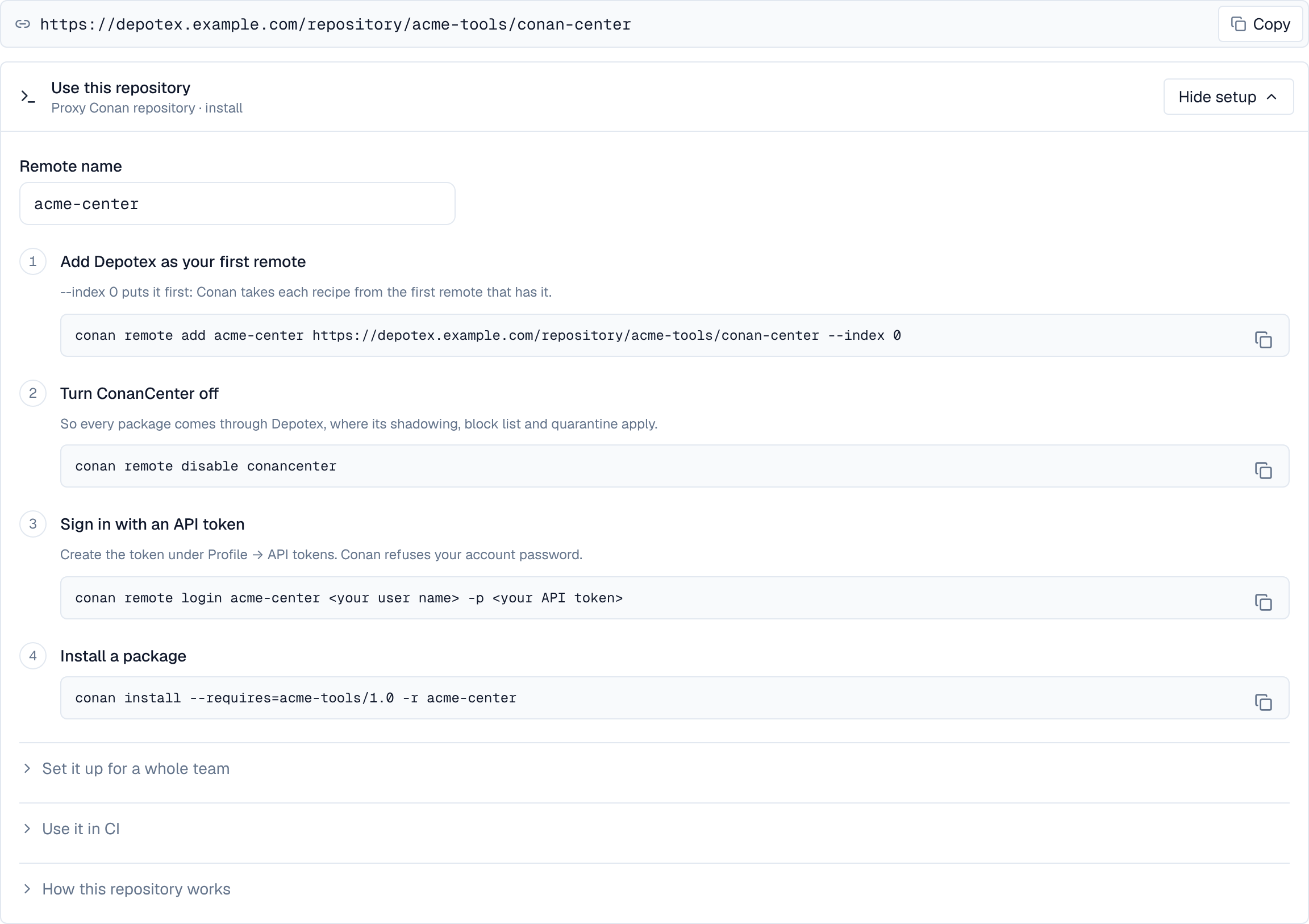
conan remote add acme-center https://depotex.example.com/repository/acme-tools/conan-center --index 0
conan remote disable conancenter
conan remote login acme-center me -p "$DEPOTEX_TOKEN"
conan install --requires=acme-tools/1.0 -r acme-center
Then install as you would from ConanCenter, for example conan install --requires=zlib/1.3.1 -r acme-center.
Keep ConanCenter off while the proxy stands in for it: Conan takes each recipe from the first remote that has it, so with ConanCenter still on, a version the proxy leaves out (blocked, or quarantined or too new for an age rule while the proxy hides quarantined versions) comes straight from ConanCenter instead. See Make Depotex the only Conan remote for a whole team's machines.
- Defaults: a new Conan proxy asks its upstream again for a list (revisions, binaries, search) once its copy is 60 minutes old (Re-check metadata after), and remembers for 60 minutes that something wasn't found (Remember “not found”), so a version or binary published upstream shows within the hour. A revision's files never change, so they're never fetched again. Settings sent when creating the repository through the API replace these.
- Other upstreams: an Artifactory Conan repository (its https://artifactory.example.com/artifactory/api/conan/<repository> address), a conan_server, or a Conan repository of another Depotex through a Depotex link (Enterprise; hosted, group or proxy). Give a server that needs it a token, sent as a Bearer token (an Artifactory access token, for example), or a user name and password: a server that takes the password only to sign in, as conan_server does, gets it there, and the proxy uses the token it gets back, as the Conan client would.
- What is checked, before a file is kept: each conanmanifest.txt must hash to the revision ID it's fetched for, so the manifest, which lists every file of the revision with its md5, is the one the ID names; conanfile.py and a binary's conaninfo.txt must have the md5 their manifest lists (conanfile.py when the proxy already has the recipe's manifest: Conan fetches a recipe's files all at once); and a file the upstream sends with an X-Checksum-Sha1 header (Artifactory does) must match it. A revision named after a source control commit, or revision 0, can't be checked against its ID. After that, every file inside the archives the proxy keeps (conan_export.tgz, conan_sources.tgz, conan_package.tgz) is checked against the manifest in the background, as in a hosted repository (see Archive checks); an archive the proxy hasn't fetched yet (Conan rarely fetches conan_sources.tgz) is checked when it arrives. See What is checked.
- New Conan proxies start with Checksums at Use the Security setting: Strict while Settings → Security → Proxy checksums is on (a file that fails a check is never kept; the client gets 503, or the last cached copy), Warn while it is off (the file is kept and a warning logged). That switch decides what happens when a file is fetched; Settings → Integrity's checks are another thing, re-reading files already stored. A conanmanifest.txt kept under Warn or Off although it doesn't hash to its revision ID marks the revision Check failed and quarantines the version in the background, as a mismatch inside an archive does: the client was served the file, but nobody installs the revision afterwards until an administrator releases it.
- Revisions the upstream removes stay with the proxy once it has them: they stay in the reference's revision list and install by revision (acme-tools/1.0#<revision>, as a lockfile pins it), while the latest revision follows the upstream.
- Search and install: conan search and conan list show what the upstream's search answers, together with the references the proxy has kept, also ones the upstream no longer lists (so a version range still finds them), up to 1,000 references. ConanCenter lists no binaries for a recipe revision, so conan list "zlib/1.3.1:*" through its proxy shows only the binaries the proxy has kept, while conan install still finds every binary ConanCenter has: Conan asks for each binary by its package ID.
- Uploads are refused: conan upload to a proxy fails with Proxy repositories can't be published to. Upload to a hosted repository, or through a group.
- conan remove on the proxy (Delete permission) deletes revisions it has kept, as in a hosted repository, and so does deleting one of a revision's files in the browser. The upstream keeps them, and the proxy fetches them again when someone installs them.
- With Caching set to Pass through, the proxy keeps nothing: every list and file comes from the upstream as it is, unchecked, and nothing installs while the upstream is down.
- A proxy that doesn't have a binary yet downloads it whole before sending it on: for very large binaries, raise the client's timeout (see Limits).
9. Groups
A Conan group is one remote over its members, in the group's order: usually the hosted repository your builds upload to first, then the others your builds install from, and a proxy of ConanCenter last. conan list, conan search, a reference's revisions and the binaries of a recipe revision combine every member's; the latest revision comes from the first member that has the reference, and each file from the first member that has it. Groups work on every tier; a proxy member needs Pro.
- Create — In the space, New repository, type Group, format Conan: the hosted repositories in the order they should be asked, then the ConanCenter proxy, and the hosted repository CI uploads to as the Default repository for uploads.
- Universal address — Make the group the space's default for Conan to also serve it at https://depotex.example.com/repository/<space>/conan (Conan's addresses have no trailing slash).
- Clients — Add the group's address as the first remote, as for a single repository above. The group's page shows the commands with your address filled in, below its members.
conan remote add acme-conan https://depotex.example.com/repository/acme-tools/conan --index 0
conan remote disable conancenter
conan remote login acme-conan me -p "$DEPOTEX_TOKEN"
conan install --requires="acme-tools/[>=1.0 <2]" -r acme-conan
Upload through the group too: each revision, every file of it, goes to the hosted member the group's write rules choose by recipe name and version (a rule can send pre-releases, versions with a - such as 1.1-rc.1, to another member than releases), or to the Default repository for uploads, and that member's rules apply (the Publish permission, its size limit and Publishing setting).
When the recipe revision of a binary you upload is already in another member, conan upload finds it through the group, skips the recipe and sends only the binary, which the member uploads go to refuses: it doesn't have that recipe revision. The message names the member that has it (when you may read that member); run the upload again with --force, which sends the recipe revision too:
$ conan upload "acme-tools/1.0" -r acme-conan -c
acme-tools/1.0: Recipe 'acme-tools/1.0#e570e109a3c4e0ba07c4c0bd4f9cd106' already in server, skipping upload
...
ERROR:
Error uploading file: conan_package.tgz, '400: Recipe revision e570e109a3c4e0ba07c4c0bd4f9cd106 is in conan-thirdparty but not in conan-local: upload with --force'

$ conan upload "acme-tools/1.0" -r acme-conan -c --force- conan remove through the group deletes the revision from the first hosted member, in the group's order, that has it, and never from a proxy. To delete a revision another member has too, run conan remove against that hosted repository.
- People whose access is limited to some paths of the group (content selectors) see only what they may read, and search by exact name (conan search acme-tools): a search with a pattern is refused (403).
- A group lists at most 10,000 revisions of a reference and 1,000 references in a search, and a recipe revision's binaries within the limits of a hosted repository.
- The API's /v2/conans/<reference>/search (the binaries of a reference's latest revision) answers from the first member that has the reference. Conan 2 clients don't use it: conan list asks for a recipe revision's binaries, which combine every member's.
Hosted recipes hide upstream recipes of the same name, in the group's Settings tab, Conan card (repository admins), is on by default: a recipe name any hosted member has, at any version, gets nothing from the proxy members: no references, revisions or binaries in what the group lists, and no downloads, even when a proxy comes first. So nobody can publish a recipe under one of your internal names upstream, at a newer version either, and have it installed through the group (dependency confusion). Changing it raises the conan.settings.update event. Scripts change it with PUT /api/spaces/<space>/repositories/<group>/conan/settings and {"shadowUpstream": false} (repository admins), and read it with GET (anyone who can read the group).

- Names compare without regard to case: a hosted acme-tools hides an upstream ACME-Tools too.
- The binaries of a recipe revision a hosted member has still come from every member. When you upload an upstream recipe unchanged (the same revision) with your own binaries, the configurations upstream built for it stay installable through the group. A proxy member gives them only when its own copy of that recipe revision's manifest hashes to the revision ID (it fetches the manifest to check, whatever its Checksums setting); otherwise the group lists and installs the hosted members' binaries alone. A revision named after a source control commit, or revision 0, says nothing about its content: its binaries come from hosted members only.
- Newer upstream versions of a hidden name stay hidden: to use one, copy it into a hosted repository (conan download from upstream, then conan upload), or turn the setting off.
- It applies to the group a client reads, together with the hosted members of the groups inside it; a group inside another keeps its own setting for its own address.
10. Air-gapped networks
To move packages into a network without internet access, download them outside with their binaries, carry them across as one file and upload them to a hosted repository inside:
# Outside
conan list "acme-tools/1.0#*:*#*" -r acme-conan --format=json > pkglist.json
conan download --list=pkglist.json -r acme-conan --format=json > downloaded.json
conan cache save --list=downloaded.json --file=acme-tools.tgz

# Inside, in a Conan home whose remote is the inside repository
conan cache restore acme-tools.tgz --format=json > restored.json
conan upload --list=restored.json -r acme-inside -c- List with #*:*#*: without the last #* the list names binaries without their package revisions, and conan download --list fetches only the recipes.
- Where one machine can reach both repositories, skip the file: conan download --list=pkglist.json -r acme-conan, then conan upload --list=pkglist.json -r acme-inside -c.
Recipes download their sources from where they're published (--build=missing builds from them), which fails inside. Conan's sources backup keeps a copy, and a raw hosted repository can hold it. Set it up in the Conan home's global.conf and give Conan a token for the repository in source_credentials.json:
# global.conf
core.sources:download_urls=["origin", "https://depotex.example.com/repository/acme-tools/conan-sources/"]
core.sources:upload_url=https://depotex.example.com/repository/acme-tools/conan-sources/

# source_credentials.json, in the same folder
{"credentials": [{"url": "https://depotex.example.com", "token": "<API token>"}]}
conan create . --build=missing # downloads the sources from origin
conan cache backup-upload # copies them to the backup- The token needs the Publish and Overwrite permissions on the raw repository, and its Publishing setting must allow overwriting (raw repositories' default): Conan writes each source's summary .json again on every backup upload.
- Inside, core.sources:download_urls can name the backup alone; the token needs only Read there.
11. Moving from Artifactory or Nexus
Copy every recipe revision and binary through a Conan home, then point the remotes at Depotex:
conan remote add old https://artifactory.example.com/artifactory/api/conan/conan-local
conan list "*#*:*#*" -r old --format=json > all.json
conan download --list=all.json -r old
conan upload --list=all.json -r acme-conan -c- conan list names older revisions first, so they arrive in the same order and the latest stays the latest; their times become the times of the upload.
- Running it again is safe: revisions already copied pass.
- Packages Artifactory migrated from Conan 1 have revision 0; they are copied as they are.
12. Deleting revisions
- conan remove deletes a recipe revision with its binaries, every binary of a revision (:*), or one package revision. In the browser, a version's page deletes a recipe revision with its binaries; deleting a file of a revision in the Files tab or the repository's file list deletes the whole revision it belongs to (for a binary's file, that package revision), except a metadata file, which goes alone. The confirmation says which revision and how many binaries go. Deleting needs the Delete permission, and a policy can refuse it (conan.revision.delete): conan remove then prints Permission denied with the policy's reason, and nothing is deleted.
- A deleted revision can be uploaded again. A revision named by its hash comes back with the same content; one named after a source control commit, or revision 0, can come back with other files, so delete those only when no lockfile pins them.
- A revision with more than 5,000 files is deleted in parts; if one part fails, the revision is left with fewer binaries until the delete is run again.
13. Hidden versions
- Blocked versions are left out of everything Conan lists (the latest revision, revision lists, binaries, search and so version ranges), and their files are refused. Quarantined versions are left out too while the repository's Hide quarantined versions is on; otherwise they stay listed and downloading them fails with 403.
- A version range then resolves to the newest version that passes: with acme-tools 1.2 hidden, conan install --requires="acme-tools/[>=1.0 <2]" installs 1.1. A lockfile that pins a hidden version fails with not found, because Conan looks the pinned revision up in the version's revision list first; a file asked for directly gets 403.
- A proxy does the same with what its upstream lists. With Hide quarantined versions on, it also leaves out the versions it hasn't fetched yet that a quarantine age rule (Published less than) would hold: their latest revision and revision list answer not found, and conan search, conan list and the search a version range starts with leave them out, so a range installs the newest version that is old enough. A version the proxy has already fetched keeps its own state: listed unless it's in quarantine, so a lockfile pinned to it keeps installing. With the switch off, such versions stay listed and installing them fails with 403 (the proxy quarantines a version when it fetches its first file).
- A proxied version's age, for quarantine rules, is the time of its earliest revision in the upstream's revision list, the same date for what the proxy lists and for what it lets you download; without that list, the upstream's Last-Modified for the file once it's fetched. A version whose revision list the proxy can't read has no age yet, so it stays listed until it's fetched.
- People whose access is limited to some paths (content selectors) see only the revisions and binaries they may read; the rest is answered as not found.
- A group lists what its members list: each member leaves out what it hides (a proxy member also the versions an age rule would hold), and refuses their files through the group too.
- Block-list rules for Conan can give their version range in Conan's own syntax, as a conanfile writes it, with or without the brackets: >=1.0 <2 (a space means “and”, so no space after an operator), >=1.0 <2 || >=3.0 (either), ~1.2 (1.2 up to but not including 1.3), ^1.2 (up to but not including 2.0), 1.2.*, or 1.2 for exactly that version. A block covers pre-releases in its range whatever include_prerelease says: >=1.0 <2 blocks 1.5-rc1 and 1.0-rc1, and <2 stops before 2.0's pre-releases.
- Versions compare as Conan compares them (1.0 is 1.0.0; 1.0-rc1 comes before 1.0), for cleanup policies, quotas, quarantine and the block list.
Known limit: a proxy's search looks up the age of at most 50 versions per answer, each name's newest first. A version past them stays in that answer even when an age rule would hold it, while its latest revision and revision list still leave it out, so a range install that picks it fails with Recipe not found instead of installing an older version. A version range searches one name, so this happens only for a name with more than 50 versions the proxy hasn't fetched that the rule covers; conan search over many names shares the 50 among them. The same holds for a version whose age the upstream doesn't tell the proxy within 15 seconds of a search (a very slow upstream). Narrow the range, or have the proxy fetch the versions you use.
14. Signing in and anonymous access
- On a private space, a client that hasn't signed in gets a sign-in prompt (conan remote login); in CI, where Conan can't ask, it fails with an authentication error.
- On a public space with anonymous access on, anyone can install, list and search without signing in, and signs in to upload or remove.
- Conan treats a refusal sent to a client that hasn't signed in as a request to sign in. So an anonymous download of a quarantined or blocked revision on a public space shows a sign-in prompt (or an authentication error in CI) instead of the reason; signed in, the client shows the reason. Lists leave such revisions out while they're hidden, so this happens with a quarantined revision a repository lists (Hide quarantined versions off), or a file asked for directly.
15. Archive checks
A revision's ID is the hash of its conanmanifest.txt, which lists every file of the revision with its md5. When a revision is uploaded, Depotex checks the manifest against the ID and conanfile.py (or a binary's conaninfo.txt) against the manifest. Then, in the background within seconds, it reads the revision's archives (conan_export.tgz, conan_sources.tgz and a binary's conan_package.tgz, also in their .txz and .tzst forms) and checks every file inside them against the manifest:
- A revision whose files all match is Verified. A revision named after a source control commit, or revision 0, keeps that label, and Files match next to it says its files were checked.
- A file whose content differs from its manifest line, a file the manifest lists that its archive lacks, or a file the manifest doesn't list marks the revision Check failed and quarantines the version automatically, on every licence tier, as other unsafe content does: the version's Security tab names the archive ("its content doesn't match the checksums its manifest lists"), and the quarantine list shows it as Refused content (automatic). A revision that failed stays failed. Find out who uploaded it (the version's Activity), then delete the revision or, after checking, release the version.
- An archive that expands to more than 64 GiB, holds more than 200,000 files, is broken, or holds a path outside the package (../, an absolute path) or a device file quarantines the version the same way. A file that compresses well (zero-filled data, firmware padding) is fine however small its archive is. Archives are hashed as they're read, never unpacked to disk, and the recipe is never run.
- Archives larger than 2 GiB aren't checked: the revision keeps Manifest checked and shows Not checked. An archive that takes longer to read than the check allows (30 seconds plus a second per 16 MiB, at most 3 minutes; slow storage) isn't treated as a mismatch either: the revision shows Not checked and is checked again when it gets another file. On a proxy, a revision whose archives aren't all fetched yet shows Partly checked until they are.
While a revision is checked, Depotex also reads its recipe without running it: license, description, homepage, url, topics, author, package_type and the requirements conanfile.py writes as plain text, and the source URLs and SHA-256 that conandata.yml gives for the version. Values the recipe computes (in Python code or f-strings) aren't read, and a requirement inside an if is listed as if it always applied. A conandata.yml with YAML aliases or merge keys (&, *, <<), or a conanfile.py nested or long beyond what the reader takes, is refused like other unsafe content and quarantines the version; what was read before it (the conanfile.py details, when only conandata.yml is refused) is still shown, with a note that the recipe data was refused. A conanfile.py or conandata.yml larger than 1 MiB isn't read and quarantines nothing: the page says its details aren't shown.
16. In the artifact browser
A Conan version's page lists its recipe revisions, newest first, marking the latest: when each was published and by whom, its integrity, its size, and how many binaries it has. Integrity is Verified once its archives were checked (see Archive checks), Manifest checked while they aren't yet, Check failed when a file doesn't match, and Source control or Revision 0 for revisions whose ID says nothing about their content. Under the revisions, Recipe of revision shows what the picked revision's recipe says: its description, licence, homepage and recipe repository (shown as links only when they are http or https addresses), author, package type, topics and the sources conandata.yml names with their SHA-256. The Install bar shows conan install --requires=acme-tools/1.0 -r <remote>, and the Dependencies tab the newest revision's requirements as its recipe states them, with what its binaries were built with.
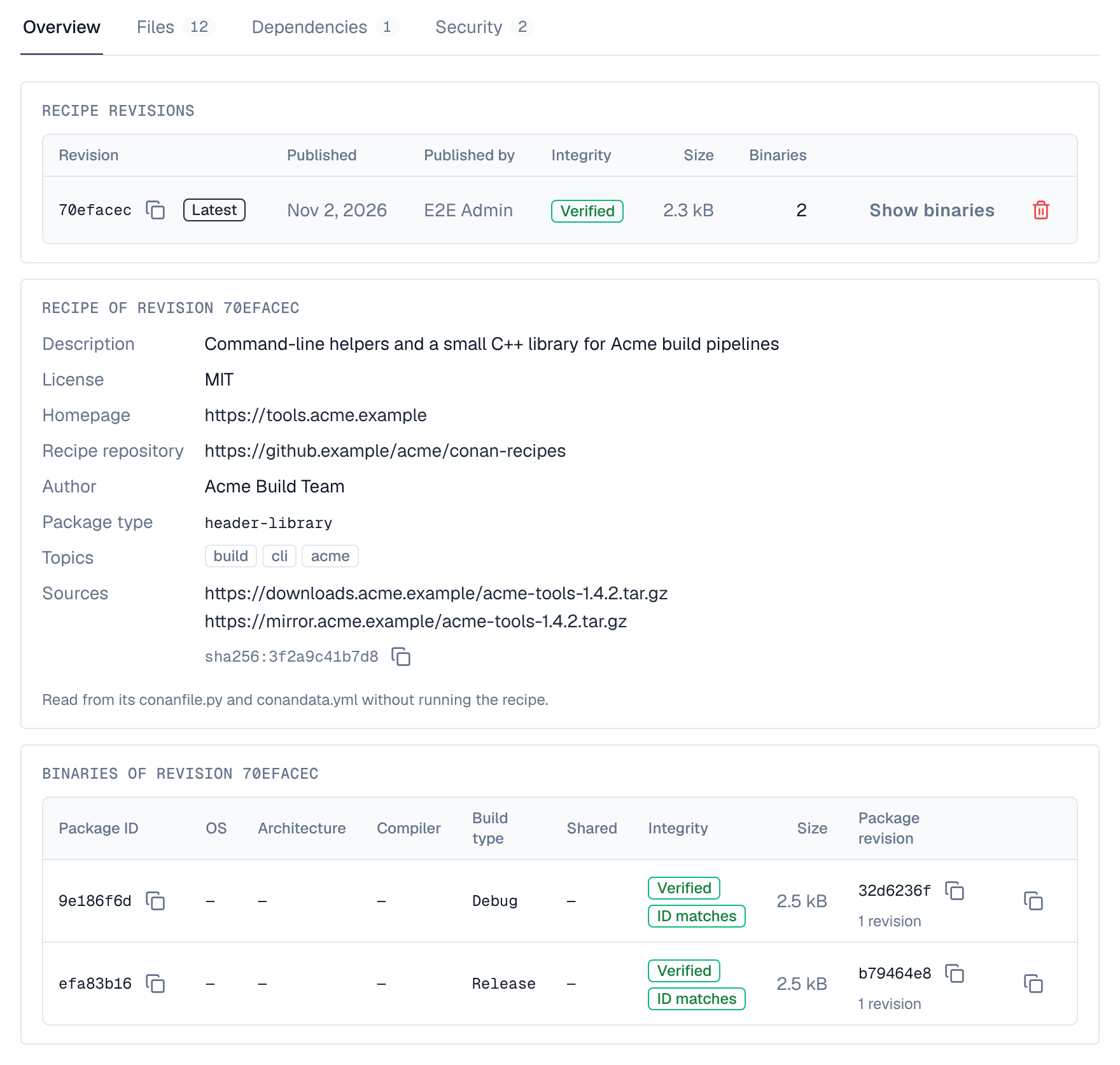
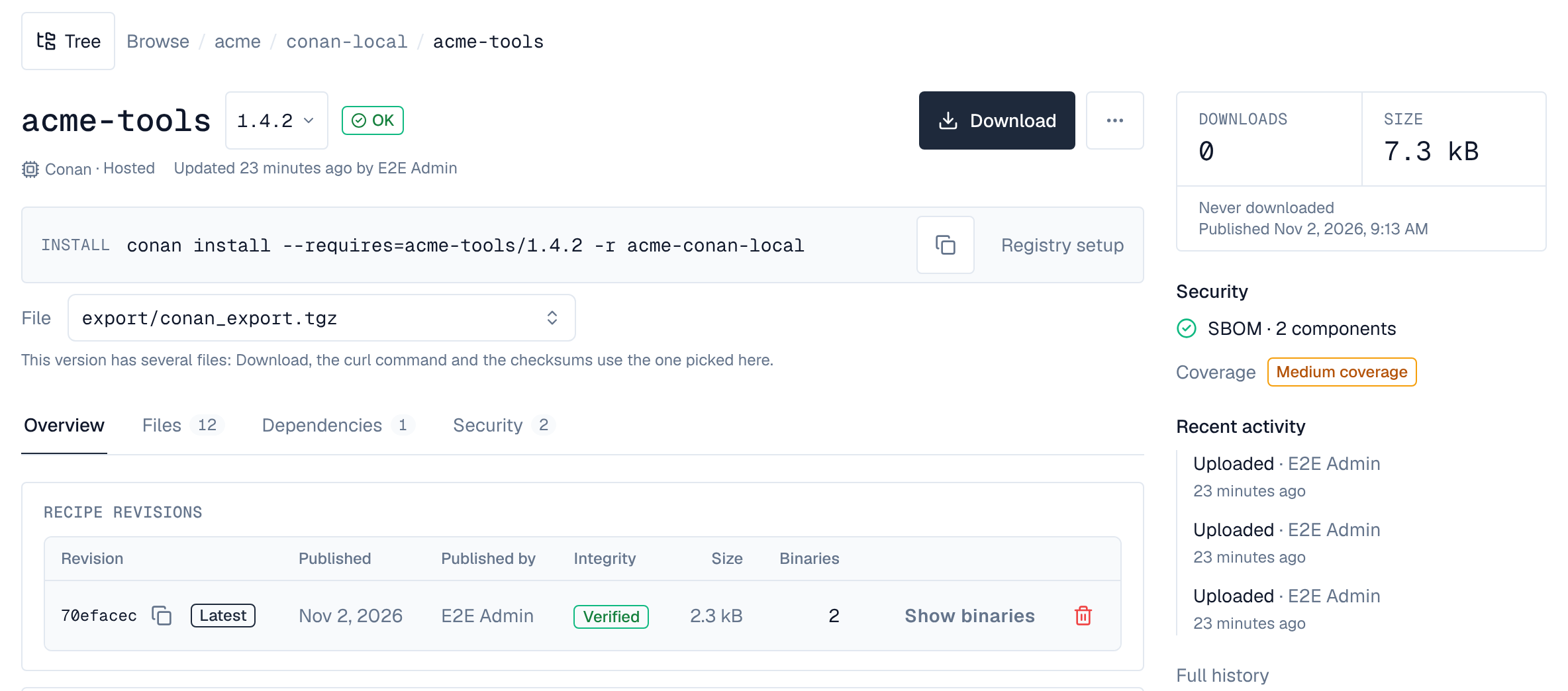
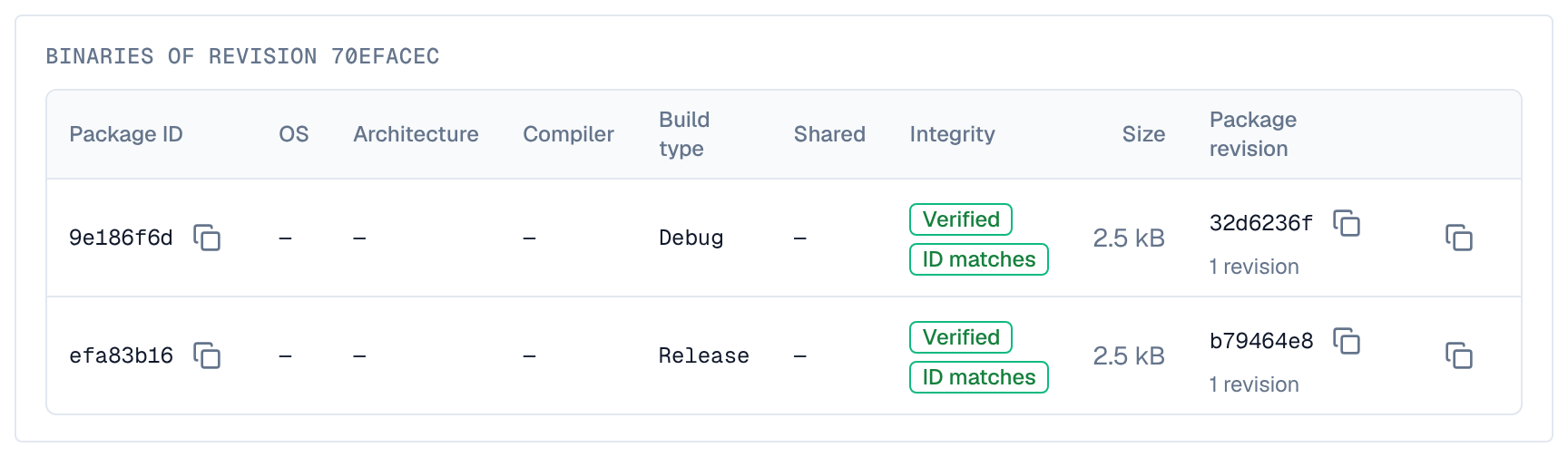
Show binaries on a revision lists its binaries (the latest revision's at first): package ID, OS, architecture, compiler, build type, whether it's shared, its integrity (as for a recipe revision, plus ID matches when its package ID is the hash of its conaninfo.txt, or ID doesn't match when it isn't), its size, and its newest package revision with how many it has, with a button that copies the command installing that binary (its settings and options, and the revision when it isn't the latest). A setting or option whose value has characters a shell could read as code (spaces, quotes, $, &, ; and the like) is left out of the copied command, and a line under the table names it so you can add it by hand. In a hosted repository, Delete on a revision removes it with its binaries (Delete permission). A proxy's version pages list the revisions and binaries it has kept.
17. SBOMs
An SBOM a package ships in its metadata folder is read as the package's SBOM, on every licence tier: a CycloneDX or SPDX file under metadata/ of a recipe revision or a binary (named like sbom.cdx.json, bom.json or *.spdx.json, or any .json, .xml, .spdx or .yaml file that is one). Conan's own SBOM tool writes one when the recipe's package() saves it there, and conan upload sends it with the package:
def package(self):
    copy(self, "*.h", self.source_folder, self.package_folder)
    from conan.tools.sbom import cyclonedx_1_4   # Conan 2.11 and later
    sbom = cyclonedx_1_4(self)
    os.makedirs(self.package_metadata_folder, exist_ok=True)
    with open(os.path.join(self.package_metadata_folder, "sbom.cdx.json"), "w") as f:
json.dump(sbom, f)- It shows under the version's Security tab as shipped with the package, one per file. The software it describes gets the package URL pkg:conan/acme-tools@1.0 with the revision it came with (rrev, and prev for a binary's) and, for a reference with them, user and channel; searching Browse → Components by pkg:conan/acme-tools@1.0 finds it whatever those are.
- Depotex makes no SBOM of its own for Conan packages: a version without a shipped one has none.
- Conan's SBOM of a package without requirements lists only the package itself. It reads Not covered too, never clean.
18. Vulnerabilities
C/C++ (Conan): not covered. Known vulnerabilities aren't matched to Conan packages: the components of their SBOMs, and versions without one, show Not covered under Security, never clean.
19. Events
Conan has three events of its own, besides artifact.upload and artifact.delete for each file:
- conan.revision.publish: a recipe revision or a binary's package revision is complete and about to become installable; policies can refuse it (for example a binary not built as Release). Uploading it again doesn't raise it.
- conan.revision.delete: a recipe revision with its binaries, or a package revision, is deleted, by a client or from the browser, also one a proxy has kept (marked cached; the upstream keeps it); policies can refuse it. Revisions that go with their whole version (a cleanup policy, the trash, deleting the repository) don't raise it: those raise their own events.
- conan.settings.update: a Conan group's settings change (whether hosted recipes hide upstream recipes of the same name); policies can refuse it, and it's refused when a subscriber can't be reached.
20. Licence tiers
- Hosted repositories, groups and their settings, uploads, removes, the browser's revisions and binaries, archive checks, recipe details and shipped SBOMs: every tier.
- Proxy repositories (in a group too), the ConanCenter one included: Pro. A proxy of another Depotex (Depotex link), quarantine and the block list: Enterprise.
21. Limits
- A file is at most 5 GiB by default, and never more than the installation's limit (Settings → Repositories). A repository's own Largest artifact, in its settings, replaces both, larger or smaller: that's how to raise or lower it for one repository.
- For very large binaries on a slow link, or through a proxy that doesn't have them yet (it downloads a binary whole from its upstream before sending it on), raise the client's timeout: -c core.net.http:timeout=300 (seconds) on the command, or core.net.http:timeout=300 in global.conf.
- Search returns at most 1,000 references, on a proxy too; narrow the pattern (acme-* rather than *) when there are more.
- Listing a recipe revision's binaries (conan list "acme-tools/1.0:*") answers for up to 10,000 binaries, and up to 64 MiB of their conaninfo.txt when the client asks for every binary's settings and options at once (Conan 2.0 does); a revision with more is refused with a message saying so, never listed in part.
22. Server settings
| Variable | Default | What it does |
|---|---|---|
| CONAN_UPLOAD_TTL | 24h | How long the files of a revision upload wait for its manifest (1h to 720h). Set per server: each file keeps the time of the server that took it, so servers with different values don't cut each other's uploads short. |
The size limit isn't a server setting: see Limits.
23. Conan 1
Depotex is built and tested for Conan 2 (2.0 or later). Conan 1 isn't tested and may not work: use Conan 2. Packages Artifactory migrated from Conan 1 (revision 0) can be copied with Conan 2, as in Moving from Artifactory or Nexus.