COLLECTIONS
Opening the Editor
The collection editor opens as a dedicated tab — just like request tabs — giving you full access to collection-level settings.
Overview Tab
The default tab when opening a collection editor. Provides documentation, stats, and collection-scoped variables.
Markdown Description
Write documentation for your collection in markdown. Supports full markdown syntax — headings, lists, code blocks, links, and more.
Stats
Shows the number of requests, folders, and total variables in the collection at a glance.
Variables Table
Collection-scoped key-value variables. These have the lowest priority in the resolution chain — overridden by global env, vault secrets, and local env. Each variable supports an enabled/disabled toggle.
Auth Tab
Set authentication at the collection level. All 7 auth types are available — the same UI you see on individual requests.
| Auth Type | Description |
|---|---|
| Basic | Username & password (Base64 encoded) |
| Bearer | Token-based authentication |
| API Key | Key in header or query param |
| OAuth 2.0 | Authorization code & client credentials |
| AWS SigV4 | AWS Signature Version 4 signing |
| Digest | RFC 7616 digest authentication |
| None | No authentication |
Scripts Tab Advanced Mode
Write JavaScript that runs before or after every request in the collection (when inherited).
Pre-Request Script
Runs before every inherited request in the collection. Use it to set dynamic headers, generate timestamps, or log debug info.
Test Script
Runs after every inherited request. Use it for common assertions, variable extraction, or logging response metadata.
Both editors provide JavaScript syntax highlighting. Scripts are concatenated in order during execution:
A folder with inheritScripts: false contributes its own scripts but stops the chain — parent scripts above it are excluded.
Runs Tab Advanced Mode
Run all requests in the collection at once — ideal for integration testing, smoke tests, or chained workflows.
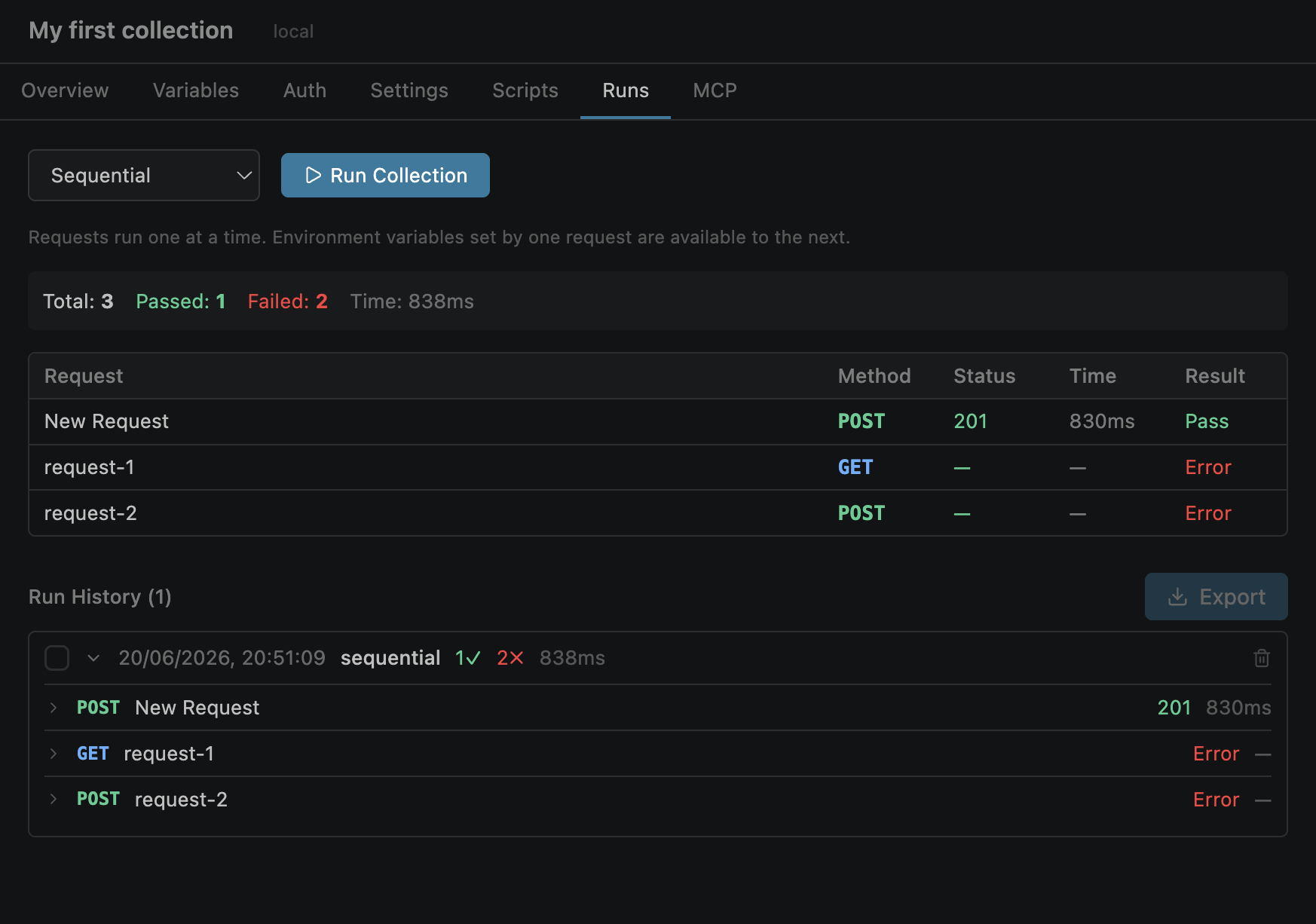
Sequential Mode
Runs requests one after another with a shared environment context. Supports chaining — extract a token from one response and use it in the next request.
Parallel Mode
Runs requests concurrently with configurable concurrency. Each request uses a separate copy of the environment (no chaining).
MCP Tab Advanced Mode
Start a collection-sourced MCP (Model Context Protocol) server that exposes your collection's requests as tools for AI clients.
POST /mcp. AI clients (Claude Desktop, Cursor, Kiro) connect and discover your collection requests as callable tools.
Folder Editor
Click a folder name in the sidebar to open its editor. Similar to the collection editor but with fewer tabs.
| Tab | Available | Description |
|---|---|---|
| Auth | Always | Set folder-level auth with the same inheritance mechanics |
| Scripts | Advanced Mode | Pre-request and test scripts for the folder |
| Settings | Advanced Mode | Certificate configuration for mTLS |