SETTINGS & DATA
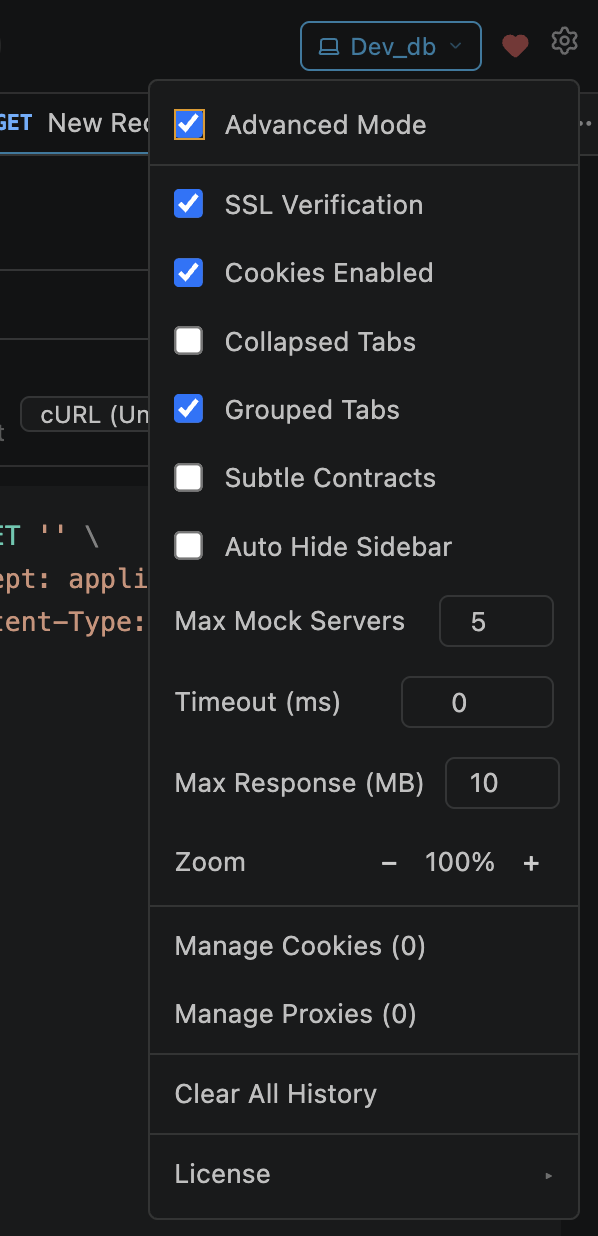
Accessing Settings
Settings are available in two places — both control the same underlying configuration:
Gear icon in webview top bar
Opens a popup menu with toggle switches. Faster for quick changes — SSL, cookies, mode toggles are one click away.
VS Code Settings → Extensions → API Studio
Standard VS Code settings UI. Best for JSON-level editing, workspace vs user scope, and settings sync.
Simple vs Advanced Mode
API Studio starts in Simple Mode by default for a clean, focused experience. Advanced Mode unlocks the full feature set.
| Feature | Simple Mode | Advanced Mode |
|---|---|---|
| Top-level views | Requests only | Requests, Mock + MCP, Vault |
| Request tabs | Params, Headers, Body, Auth | All 8 tabs (+ Tests, Scripts, MCP, Settings) |
| Vault | Locked (if exists) | User-controlled |
Side effects when toggling to Simple Mode:
SSL Verification
Controls whether API Studio verifies server TLS certificates before completing connections.
openPost.sslVerification
Cookies Enabled
Controls automatic cookie storage and sending.
Set-Cookie headers and sends matching cookies on subsequent requests.openpost/cookies.jsonTab Settings
Customize how request tabs appear and behave in the webview:
| Setting | Default | Description |
|---|---|---|
| Collapsed Tabs | Off | Compact vertical tab list — stacked view for more screen space |
| Grouped Tabs | On | Group tabs by their source collection |
| Auto-hide Sidebar | Off | Hide VS Code native sidebar when the webview panel opens |
.openpost/config.json
Max History
Controls how many request history entries are kept before old ones are trimmed.
openPost.maxHistory
Subtle Contracts
Controls how API Studio notifies you when a response returns a new JSON structure (contract variant).
| Mode | Behavior |
|---|---|
| Off (default) | Shows a modal dialog — "Save Type" / "Skip" buttons interrupt your workflow |
| On | Shows a subtle inline indicator with a glow animation in the response status bar. Click to accept or dismiss. |
.openpost/config.json