A repository holds artifacts of one format and belongs to a space. Its address is /repository/<space>/<repository>/, so the name only has to be unique within its space. There are three types: hosted (stores what is published to it), proxy (fetches from an upstream such as Maven Central and keeps a copy; Pro license or higher) and group (combines repositories of the format behind one address; see Repository groups).
1. Create a repository
- Open the space — Choose Spaces in the sidebar, open the space and its Repositories tab.
- Select New repository — You need the space's Maintainer or Owner role, or to be a super admin.
- Enter a name — 2–64 characters: lowercase letters, digits, dots, underscores or hyphens, starting with a letter or digit. It is part of every artifact address and can't be changed later. Format names (npm, maven, …) are reserved: /repository/<space>/<format>/ is the space's universal address for that format.
- Pick a format and a type — Only the formats the space allows are offered (see Supported formats); the format can't be changed later. A proxy repository also needs an upstream from the space's list; a group needs its members, in the order they're asked, and the member uploads go to, and can become the space's universal address for the format.
- Add a description — optional.
- Select Create repository — It appears in the list and can be used at once.
A repository opens on Browse, with its address, setup instructions for its package manager and its contents; Versions, Settings and Access are beside it. See Spaces → Repositories for settings, access, upload rules and cleanup.
2. Every repository
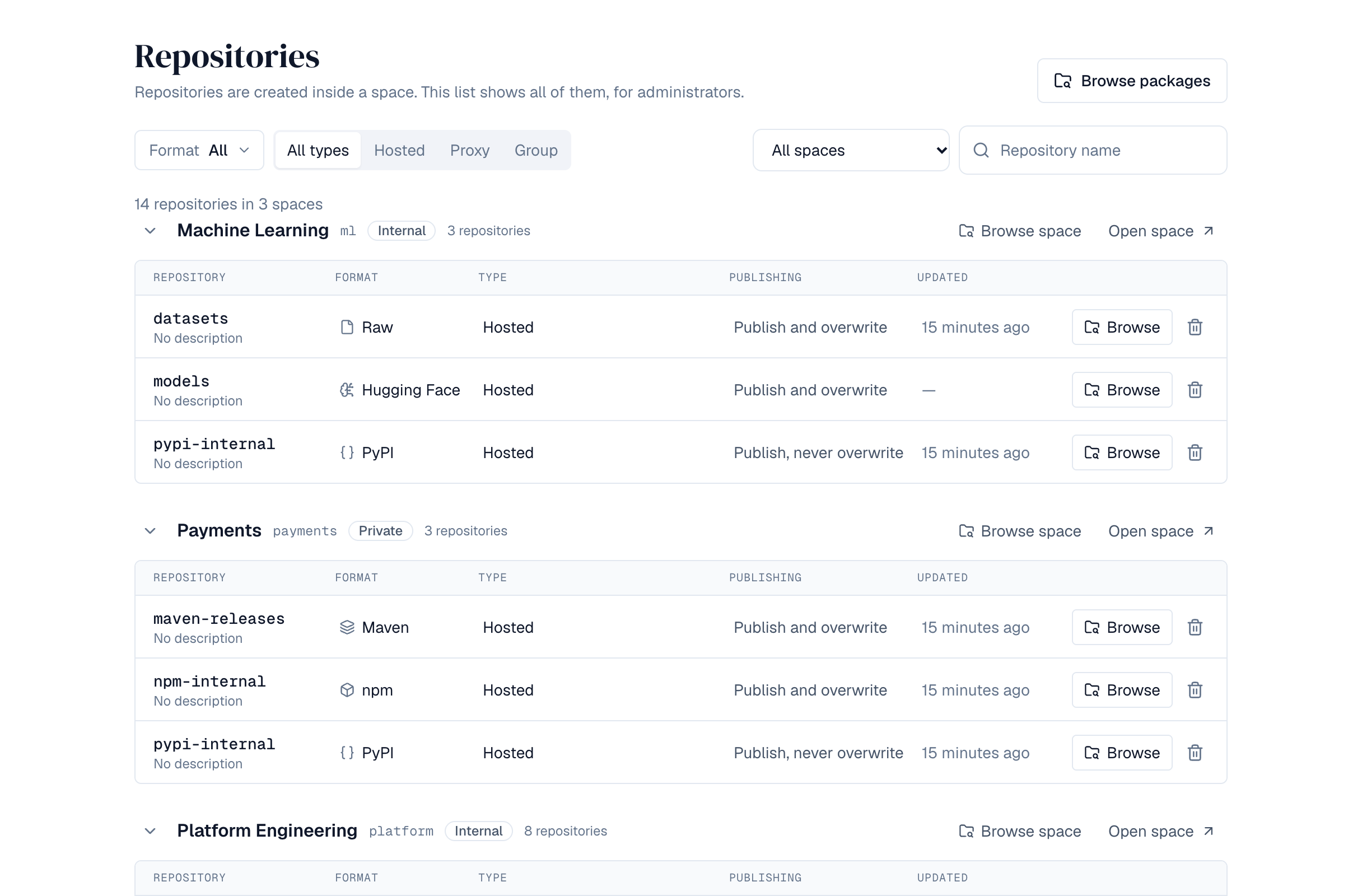
Repositories in the sidebar (super admins) lists every repository of the installation, grouped by space: its format, type, whether it can be published to and overwritten, and when it last changed. Filter by format, type, space or name; Browse opens a repository in the artifact browser, Open space opens its space.
3. Delete a repository
Choose the bin next to a repository, in its space or in the list above, and confirm. The repository disappears at once, on every server: nobody can browse, download from or publish to it, and a group it belongs to leaves it out. It isn't gone yet: it is kept, with everything in it, so a super admin can restore it.
4. Restore a deleted repository
Super admins find deleted repositories under Settings → Repositories → Deleted repositories: each with its space, format and type, when and by whom it was deleted, when it will be removed for good, and how many versions and how much storage it holds.
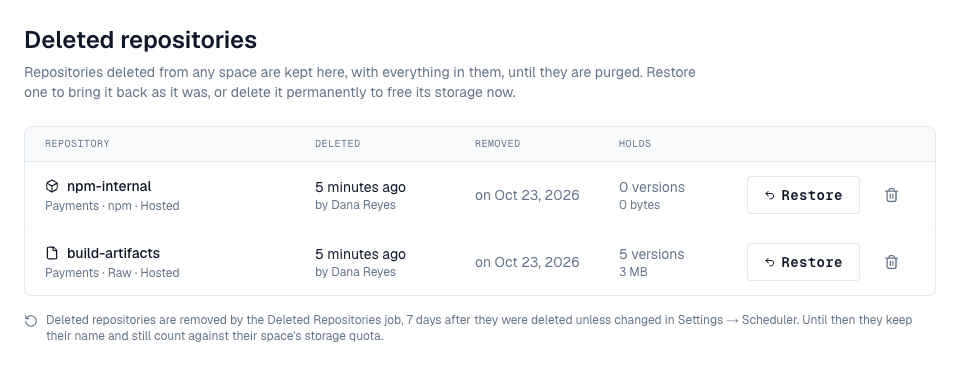
- Restore brings the repository back as it was: its files and versions, its settings, the roles people had on it and its place in groups. It is refused when the space no longer allows the repository's format (add the format to the space first), or when a proxy repository's upstream is no longer on the space's list.
- Delete permanently removes it now instead of waiting, and frees its storage. This can't be undone.
A deleted repository is removed for good 7 days after it was deleted, by the Deleted Repositories job (Settings → Scheduler; change retention_days there to keep them longer or shorter). Until then:
- it keeps its name: a new repository can't take the name until the old one is restored or removed;
- its storage still counts against its space's quota;
- its space can't be deleted, and an upstream it uses can't be deleted. Both say deleted repositories still hold them: restore them or delete them permanently first.
| Permission | Who has it | Allows |
|---|---|---|
| depot:write | Super admins | See, restore and permanently delete deleted repositories |
5. Permissions
| Permission | Who has it | Allows |
|---|---|---|
| spaces:repos:write | Space Maintainer and Owner | Create, change and delete the space's repositories |
| depot:read | Super admins | See every repository of the installation |
| depot:write | Super admins | Delete any repository from the list of every repository |
Creating a repository raises the depot.repository.create event, so a policy can restrict names or formats (the Allowed repository formats template).