Settings → Kee → Features and access switches each feature on or off and holds the Kee permissions grid.
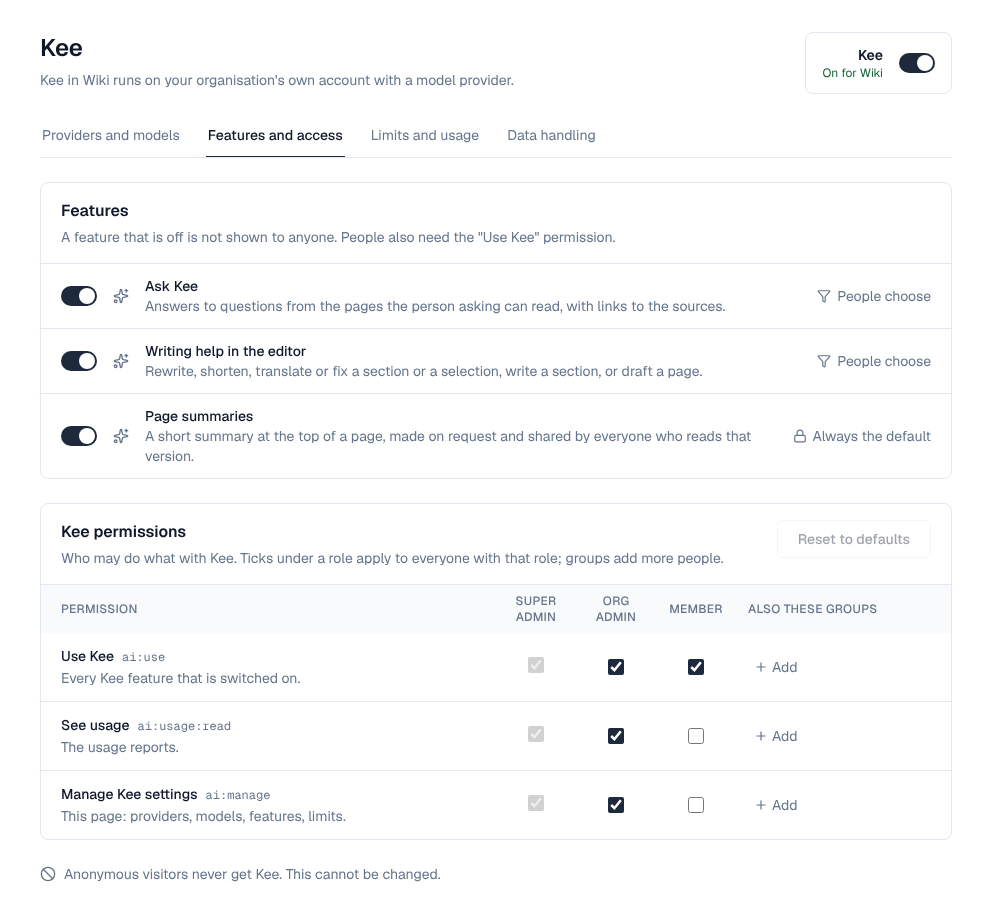
1. Features
| Feature | What it is | Model |
|---|---|---|
| Ask Kee | Answers to questions from the pages the person asking can read, with links to the sources. See Ask Kee | People choose |
| Writing help in the editor | Rewrite, shorten, translate or fix a section or a selection, write a section, or draft a page. See Writing with Kee | People choose |
| Page summaries | A short summary at the top of a page, made on request and shared by everyone who reads that version. See Page summaries | Always the default |
A feature that is off isn't shown to anyone, and its requests are refused. Each switch applies on every server at once.
2. Permissions
Who may use Kee is set here, not in the system roles. A tick under a role applies to everyone with that role; Also these groups adds the members of groups, whatever their role. Super admins always hold every permission.
| Permission | Allows | Who holds it |
|---|---|---|
| Use Kee (ai:use) | Every Kee feature that is switched on | Org admins and members by default; set here |
| See usage (ai:usage:read) | The usage report and its CSV export | Super admins only (not in the grid) |
| Manage Kee settings (ai:manage) | Settings → Kee: providers, models, features, limits, data handling | Super admins only (not in the grid) |
- Change the ticks and groups, then save. Reset to defaults puts back the defaults above.
- An API token used for Kee needs the permission among its scopes too.
- Anonymous visitors never get Kee. This can't be changed.
- Using Kee also needs access to the content: editing the page for writing help, reading the page for a summary or an answer. Kee never widens what a person can do.
- A space's admins can turn Kee off in their space, whatever the permissions: see Kee in a space.
Settings → Kee and the usage report stay with super admins: they hold the installation's providers, budget and the server's own cloud role, and list usage by person across every organization, so the grid can't give them to a role or a group.
3. Events and audit
Saving the grid raises ai.permissions.update and changing settings ai.settings.update; both are in the audit log and can be refused by a policy. See Events.