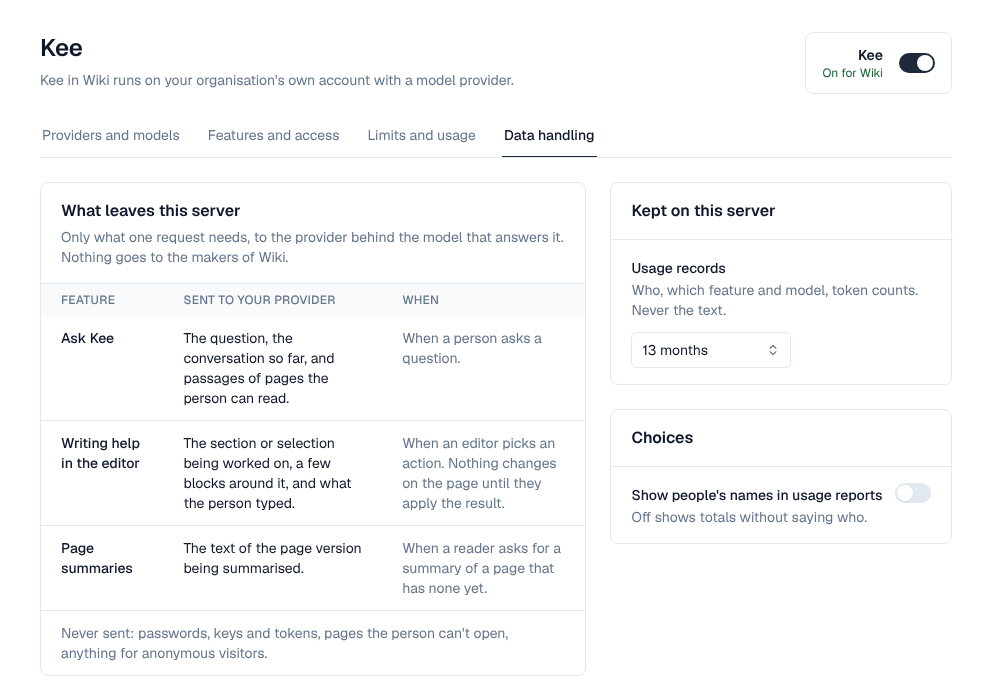
Kee sends text to the model provider you connected, and only when a person asks for something. This page says what goes out, what stays on the server, and how to keep a space out of it entirely. Settings → Kee → Data handling shows the same for the features that are on.
1. When something is sent
- Only when a person uses a feature: picks an action in the editor, asks for a summary that doesn't exist yet, or asks a question. Nothing is sent in the background.
- Only to the provider behind the model that answers. Nothing goes to Vectored.
- Only what that person can read. Kee reads with the person's own access.
- Never for anonymous visitors, and never anything of a space where Kee is off.
2. What is sent
| Feature | Sent to your provider | When |
|---|---|---|
| Writing help | The section or selection being worked on, a few blocks around it, and what the person typed (for a new section, also the page's title). The text comes from that person's editor, including changes not saved yet | When an editor picks an action. Nothing changes on the page until they apply the result |
| Write the page | The request, the page's title and the chosen template | When an editor writes a draft |
| Page summaries | The text of the published version being summarised | When a reader asks for a summary of a version that has none yet |
| Ask Kee | The question, the conversation so far, and passages of the pages and comments its tools read for that person | When a person asks a question |
Text is sent as plain text with headings and lists. Some content never leaves the server:
- Images, videos, files and attachments themselves: only their caption, alternative text or file name.
- The names of people mentioned, plugin blocks, HTML blocks, imported macros' contents and spreadsheet formulas.
- Mermaid diagrams' source and spreadsheet tables' values only for summaries and answers, never for rewrites.
- Passwords, keys and tokens. Feedback notes on answers.
What a provider keeps, and for how long, is set by your agreement with them, not by the Wiki. Data handling links each connected provider's own data and retention terms (for Amazon Bedrock, with the region you chose).
3. What is kept on the server
| What | Holds | Kept |
|---|---|---|
| Usage records | Who, which feature and model, token counts, estimated cost, outcome. Never the text | 13 months by default; 3, 6, 13 or 24 months in Data handling |
| Ask Kee conversations | The person's questions and Kee's answers, with steps and sources. Only their owner sees them | 30 days after the last message by default (1 to 3,660 days, set through the API: PUT /api/wiki/ai-settings, needs Manage Kee settings) |
| Feedback on answers | Good or bad, the reason and the note | 13 months |
| Page summaries | One per page version, model and language | Until a newer version of the page is published (then removed by a nightly job), or the page or model is removed. Not in exports, search or history |
| The "with Kee" mark | That a version holds text applied from Kee. No person, no text | As long as the version |
Neither the text of a request nor an answer is in an event, a log line or an alert. The ai.request event carries the feature, model, tokens, cost and outcome only.
4. Kee in a space
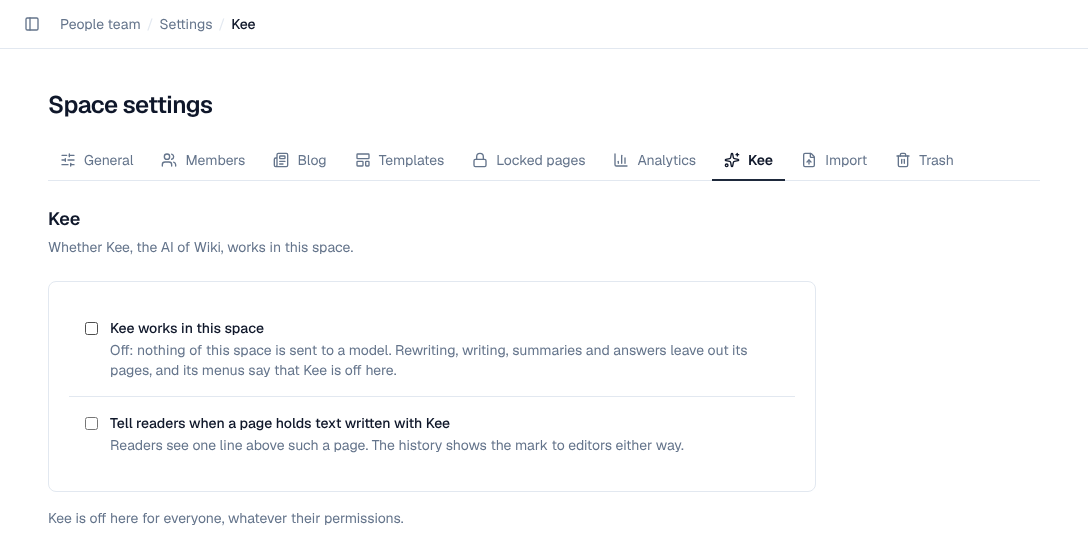
A space's admins decide whether Kee works in their space, in the space's Settings → Kee tab:
| Setting | Default | Meaning |
|---|---|---|
| Kee works in this space | On | Off: nothing of this space is sent to a model, for everyone, whatever their permissions. Rewriting, writing and summaries are refused here, Ask Kee leaves its pages out, and its menus say that Kee is off |
| Tell readers when a page holds text written with Kee | Off | Readers see one line above such a page: "Parts of this page were written with Kee and checked by its authors." Editors see the mark in the page history either way |
The change applies on every server at once. It raises space.ai_settings.update, which a policy can refuse, and is in the audit log.
5. Personal data
- Download personal data includes the person's Ask Kee conversations and their feedback.
- Anonymize deletes their conversations, messages and feedback, and removes their name from usage records (the numbers stay).
- See Personal data.
6. Scheduled jobs
| Job | When | What it does |
|---|---|---|
| wiki-ai-conversation-cleanup | Daily at 03:17 | Deletes conversations idle longer than the retention, and feedback older than 13 months |
| wiki-ai-summary-cleanup | Daily at 03:37 | Deletes summaries of versions that have a newer one |
| ai-usage-retention | Daily at 03:40 | Deletes usage records older than the retention |