MCP SERVERS
Overview
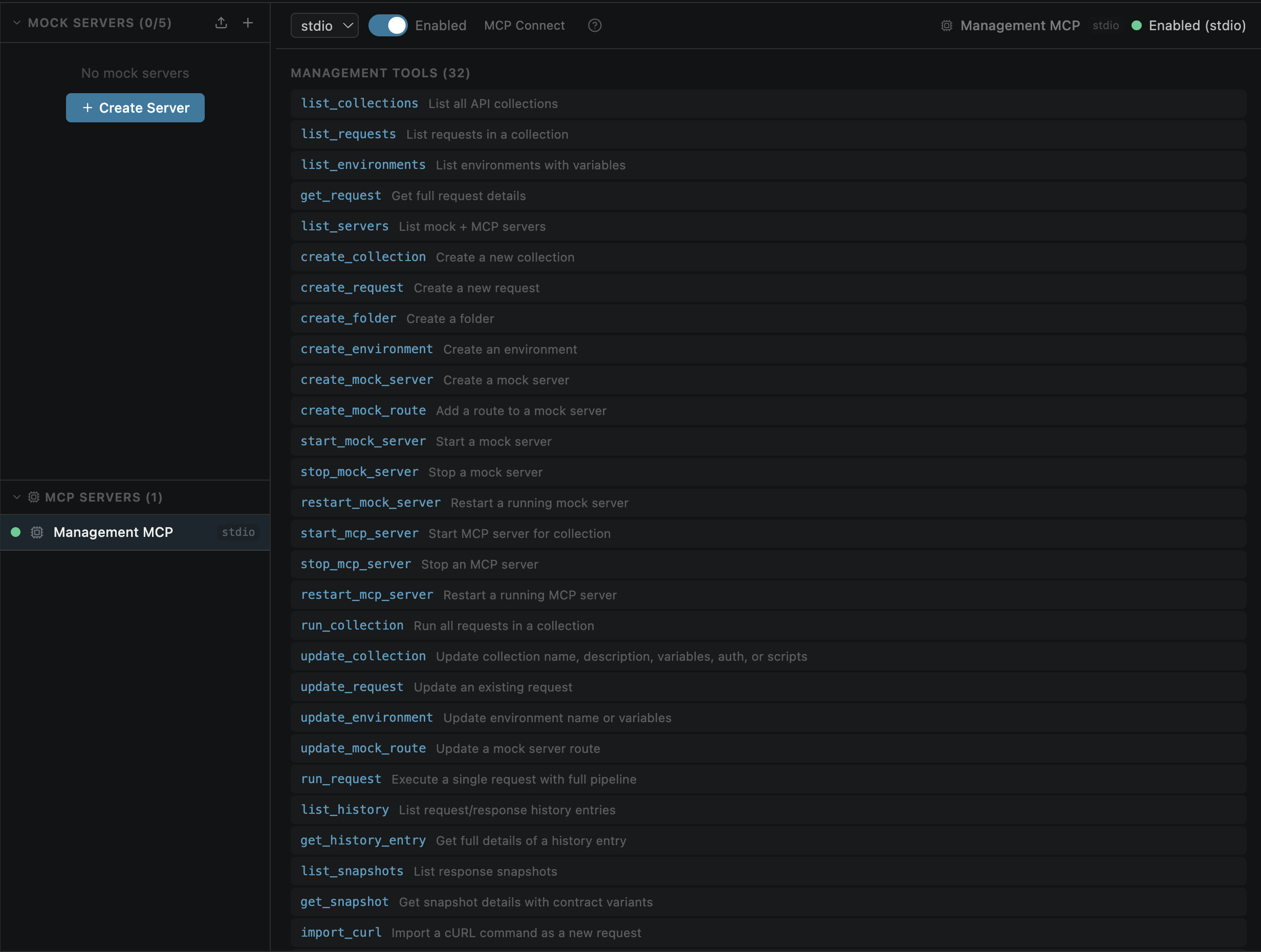
The Management MCP server is a built-in MCP (Model Context Protocol) server that exposes 33 tools for full workspace management via AI. Any MCP-compatible client can connect and control API Studio programmatically.
3199http://127.0.0.1:3199/mcpEnabling
Two ways to enable the Management MCP server:
VS Code Settings
Settings → Extensions → API Studio → Management MCP Enabled
Setting key: openPost.managementMcp.enabled
Port: openPost.managementMcp.port (default: 3199)
Mock+MCP Panel
Mock+MCP view → MCP Servers section → Management MCP → toggle on
All 33 Tools
The Management MCP exposes the following tools, organized by category:
Read (5 tools)
| Tool | Description |
|---|---|
| list_collections | List all collections (local + global) |
| list_requests | List requests in a collection or folder |
| list_environments | List all environments (local + global) |
| get_request | Get full details of a specific request |
| list_servers | List mock and MCP server instances |
Write (17 tools)
| Tool | Description |
|---|---|
| create_collection | Create a new collection |
| create_request | Create a new request in a collection |
| create_folder | Create a folder in a collection |
| create_environment | Create a new environment |
| create_mock_server | Create a new mock server |
| create_mock_route | Add a route to a mock server |
| start_mock_server | Start a mock server |
| stop_mock_server | Stop a running mock server |
| restart_mock_server | Restart a mock server |
| start_mcp_server | Start a collection-sourced MCP server |
| stop_mcp_server | Stop a running MCP server |
| restart_mcp_server | Restart an MCP server |
| update_collection | Update collection name, description, auth, or scripts |
| update_request | Update request fields including testRules and setVariables |
| update_environment | Update environment variables |
| update_mock_route | Update an existing mock route |
| set_active_environment | Switch the active environment |
Execution (2 tools)
| Tool | Description |
|---|---|
| run_request | Execute a single request — full pipeline: auth, scripts, cookies, testRules, setVariables, digest retry, history save |
| run_collection | Run all requests — sequential (shared env for chaining) or parallel (separate copies) |
History & Snapshots (4 tools)
| Tool | Description |
|---|---|
| list_history | List request history entries |
| get_history_entry | Get full details of a history entry |
| list_snapshots | List snapshot contracts |
| get_snapshot | Get full details of a snapshot |
Import / Export (4 tools)
| Tool | Description |
|---|---|
| import_curl | Import a cURL command as a request |
| import_openapi | Import an OpenAPI/Swagger spec as a collection |
| export_curl | Export a request as a cURL command |
| export_openapi | Export a collection as an OpenAPI spec |
Security (1 tool)
| Tool | Description |
|---|---|
| security_scan | Run automated security probes against an endpoint |
Tool Categories Explained
Read
List and inspect existing data — collections, requests, environments, servers. No mutations.
Write
Create, update, and delete resources. Includes server lifecycle management (start/stop/restart).
Execution
run_request executes the full pipeline — auth injection, pre-request scripts, HTTP call, test runner, digest retry, history save. run_collection runs all requests either sequentially (shared env vars for chaining) or in parallel (separate env copies per request).
Import / Export
Convert between formats — import cURL commands or OpenAPI specs, export requests as cURL or collections as OpenAPI.
Security
Automated security testing — run probes against endpoints to detect common vulnerabilities.
Security Scan Tool
The security_scan tool runs automated security probes against an endpoint. It checks for common vulnerabilities and returns findings with severity levels.
Probe Types
| Probe | What it checks |
|---|---|
| injection | SQL injection and XSS vulnerabilities |
| broken-auth | Missing or weak authentication checks |
| security-headers | HSTS, Content-Security-Policy, X-Frame-Options |
| information-disclosure | Stack traces in errors, server version headers |
| rate-limit | Burst request testing for rate limiting |
| mass-assignment | Extra field injection to test for unprotected properties |
Stdio Mode
For AI clients that prefer stdio transport over HTTP, API Studio provides a stable script path that survives extension upgrades.
Stable script path:
~/.openpost/global/mcp-stdio.jsUsage:
node ~/.openpost/global/mcp-stdio.js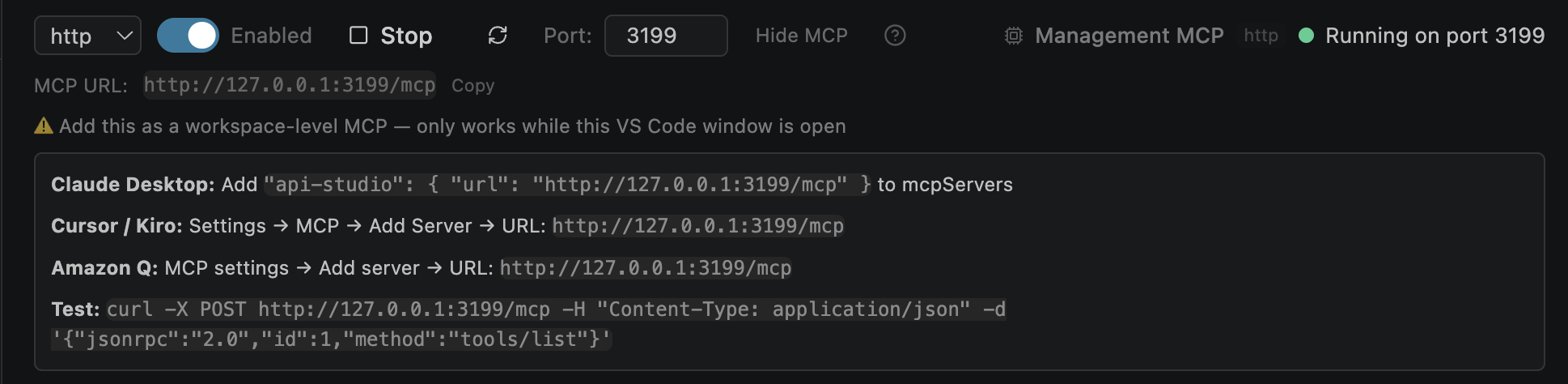
The MCP Connect panel shows connection instructions for both HTTP and stdio modes
Multi-Window Note
The Management MCP server runs as a single global instance — the first VS Code window to start it wins.
create_collection, create_request without scope: "global") always target the workspace where the Management MCP server was started.
Workarounds
scope: "global" for collections you want accessible across all workspaces