ENVIRONMENTS
{{variable}} Syntax
Variables use double curly brace delimiters and are resolved just before the request is sent over the wire.
{{variable_name}}{{Token}} ≠ {{token}}{{unknown_var}}Example:
GET {{base_url}}/users/{{user_id}}
Authorization: Bearer {{token}}
Where Variables Work
Variables can be used in virtually every input field across the request builder:
| Location | Example |
|---|---|
| URL bar | {{base_url}}/users/{{id}} |
| Query parameter values | page={{page_num}} |
| Header values | Authorization: Bearer {{token}} |
| Body content (JSON, raw, XML, GraphQL) | {"key": "{{value}}"} |
| Auth fields | username, password, token, API key value |
| Form-data text field values | field={{dynamic_value}} |
| GraphQL variables JSON | {"userId": "{{id}}"} |
| Mock server response bodies & headers | Resolved when mock responds |
| Pre-request & test scripts | Read/write via environment object |
Visual Indicators
The editor highlights variables with color-coded tokens so you can immediately see their resolution status and source:
Color coding by source:
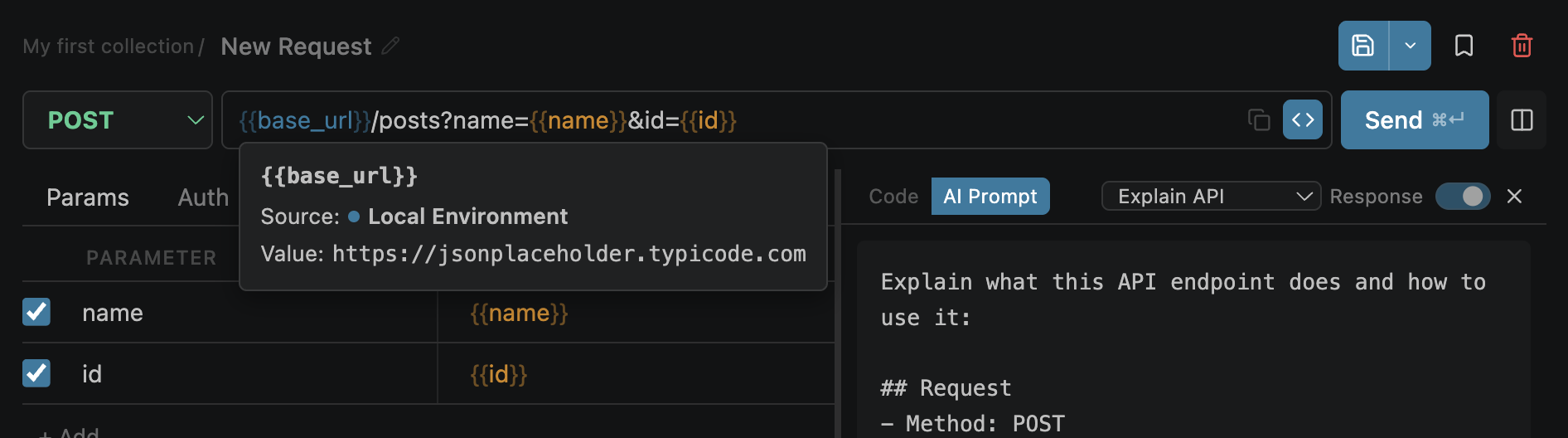
Resolved variable showing value and source on hover
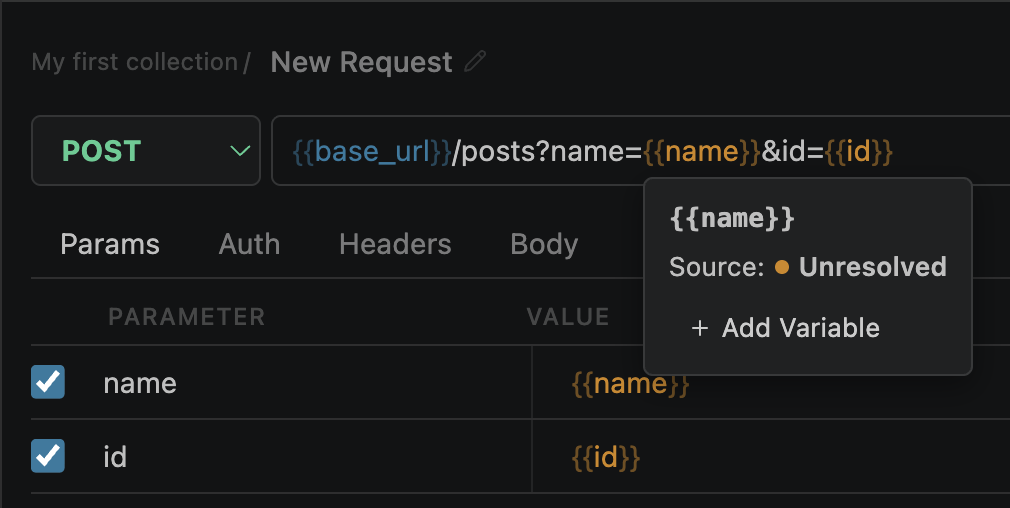
Unresolved variable with Add Variable action
Variable Sources
Variables are resolved from multiple sources with a defined priority chain. If the same variable name exists in multiple sources, the higher-priority source wins.
| Priority | Source | Defined in |
|---|---|---|
| 1 (lowest) | Collection variables | Collection editor → Overview tab |
| 2 | Global environment | Selected global env variables |
| 3 | Vault secrets | Active secret set entries (variableName field) |
| 4 (highest) | Local environment | Selected local env variables |
collection < global env < vault < local env — local environment always wins. Useful for testing overrides.
Dynamic Variables (Scripts)
Scripts can programmatically set and read variables during request execution:
Pre-request script — set a variable:
environment.set('timestamp', Date.now().toString());
environment.set('nonce', Math.random().toString(36).slice(2));
Test script — extract from response:
const body = response.json();
environment.set('token', body.access_token);
environment.set('user_id', body.user.id.toString());Response Variable Extraction
Extract values from responses and save them as variables — no scripting required. Use the GUI Set Variables rules on the Tests tab: