AUTHENTICATION
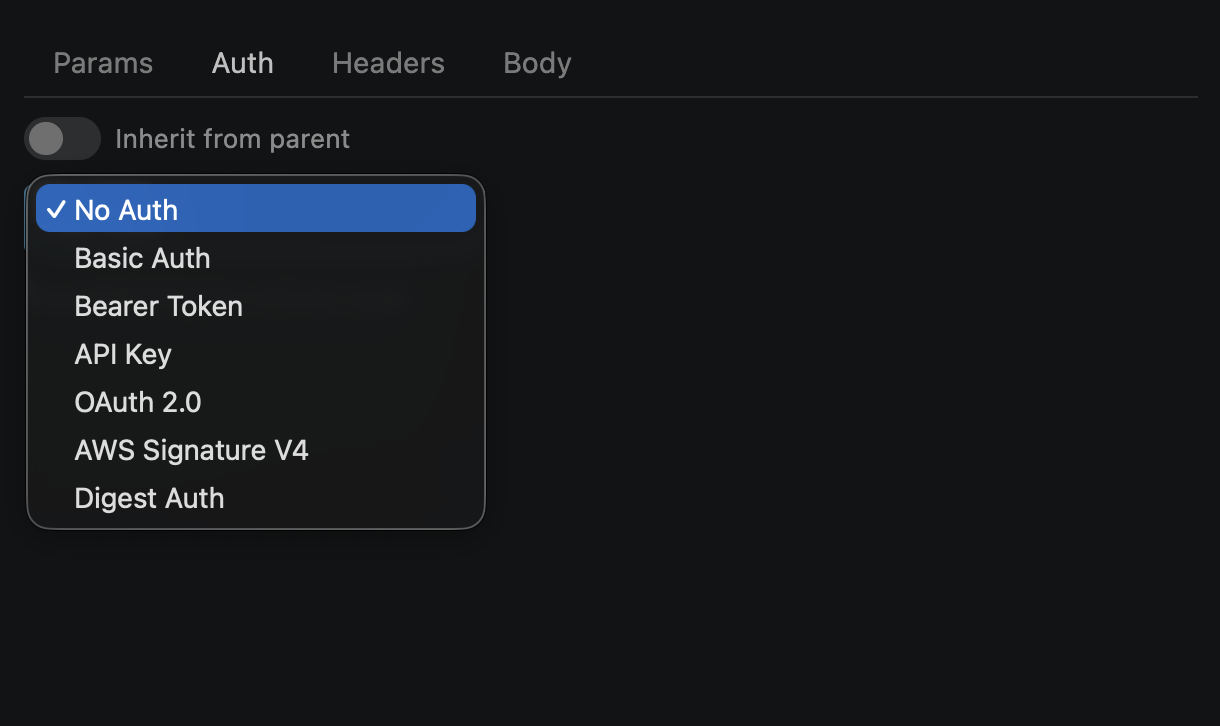
Supported Types
All authentication types available in the Auth tab dropdown:
| Type | Description | When to Use |
|---|---|---|
| None | No authentication applied | Public endpoints with no auth requirement |
| Basic | Username + password Base64-encoded in Authorization header | Simple internal APIs, dev servers |
| Bearer | Token sent as Authorization: Bearer <token> | JWT tokens, OAuth access tokens |
| API Key | Key-value pair added to header or query parameter | Third-party APIs with static keys |
| OAuth 2.0 | Authorization Code or Client Credentials grant flow | User-authorized flows, third-party integrations |
| AWS SigV4 | HMAC-SHA256 signature with access key, secret, region, service | AWS services (S3, Lambda, API Gateway) |
| Digest | Challenge-response authentication (MD5/SHA-256) | Legacy systems requiring RFC 7616 digest auth |
How Auth Works
Auth is the first step in the request pipeline — injected before pre-request scripts and HTTP execution:
1. Auth Injection
→
2. Pre-Request Script
→
3. HTTP Call
→
4. Test Runner
Auth headers/params are added transparently — they don't appear in the request Headers tab
The Actual Request tab shows exactly what was injected (resolved auth headers, query params)
Variables in auth fields are interpolated before encoding (e.g., Basic Auth Base64 uses resolved values)
Code export includes the resolved auth — generated cURL/Python/JS code is ready to run
💡 Tip: If you set an
Authorization header manually in the Headers tab and configure auth in the Auth tab, both will be sent. Avoid duplicates by using one or the other.
The Auth Tab
The Auth tab in the request builder is where you configure authentication for each request:
Type dropdown — select from None, Basic, Bearer, API Key, OAuth 2.0, AWS SigV4, or Digest
Dynamic fields — the form changes based on the selected type (e.g., username/password for Basic, token field for Bearer)
Inherit from parent — toggle that delegates auth to the parent folder or collection (walks up the tree)
Persisted with request — auth config is saved as part of the request in
collections.json
Inheritance chain: When "Inherit from parent" is enabled, auth resolution walks:
request → folder → ... → collection. The first ancestor with a non-"none" auth config wins.
Variable Support
All auth fields support {{variable}} placeholders — resolved at send time from the active environment, vault secrets, and collection variables.
| Source | Priority | Example |
|---|---|---|
| Collection variables | Lowest | {{base_url}} |
| Global environment | ↑ | {{global_key}} |
| Vault secrets | ↑ | {{api_token}} |
| Local environment | Highest (wins) | {{token_override}} |
Common pattern — store tokens in the vault:
// Vault secret: api_token → sk-abc123...
// Secret set maps: api_token → {{api_token}}
// Bearer token field: {{api_token}}
// At send time resolves to: Authorization: Bearer sk-abc123...
Choosing a Type
Use this decision table to pick the right auth type for your API:
| Scenario | Recommended Type | Why |
|---|---|---|
| Simple internal APIs, dev servers | Basic | Minimal setup — just username and password |
| JWT tokens, OAuth access tokens | Bearer | Standard token-based auth, one field |
| Third-party APIs with static keys | API Key | Flexible — header or query param, custom key name |
| User-authorized flows, third-party integrations | OAuth 2.0 | Full OAuth flow with token exchange |
| AWS services (S3, Lambda, API Gateway) | AWS SigV4 | Required by AWS — signs request with HMAC-SHA256 |
| Legacy systems requiring challenge-response | Digest | Server challenges, client responds with hash — avoids plaintext passwords |
💡 Tip: Not sure which auth your API uses? Check its documentation for
Authorization header examples. Bearer xyz = Bearer type. Basic abc== = Basic type. X-API-Key: xyz = API Key type.